88192277-01-19 - Micron Technical Reference V9 Volume 4.pdf - 第127页
SENSORS OPTO SENSORS Chapter Issue 6, May 19 Technical Reference Manual 40.5 T esting Procedure If the sensor fails to operate carry out the following: 1. Disconnect the opto. 2. Short out the signal to earth on the sock…
SENSORS
OPTO SENSORS
40.4 Technical Reference Manual Chapter Issue 6, May 19
OPTO SENSORS
Background
Suppressed Opto
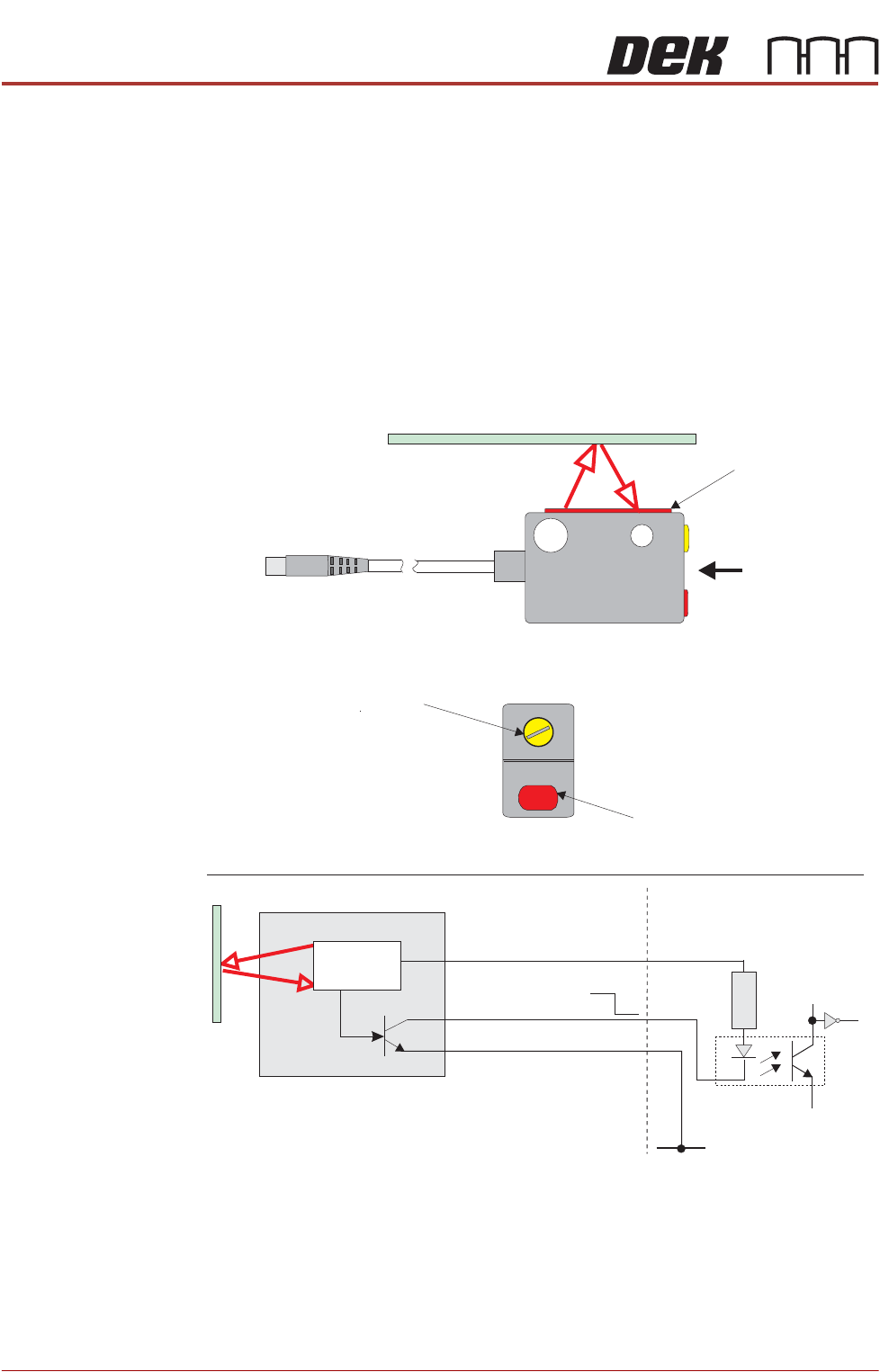
The background suppressed opto sensor is a diffuse type sensor. The sensor
incorporates a background suppression by triangulation capability, for precisely
adjusting the sensing distance.
The opto emits a pulsed red light which is reflected by a target when it enters
the sensing distance, not only sensing the reflected light but also the distance
of the object to the sensor.
When the beam of light hits the board or stencil, some of the diffused light is
reflected back and the sensor NPN transistor output state is switched ON.
The pulsed beam of light, which is continuously on, is accurately focused and
is able to distinguish between the target and objects outside the scan range.
Setting Up
Procedure
The procedures for setting up the background suppressed optos are fully
detailed in the Camera System Module chapter (camera board at stop), the
Transport Rails Module chapter (board at left and board at right sensors), the
Screen Change chapter (stencil position sensor) and the Rising Table Module
chapter (remote board at stop) of this manual, (Adjustments and Settings
section).
+V
NPN
Opto-isolator
1K8
0V
Pin 1 12V
Pin 3 0V
Pin 2 Signal
12V
0V
Control
Circuit
View on Arrow A
Sensitivity/Focal Length
Adjustment
Red LED - Target Detected
Background Suppressed Opto
Emitter/Receiver
A
Digital Input
SENSORS
OPTO SENSORS
Chapter Issue 6, May 19 Technical Reference Manual 40.5
Testing Procedure If the sensor fails to operate carry out the following:
1. Disconnect the opto.
2. Short out the signal to earth on the socket.
3. Check the relevant digital input under Diagnostics - System - Display all
Digital Inputs to confirm, or otherwise, that the sensor is defective.
Figure 40-5 Voltage Diagram
Through Beam
Optos
The types of through beam opto used on this printer are:
• Fork Sensor Type
• Long Throw Type
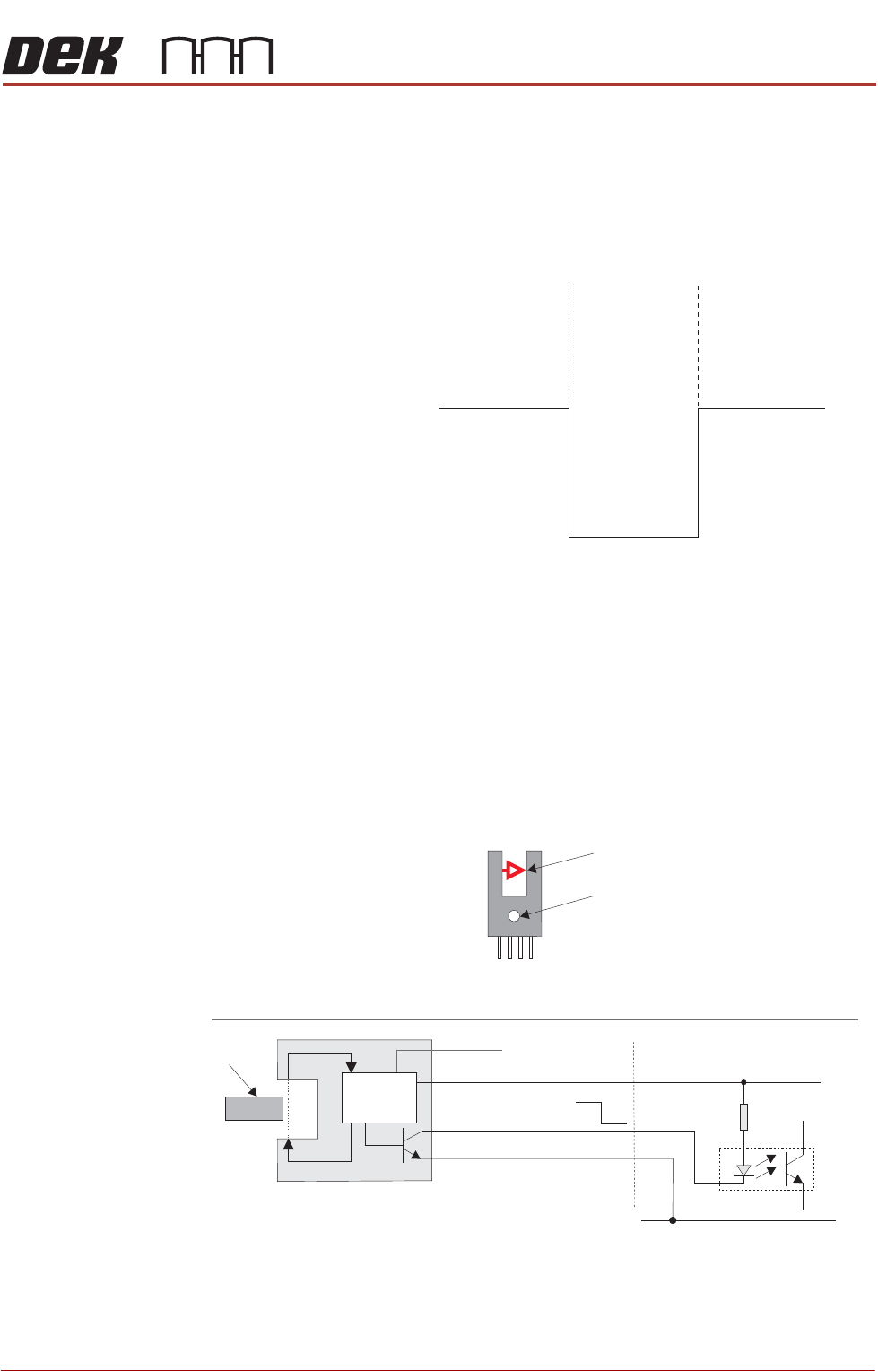
Fork Sensor Type The through beam fork sensor transmits a beam across the gap in the opto.
When a vane enters the gap the beam is broken and the sensors output
transistor is switched high or low depending on connection (L).
Figure 40-6 Through Beam Optos
Testing Procedure If the sensor fails to operate carry out the following:
1. Disconnect the opto.
Board
Absent
Present
Absent
12V
0V
Signal
Through Beam Fork Opto
+V
Opto-isolator
1K8
0V
0V
+V
Signal O/P
Vane
Control
Circuit
Digital Input
(L)
Pin 1 - +V
Pin 2 - (L)
Pin 3 - Signal O/P
Pin 4 - 0V
Operation Indicator
Transmitted Beam
1
12V
0V
SENSORS
OPTO SENSORS
40.6 Technical Reference Manual Chapter Issue 6, May 19
2. Short out the signal to earth on the socket.
3. Check the relevant digital input under Diagnostics - System - Display all
Digital Inputs to confirm, or otherwise, that the sensor is defective.
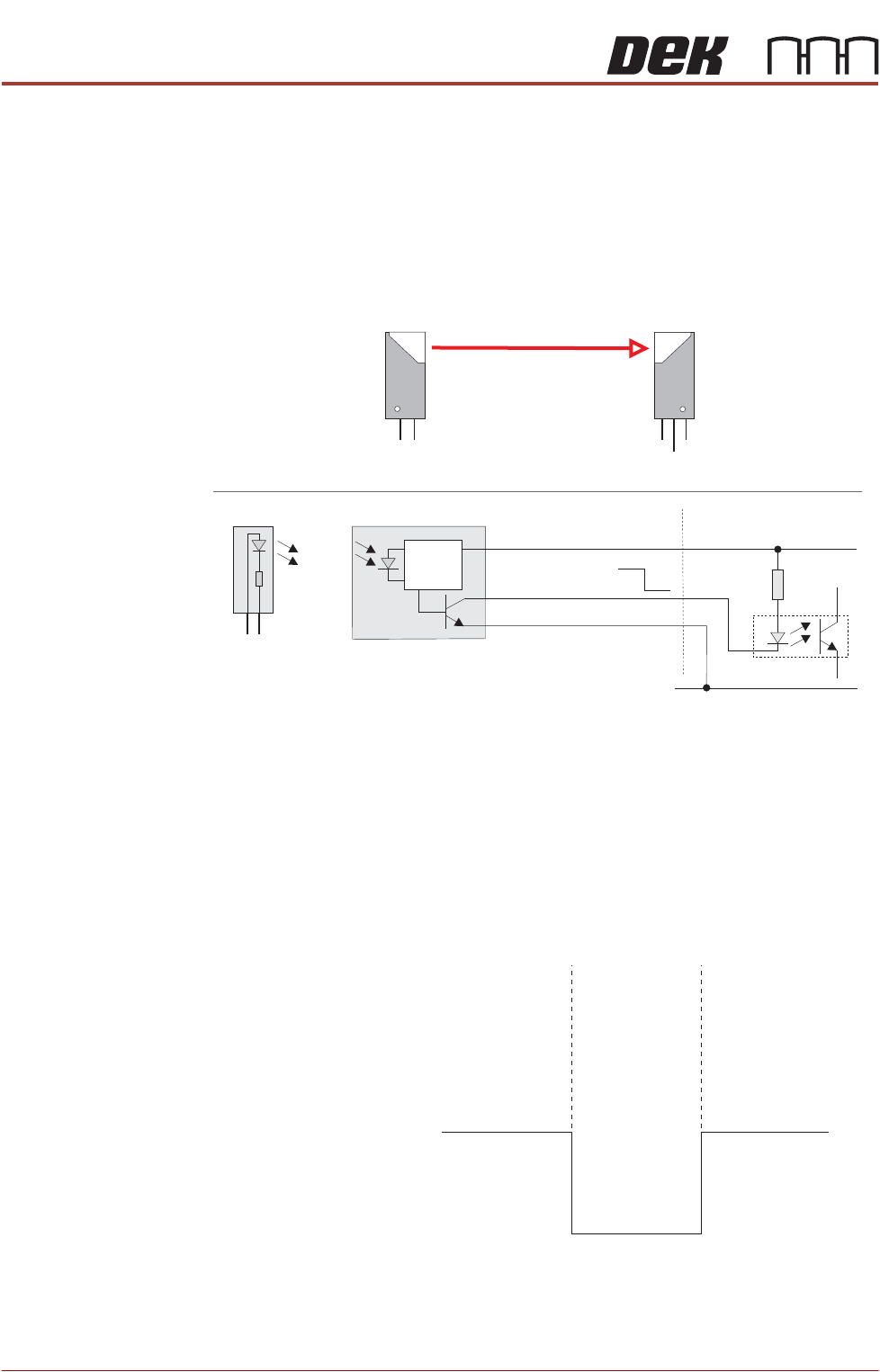
Long Throw Type The long throw opto works on the same principal as the through beam type but
uses two individual sensor devices (receiver and emitter) to cover a wider gap,
ie screen at centre indicator.
Figure 40-7 Long Throw Opto
Testing/Adjustment If the sensor fails to operate, confirm the sensor is faulty as follows:
1. Disconnect the long throw opto receiver.
2. Short out the signal to earth on the socket.
3. Check the relevant digital input under Diagnostics - System - Display all
Digital Inputs to confirm, or otherwise, that the sensor is defective.
Figure 40-8 Voltage Diagram
Long Throw Optos
+V
Opto-isolator
1K8
0V
0V
12V
Signal O/P
12V
0V
Control
Circuit
12V
12V
Emitter
Emitter
0V
0V
Signal O/P
Receiver
Receiver
12V
0V
Digital Input
Vane
Out
In
Out
12V
0V
On
Off
Off
Indication Light
Signal