88192277-01-19 - Micron Technical Reference V9 Volume 4.pdf - 第152页
TRANSPORTATION - MINOR RELOCATION TRANSIT BRACKET REMOVAL 41.10 Technical Reference Manual Chapter Issue 4, May 19 the three actuator shafts. 9. Using a 5mm Allen key , remove the rear chase transit bracket (12) by remov…
TRANSPORTATION - MINOR RELOCATION
TRANSIT BRACKET REMOVAL
Chapter Issue 4, May 19 Technical Reference Manual 41.9
TRANSIT BRACKET REMOVAL
To remove the transit brackets and screws from the machine, remove/open the
rear printhead cover. On sliding cover machines remove the two upper side
panels as detailed in the Covers chapter.
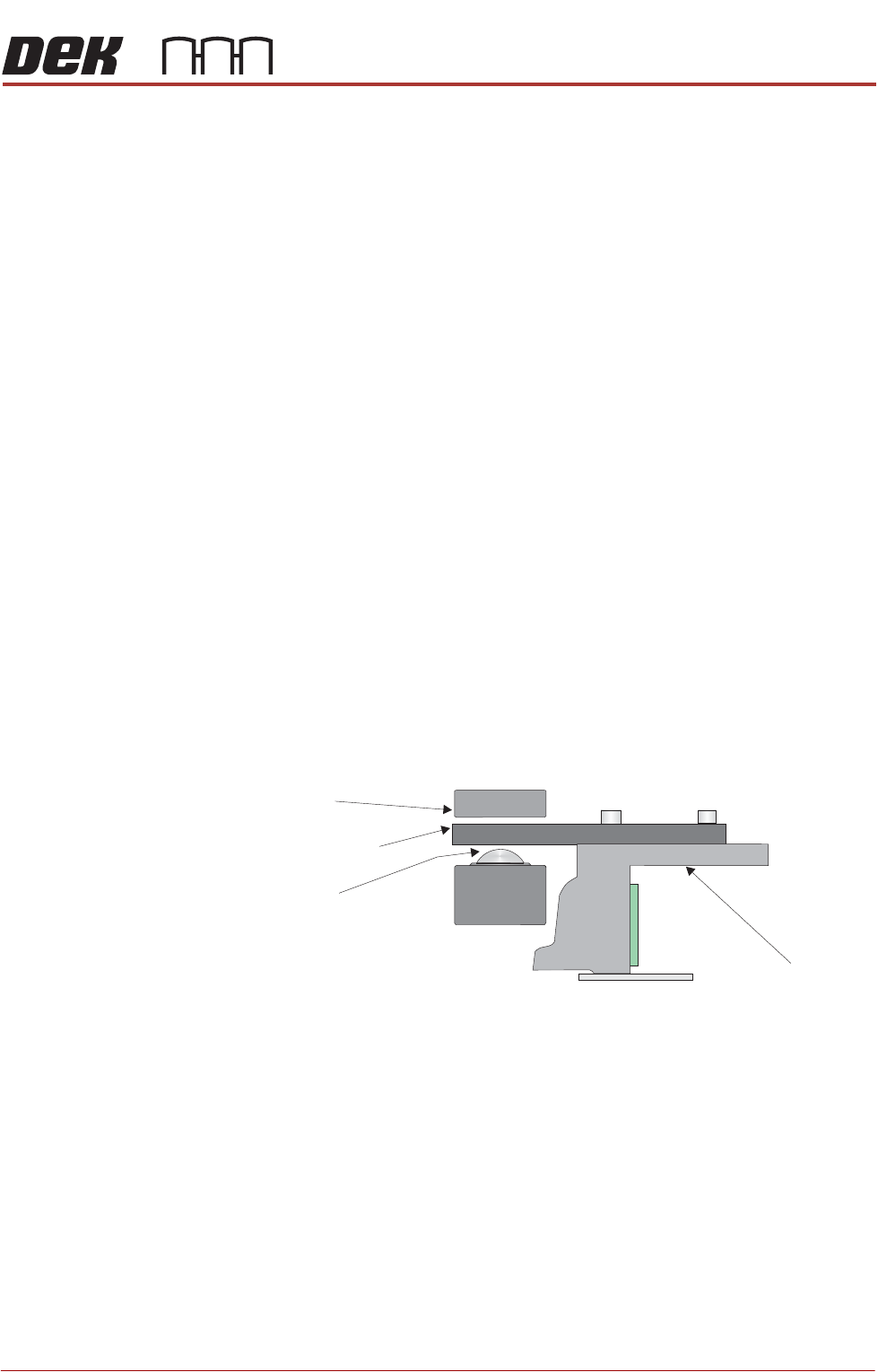
Chase Transit
Brackets
The chase transit brackets include the following:
• Front Transit Bracket
• Rear Transit Bracket
• Rear Chase Transit Bracket
• Cover Frame Transit Bracket
The Front and Rear Transit Bracket Location and Rear Chase Transit Bracket
Location figures earlier in this chapter refers.
The following procedure must be adhered to and care must be taken to ensure
that the chase/ASM is released in a controlled manner to prevent damage to
the roller bearings or the actuators.
To remove the chase transit brackets, carry out the following procedure:
NOTE
The numbers in brackets refer to the items in the Chase Transit Brackets, Rear
Chase Transit Bracket and Cover Frame Bracket figures earlier in this chapter.
1. Using a 13mm spanner, loosen the four M8 nuts (3) directly below the front
and rear transit brackets (2).
2. Slowly loosen the four M8 nuts (3) above the front and rear transit brackets
(2) to lower the roller counter plates onto the roller bearings.
3. Using a 4mm Allen key, remove the M5 cap head screws (9) and washers
(10) that attach the adaptor bracket (8) at each end of the front and rear
transit brackets (2) to the left and right printheads.
4. Remove the four M8 nuts (3) and washers (4) above the front and rear transit
brackets (2).
5. Remove the front and rear transit brackets (2) from the M8 chase studs (1).
6. Loosen the transit adjustment screw lock nut (6) on the front and rear transit
brackets (2).
7. Loosen the transit adjustment screw lock nut (15) on the rear chase transit
bracket (12).
8. Using a 6mm Allen key, loosen the transit adjustment screw (7), on both the
left chase transit brackets (5), and the transit adjustment screw (11) on the
rear chase transit bracket (12), so that the chase comes into contact with
Chase
Chase Clamp
Roller Bearing
Roller Counter Plate

TRANSPORTATION - MINOR RELOCATION
TRANSIT BRACKET REMOVAL
41.10 Technical Reference Manual Chapter Issue 4, May 19
the three actuator shafts.
9. Using a 5mm Allen key, remove the rear chase transit bracket (12) by
removing the M6 cap head screw (13) and M6 washer (14).
10. Loosen the M8 nut (3) that secures the left chase transit bracket (5) to the
chase on the front and rear transit brackets.
11. Unscrew the M8 chase studs (1) from the chase and remove from the
machine.
12. Remove the two left chase transit brackets (5) from the machine.
13. Remove the two right hand chase studs (1) by loosening the two M8 nuts
(3) that secure the chase studs (1) to the chase.
14. Loosen the nylon screws (5) on the cover frame transit bracket (1) block (6)
assembly on to the carriage rail.
15. Remove the M5 cap head screws (7)
16. Loosen the M5 cap head screws (2) to allow movement.
17. Remove the cover frame transit bracket (1) and the block (6) as an assembly
from the carriage rail.
18. Refit/close any disturbed covers.
This concludes the transit bracket and screw removal procedure. Transit brack-
ets, screws and associated fasteners should be stored for future reuse.
TRANSPORTATION - MINOR RELOCATION
MACHINE HEIGHT AND LEVELLING
Chapter Issue 4, May 19 Technical Reference Manual 41.11
MACHINE HEIGHT AND LEVELLING
Leg Spacers
(Camera Linear
Drive Machine
Only)
The mounting feet on the camera linear drive machine must be kept as short as
possible to reduce vibration and oscillation.
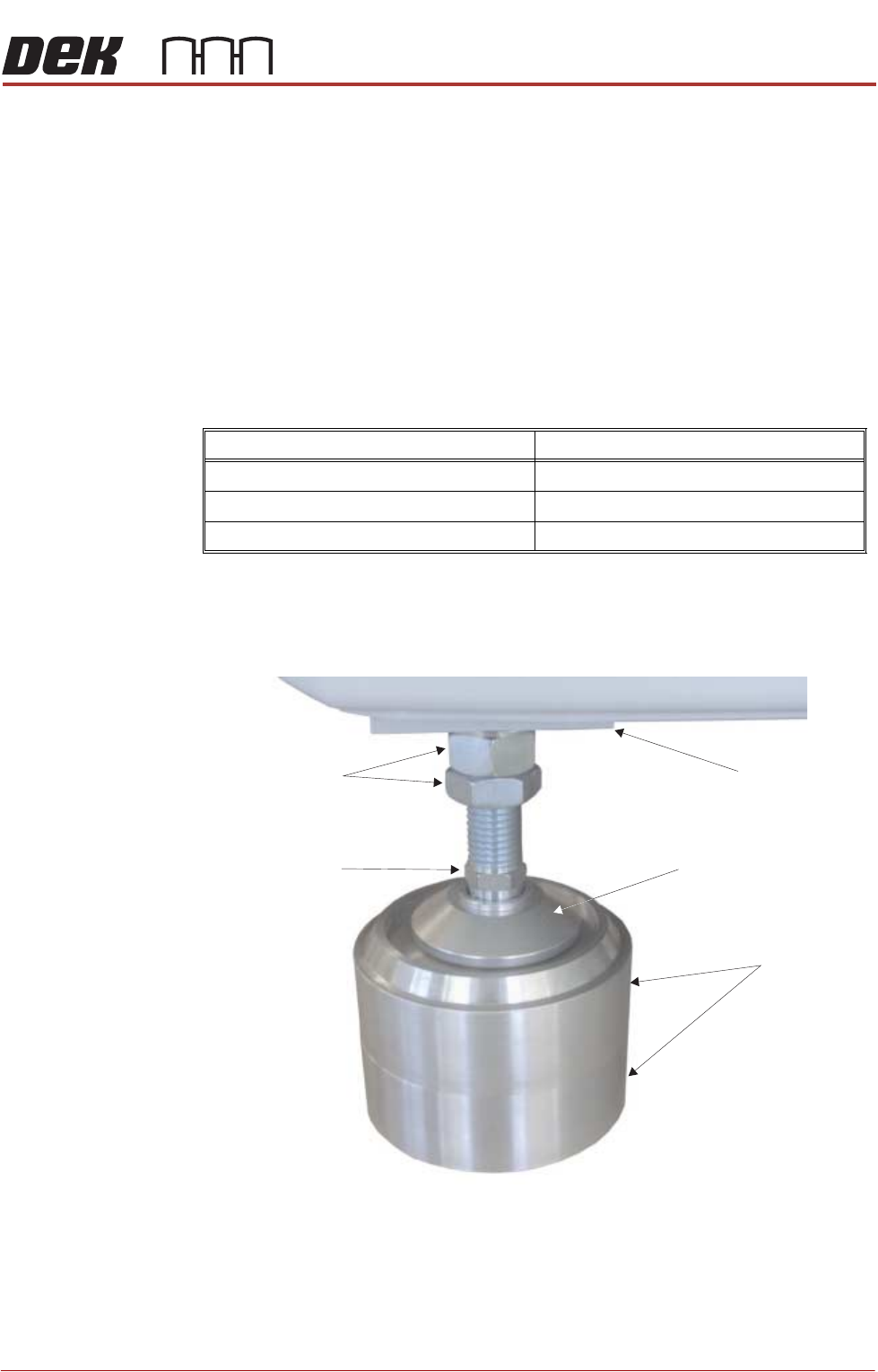
To achieve the height required, 8 leg spacers (maximum of two per foot) are
supplied. The leg spacers interlock together and the machine foot locates in the
recess of the top leg spacer.
1. Using the table below, determine the amount of leg spacers to achieve the
required machine height:
NOTE
The amount of exposed thread of the machine leg should be kept to a
minimum to ensure machine accuracy remains within limits.
2. Place the correct number of leg spacers under each mounting foot. Do not
place leg spacers under the centre rear mounting foot. Lower the machine
ensuring that each foot is located inside the recessed top, figure below
refers.
NOTE
Do not attempt to manoeuvre the machine into position whilst mounted on
the leg spacers. The machine must be lifted, moved and lowered ensuring
that the leg spacers are moved with the machine.
Transport Height Leg Spacers Required
840mm - 895mm 0
896mm - 940mm 1
941mm - 980mm 2
Leg Spacers
(2 shown)
Machine Mounting Foot
M24 Locking Nuts
Machine Frame
Leg Adjusting Nut