88192277-01-19 - Micron Technical Reference V9 Volume 4.pdf - 第297页
TRANSPORTATION - POWER UP HIGH THROUGHPUT CONVEYOR (HTC) Chapter Issue 3, Nov 19 Technical Reference Manual 43.23 3. Run the feeler gauge along the whole length of the conveyo r rail, the fit of the feeler gauge should b…
TRANSPORTATION - POWER UP
HIGH THROUGHPUT CONVEYOR (HTC)
43.22 Technical Reference Manual Chapter Issue 3, Nov 19
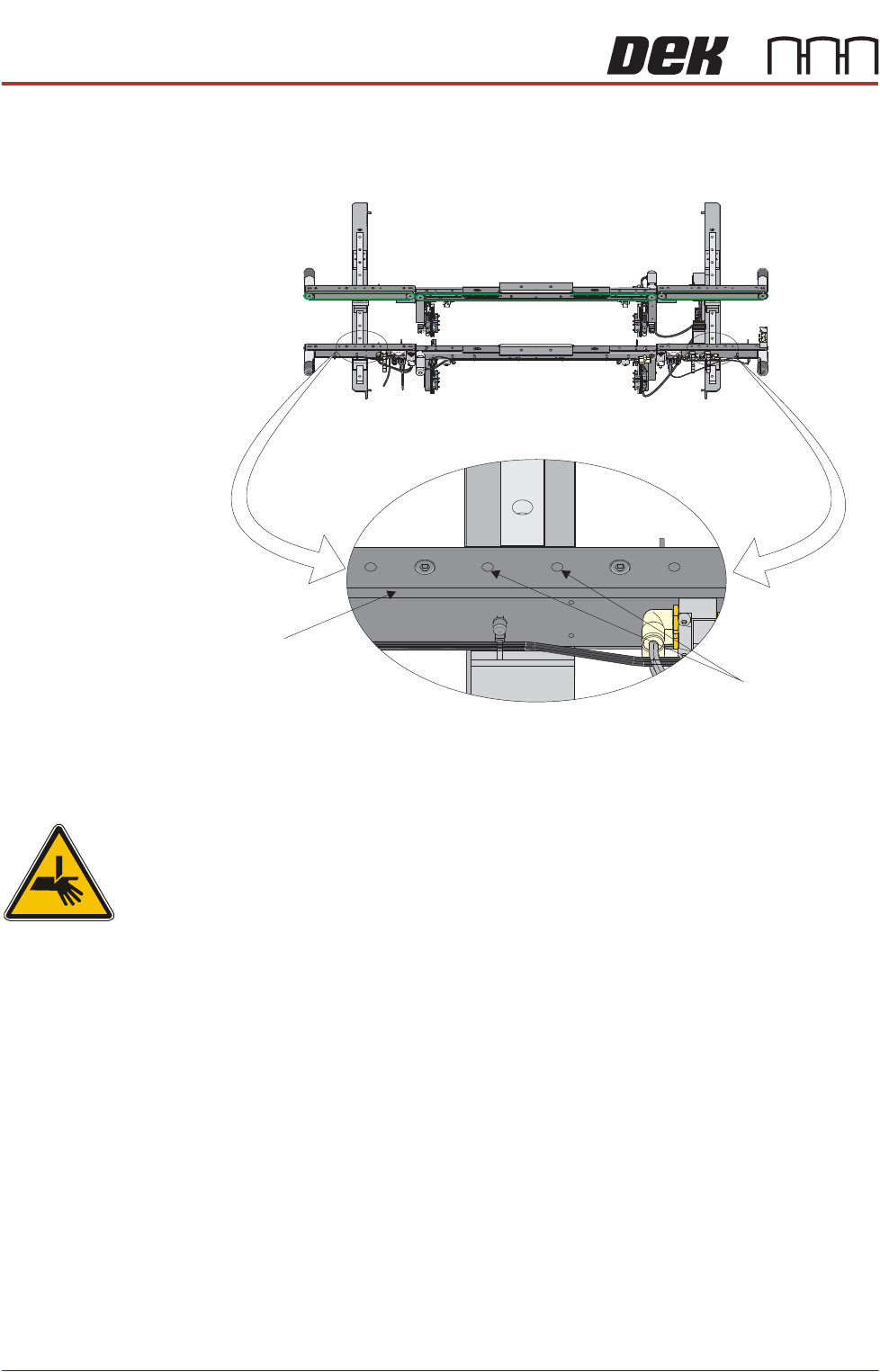
7. Further adjustment of the auxiliary conveyor can be achieved by loosening
the two front rail securing bolts, adjusting the rail to achieve parallelism and
re-tightening the rail securing bolts.
8. Repeat Steps 3 to 7 for the left hand auxiliary conveyor.
Rear Rail Parallelism
WARNING
BOARD CLAMPS. EXTREME CARE MUST BE EXERCISED WHEN WORKING IN
THE TOOLING AREA OF THE MACHINE TO AVOID INJURY. THE FOILS ON THE
FRONT AND REAR BOARD CLAMPS ARE VERY SHARP.
To check and if required adjust the auxiliary conveyors rear rail parallelism, carry
out the following procedure at transport height:
NOTE
1. The parallelism of the auxiliary conveyors rails is dependent on the front and
rear print station rails being parallel. Therefore, before any adjustment is
carried out an assessment of the parallelism of the print station rails must
be carried out.
2. Ensure that the auxiliary conveyor front rail is in alignment with the print
station front rail before any adjustment of the auxiliary conveyor rear rail
parallelism (refer to Auxiliary Conveyor Front Rail Parallelism section of this
chapter).
1. Using a Board Clamp Setting Plate Part No. 88140403-01, place the plate
on the right hand auxiliary conveyor transport belts.
2. Place a 0.5mm feeler gauge between the plate and the inner face of the
auxiliary conveyor rear rail.
Front View of HTC Rails
Auxiliary Conveyor
Front Rail
Front Rail
Securing Bolts
TRANSPORTATION - POWER UP
HIGH THROUGHPUT CONVEYOR (HTC)
Chapter Issue 3, Nov 19 Technical Reference Manual 43.23
3. Run the feeler gauge along the whole length of the conveyor rail, the fit of
the feeler gauge should be tight, between the plate and the inner face of the
rail.
4. Remove the feeler gauge and manually move the plate in and out of the
machine along the conveyor transport belts, ensuring the plate moves freely
without binding or jamming.
If adjustment is required, carry out the following:
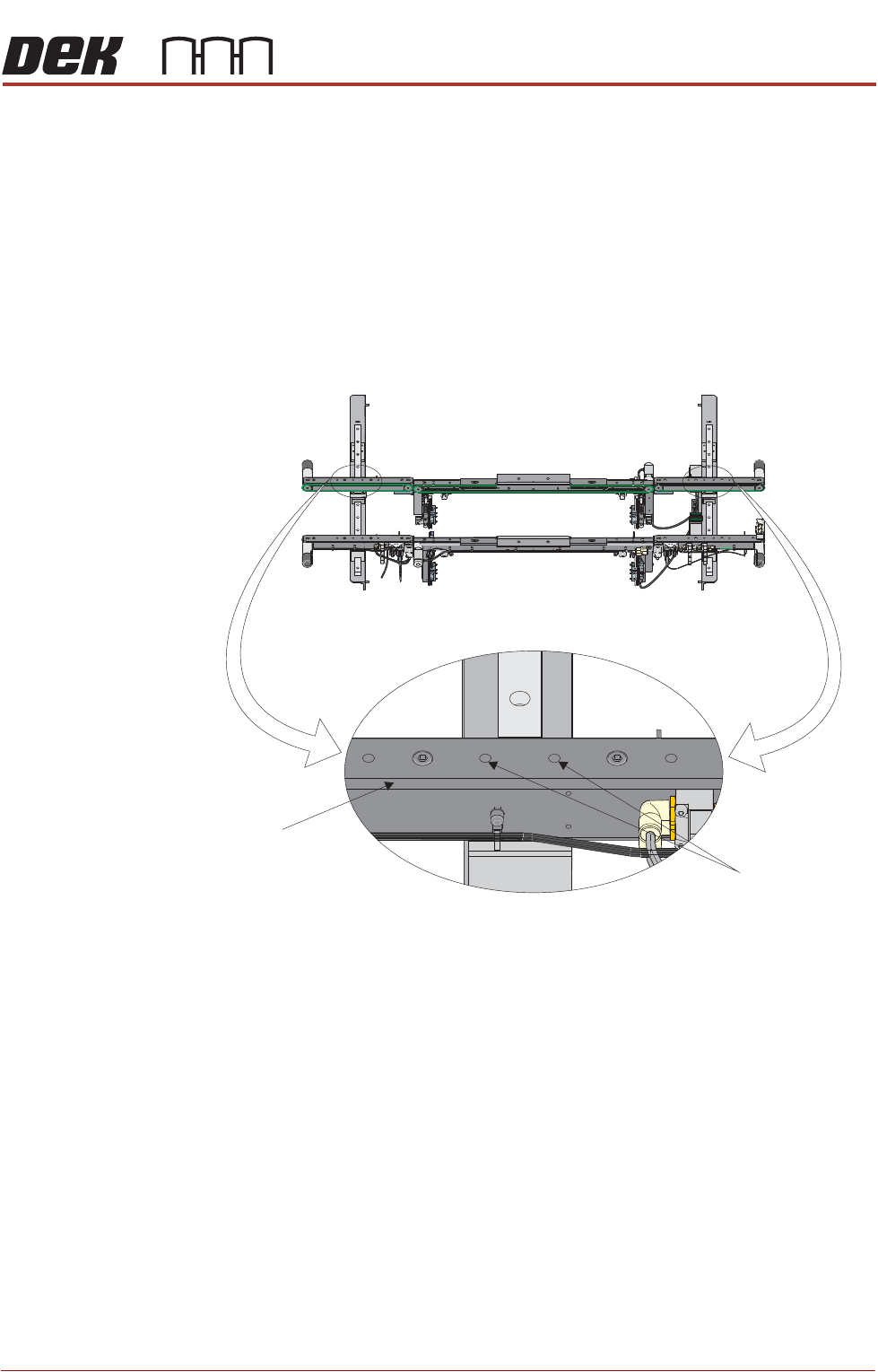
5. Loosen the two rear rail securing bolts, adjust the rail to achieve parallelism
and re-tightening the rail securing bolts.
6. Repeat Steps 2 to 5 to recheck for parallelism.
7. Repeat Steps 1 to 6 for the left hand auxiliary conveyor.
Front View of HTC Rails
Auxiliary Conveyor
Rear Rail
Rear Rail
Securing Bolts
TRANSPORTATION - POWER UP
FOREIGN MACHINE INTERFACE
43.24 Technical Reference Manual Chapter Issue 3, Nov 19
FOREIGN MACHINE INTERFACE
Introduction The Foreign Machine Interface (FMI) is an electrical means of communication
between the DEK machine and an adjacent machine/conveyor, using electrical
signals. The signals are transferred using opto-couplers and/or solid state
relays which keep the machines electrically isolated.
The DEK machine can interface with many different types of adjacent machine.
The adjacent machine utilizes a set of timing and control signals (protocols) for
communication with other machines. There are two different types of interface
available:
• An FMI Pod for SMEMA, Fuji or Panasonic protocols
• A Multi-Interface Unit (MIU) for all other protocols
The FMI Pod and the MIU are supplied with the following cables:
• An FMI loom which connects the FMI port on the machine controller, to the
MIU or FMI Pod
• Two interface cables, one cable for each adjacent machine
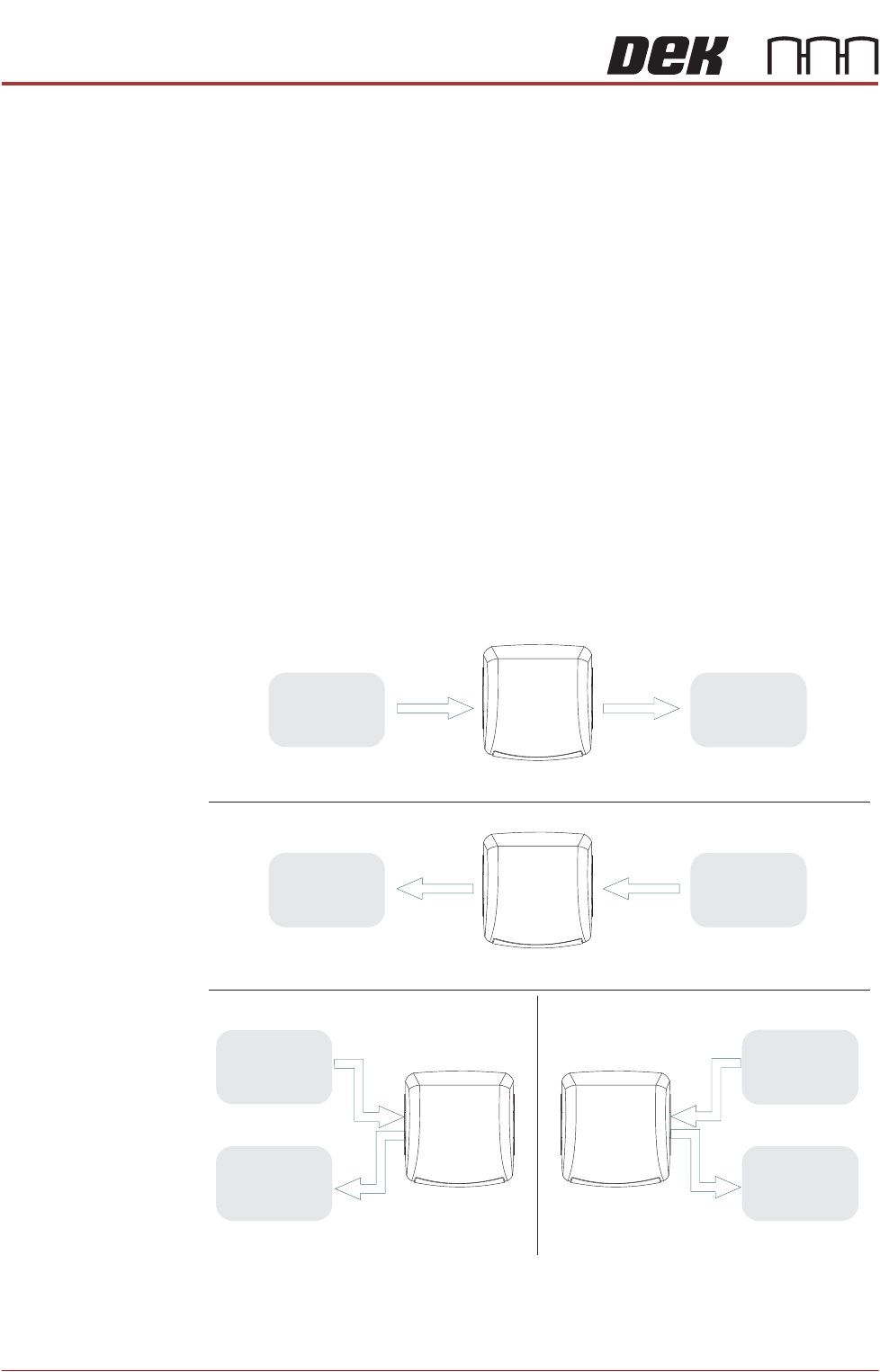
The adjacent machine/conveyor can be in the following configurations:
Figure 43-5 Machine Arrangements for Board Transfers
Left to Right Board Transfers
Right to Left Board Transfers
Upline
Downline
UplineDownline
Left to Left Board Transfers Right to Right Board Transfers
Upline
Downline
Upline
Downline
DEK
Machine
DEK
Machine
DEK
Machine
DEK
Machine
Adjacent
Machine/
Conveyor
Adjacent
Machine/
Conveyor
Adjacent
Machine/
Conveyor
Adjacent
Machine/
Conveyor
Adjacent
Machine/
Conveyor
Adjacent
Machine/
Conveyor
Adjacent
Machine/
Conveyor
Adjacent
Machine/
Conveyor