88192277-01-19 - Micron Technical Reference V9 Volume 4.pdf - 第67页
STINGER REPLACEMENT PROCEDURES Chapter Issue 4, Nov 19 Technical Reference Manual 38.25 19. Screw the actuator plate down the motor shaft thread and secure it to the dispense body . 20. R efit the level sensor . 21. Refi…
38.24 Technical Reference Manual Chapter Issue 4, Nov 19
STINGER
REPLACEMENT PROCEDURES
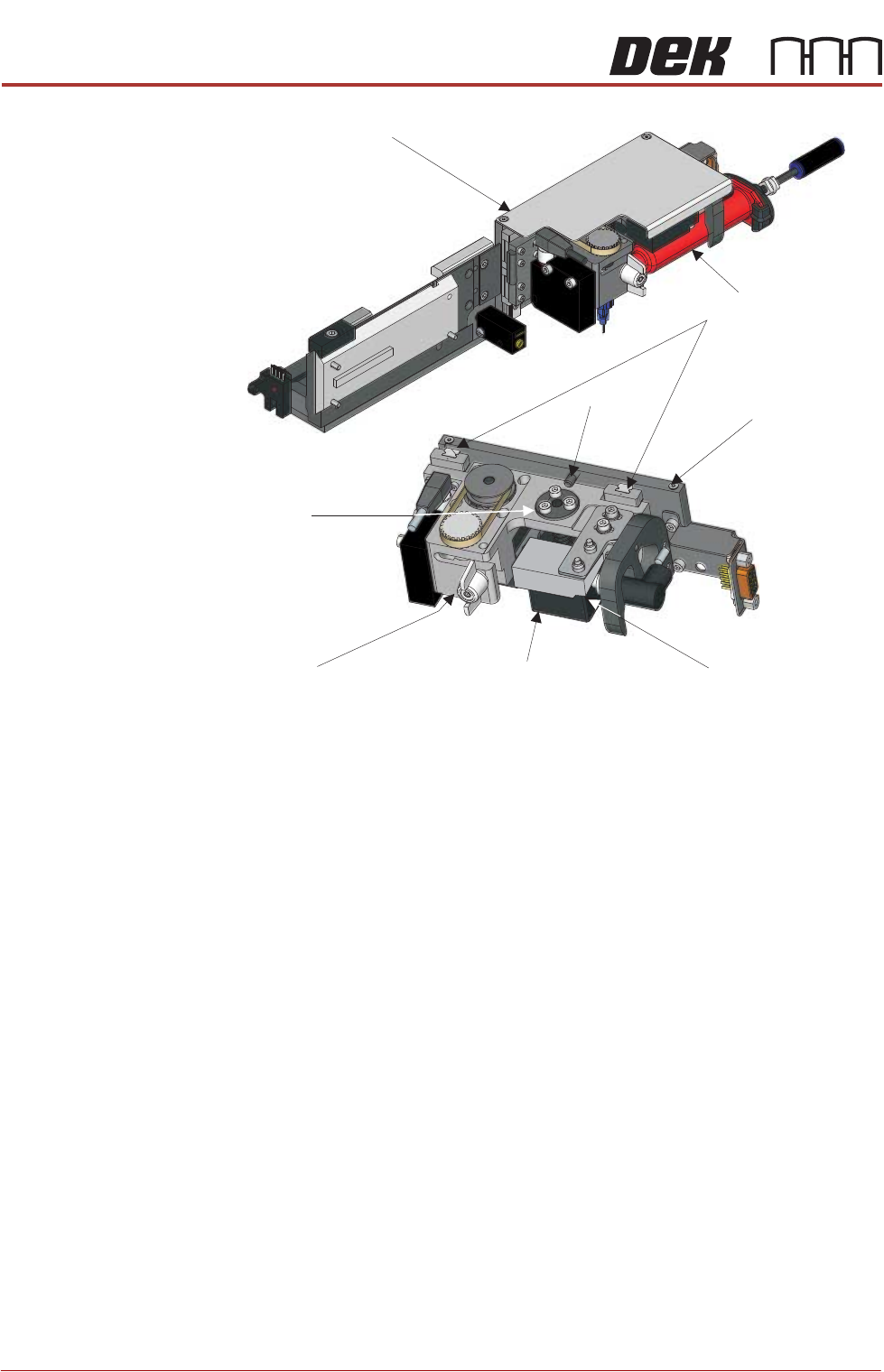
z-motor assembly provides the various height elements of the stinger operation.
1. Isolate the printer from the pneumatic supply and lockout the mains electri-
cal isolator.
2. Open the printhead cover.
3. If fitted, remove the stencil.
4. Pull the camera carriage to the front of the printer.
5. Remove the two M2.5 x 8 countersunk head screws, which secure the
cover.
6. Remove the cover.
7. Remove the syringe assembly so that it out of the way.
8. Remove the two M3 x16 cap head screws that hold the level sensor in place.
9. Remove the level sensor and place it is out of the way.
10. Remove the three M3 x 8 socket head screws of the actuator plate.
11. Unscrew the actuator plate up the thread of the motor shaft.
12. Unplug the connector and remove the connector from the motor.
13. Lift the dispense body, up to the end stop, to give access to the motor
mounting screws.
14. In-turn; slacken off the four M2.5 x5 cap head screws that hold the motor to
the mount plate.
15. Remove the motor and return spring assembly.
16. Replace, with new, the motor and the return spring.
17. Plug the motor drive connector back into the motor.
18. Refit to the dispense body.
Cover
Syringe Assembly
Linear Guide Bearings
End Stop
Mounting Plate
Z-Axis Motor
Level Sensor
Dispense Body
Actuator Plate

STINGER
REPLACEMENT PROCEDURES
Chapter Issue 4, Nov 19 Technical Reference Manual 38.25
19. Screw the actuator plate down the motor shaft thread and secure it to the
dispense body.
20. Refit the level sensor.
21. Refit the actuator plate.
22. Refit the syringe assembly.
23. Load the stencil.
24. Close the printhead cover.
25. Reconnect the printer to the pneumatic supply and unlock the mains elec-
trical isolator.
26. Switch the mains isolator ON.
27. When requested, press the System button.
28. Run a test product to check functionality.
38.26 Technical Reference Manual Chapter Issue 4, Nov 19
STINGER
REPLACEMENT PROCEDURES
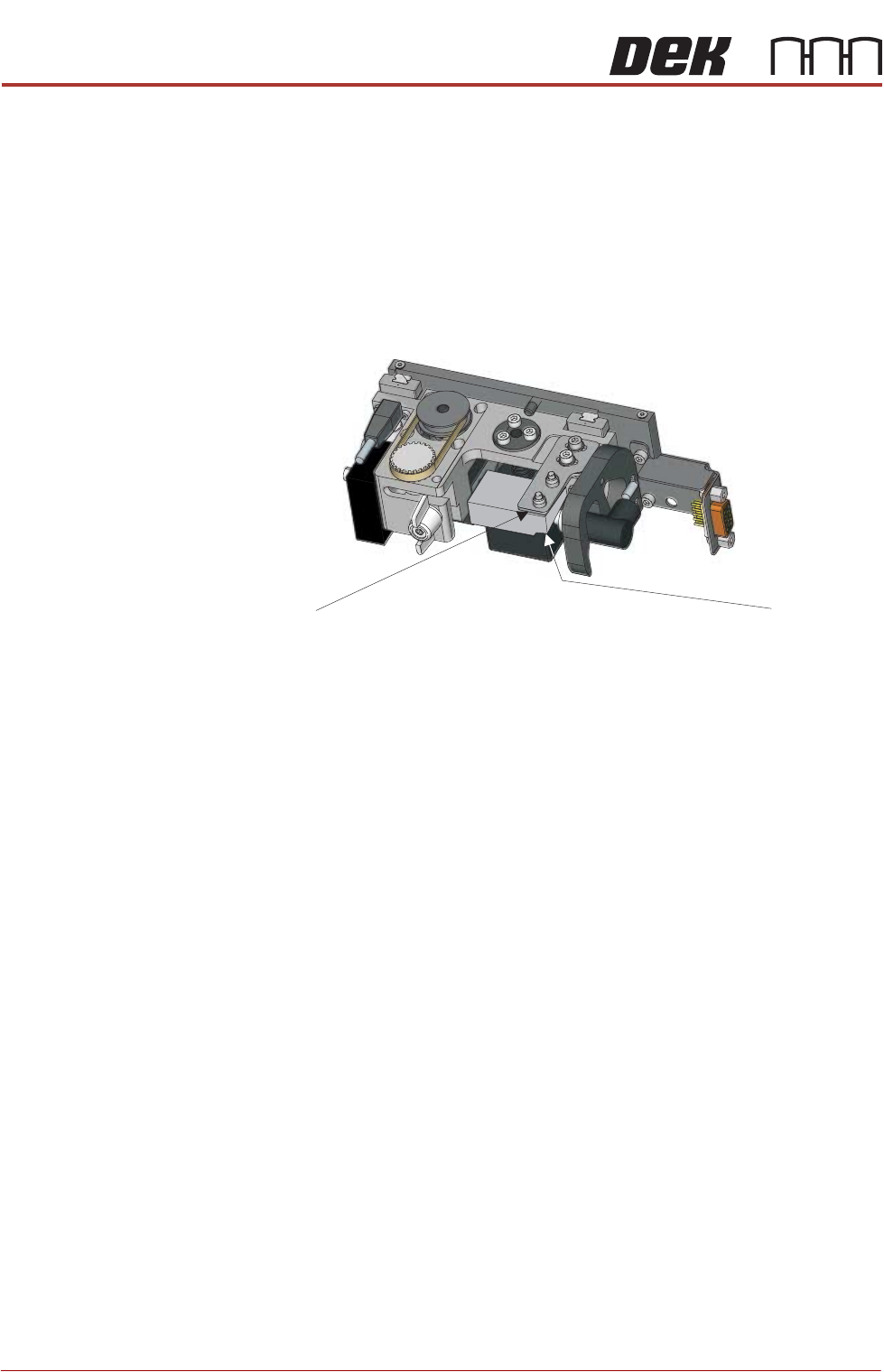
Level Sensor
Replacement
1. Isolate the printer from the pneumatic supply and lockout the mains electri-
cal isolator.
2. Open the printhead cover.
3. If fitted, remove the stencil.
4. Pull the camera carriage to the front of the printer.
5. Remove the two M2.5 x8 countersunk head screws, which secure the cover.
6. Remove the cover.
7. Remove the syringe assembly so that it is out of the way.
8. Remove the two M3 x 16 cap head screws that fasten the sensor to the
mounting plate.
9. Remove the sensor.
10. Unscrew the connector from the sensor body.
11. Reconnect the replacement sensor and refit it to the mounting plate.
12. Refit the syringe assembly.
13. Load the stencil.
14. Close the printhead cover.
15. Reconnect the printer to the pneumatic supply and unlock the mains elec-
trical isolator.
16. Switch the mains isolator ON.
17. When requested, press the System button.
18. Run a test product to check functionality.
Mounting Plate
Level Sensor