88192277-01-19 - Micron Technical Reference V9 Volume 4.pdf - 第20页
NETWORKING COMMS PROTOCOL OPTIONS 36.4 Technical Reference Manual Chapter Issue 6, Nov 19 Net Files Net Files is used wh ere remote control applications are not n eeded, at a networked PC, DEK’s Of f-line Editor software…
NETWORKING
COMMS PROTOCOL OPTIONS
Chapter Issue 6, Nov 19 Technical Reference Manual 36.3
COMMS PROTOCOL OPTIONS
These are the only options currently offered by ASM Assembly Systems
Weymouth Limited.
GEM If the Host is a PC, host control or DEK’s Remote Product Changeover (RPC)
package can be used to modify product files or to control printer operations
remotely. The flexibility of the GEM interface allows data collection to meet the
users requirements.
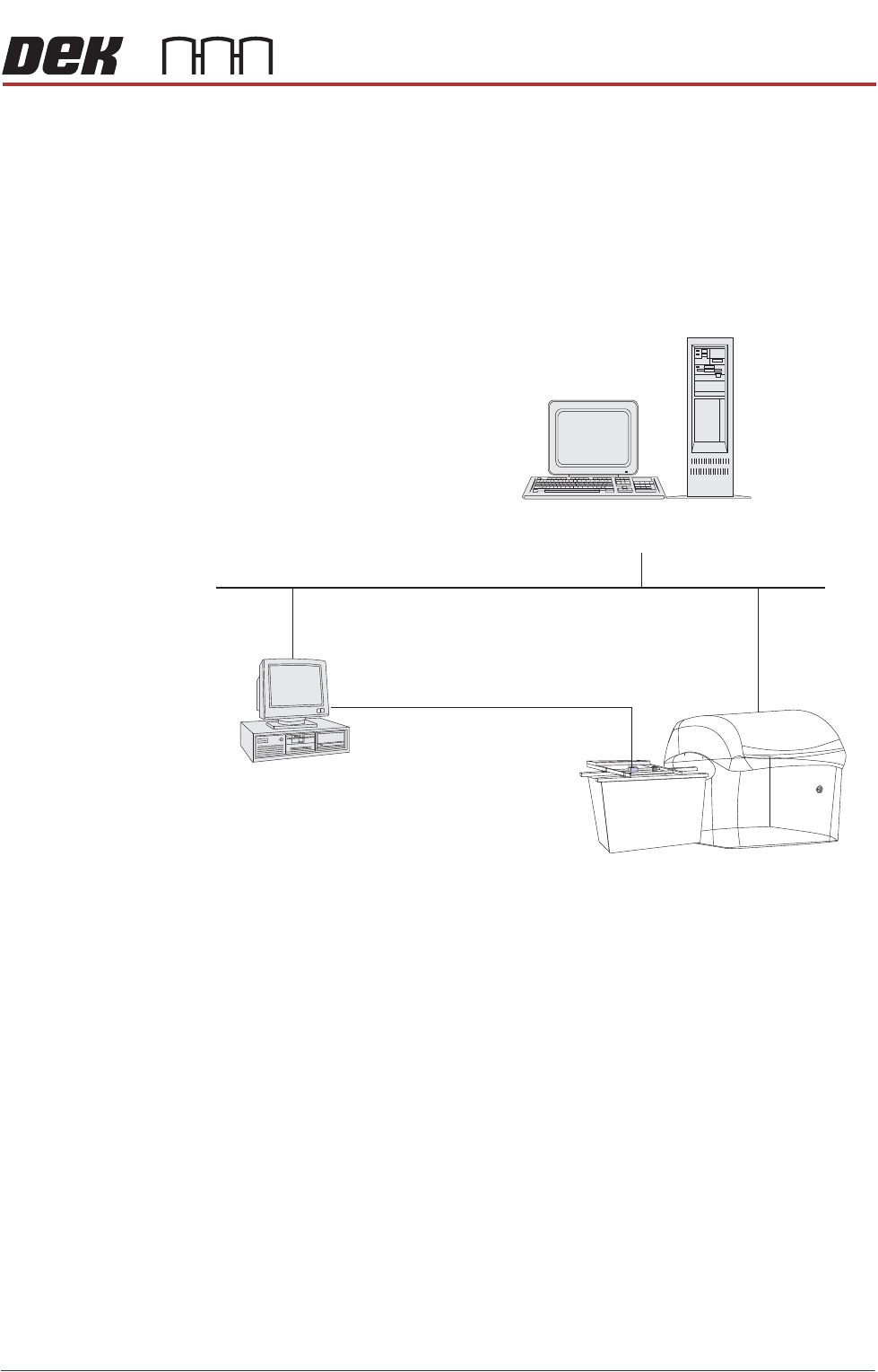
Figure 36-1 Network GEM - Typical Configuration
IP Address The IP Address of the printer must be set up in the DekSECSII.cfg file. To set
up the IP Address edit the configuration file D:\Program Files\DEK\Machine
Control\Printer\DekSECSII.cfg using a text editor. Set the passive IP Address
to the printers ‘IP Address’. If there is more than one printer communicating
with GEM Host, the DEVICEID is set different for each printer. DEVICEID values
can be set within the range 0x0000 - 0x7FFF (0 to 32767).
Server
Network
Input Conveyor and Printing Machine
Host PC
The system is hosted by a standalone PC
connected to the DEK printer using networked
GEM or Net_Files. A typical system may
interface external components such as a
Barcode Reader which uses serial RS 232.
Bar Code Reader
Serial RS232 Comms
NETWORKING
COMMS PROTOCOL OPTIONS
36.4 Technical Reference Manual Chapter Issue 6, Nov 19
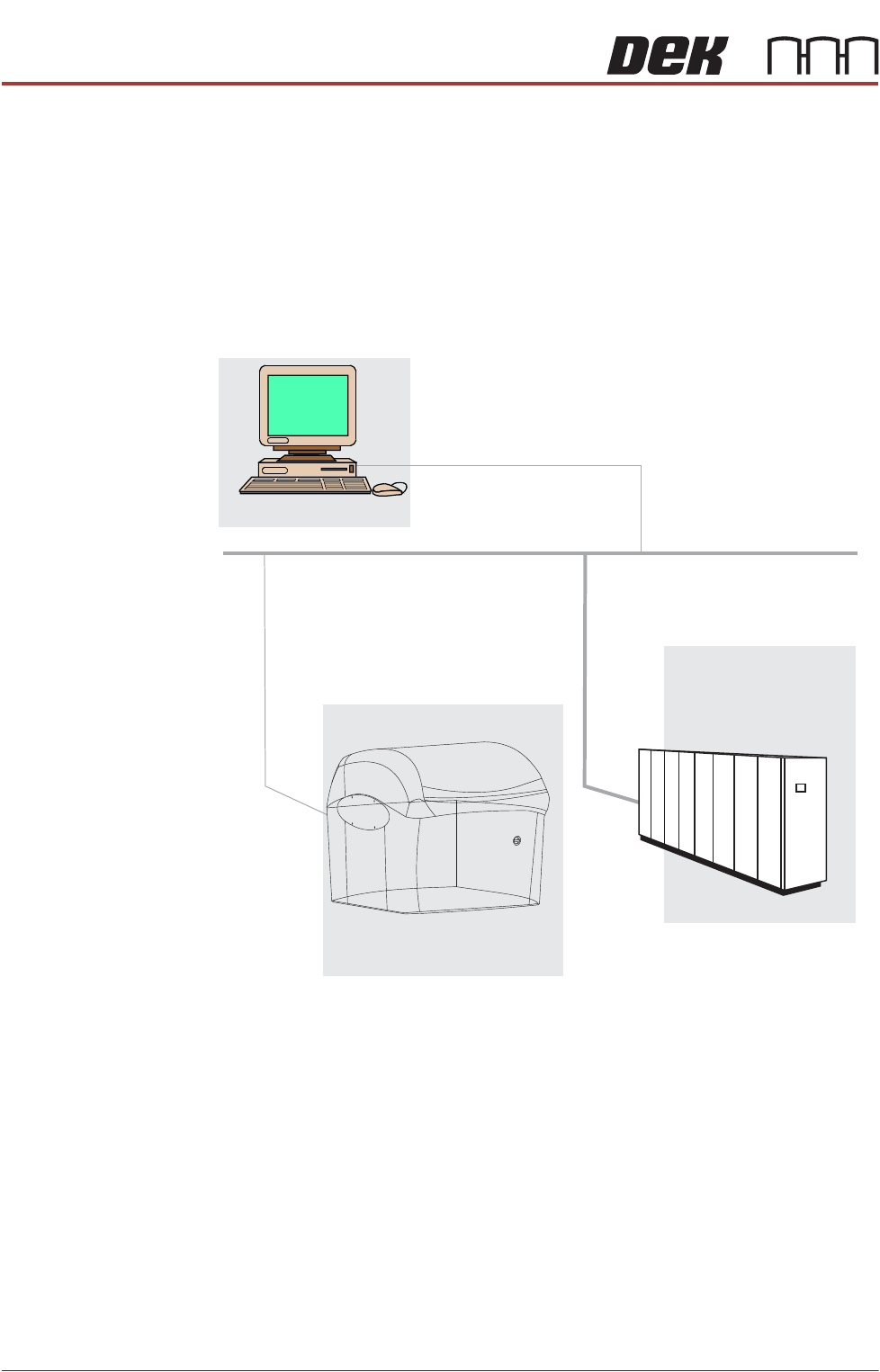
Net Files Net Files is used where remote control applications are not needed, at a
networked PC, DEK’s Off-line Editor software can be used to modify product
files, QC-Calc software can be used to access SPC data in the ‘READ-
INGS.DEK’ file and the Event Log can be read with a text editor or Remote
Event Monitor (REM).
NOTE
To set up a specific software package refer to the product manuals ‘Software
Tools for Productivity’ that are supplied with the application.
Figure 36-2 Net_Files - Typical Configuration
Net Files - File Re-direction Using TCP/IP
Networked PC
TCP/IP Network
Server
Directory Containing:
Product Files
Event Log
SPC Data
Management Information
*.Pr1, *.ISD and *.ISP
Event.dat
READINGS.DEK
DEK Printer

NETWORKING
CONNECTION TO A NETWORK SERVICE
Chapter Issue 6, Nov 19 Technical Reference Manual 36.5
CONNECTION TO A NETWORK SERVICE
Important Safety
Considerations
Whenever a printer is indirectly controlled eg, when using a network to control
its movements, there may be safety issues to consider. DEK printing printers
are fitted with several safety interlocks to protect operators and maintainers.
In addition to the above warning and before operating the machinery remotely,
ASM recommend that adequate safety systems are in place to ensure that all
personnel are clear of the moving parts in the printer and any external machin-
ery which may be in partial or full control of the networked host.
Minimum System
Requirement
The minimum system requirement for the host PC is as follows:
• IBM Compatible PC (running Windows 7 minimum)
• VDU with 800 x 600 Pixels (256 colours)
• LAN connection for GEM or Net Files
Operating
Environment
The operating system of the host computer must be capable of communicating
with a DEK printer running Windows 7 (minimum).
NOTE
Where DEK Software for Productivity Tools eg, Remote Product Changeover,
Off-Line editor etc are to be used, the installer must be logged on with Admin-
istrator level access in order for the security key device driver software to be
installed.