00196693-03_UM_SX4DX4_SR706_EN.pdf - 第137页
User Manual SIPLACE SX4/DX4 3 Technical data and assemblies From software version SC.706.xx V ersion 06/2012 EN 3.7 PCB conveyor system 137 3.7.3.4 Synchronous transport mode In synchronous mode, two PCBs of the same siz…
3 Technical data and assemblies User Manual SIPLACE SX4/DX4
3.7 PCB conveyor system From software version SC.706.xx Version 06/2012 EN
136
3.7.3.3 Asynchronous transport mode
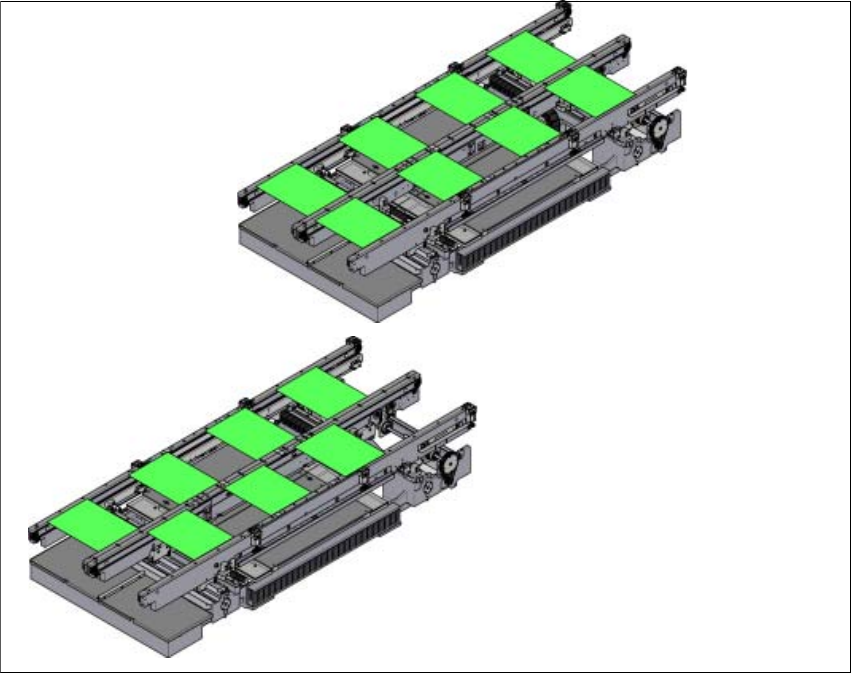
In asynchronous mode, only one PCB in a transport track is processed. At the same time, another
PCB in the second transport track is moved into the placement position. This saves the full con-
veying time of one PCB, thus considerably increasing performance, particularly for PCBs with a
short cycle time. Once the machine has received the job data (panel, setup), the PCBs on the
feeding belts are continuously transported to the available processing belt (provided that the pro-
cessing belt is free) throughout the placement operation. The placement process begins as soon
as a board is transported into the processing area. The PCBs are processed one after another.
If the placement sequence is interrupted, the conveyor interface will be disabled and the PCBs
currently on the processing belts will be completed.
The conveyor interface is disabled or enabled simultaneously for both transport tracks.
3
Fig. 3.7 - 4 Transport modes
Synchronous transport mode
Asynchronous transport mode
User Manual SIPLACE SX4/DX4 3 Technical data and assemblies
From software version SC.706.xx Version 06/2012 EN 3.7 PCB conveyor system
137
3.7.3.4 Synchronous transport mode
In synchronous mode, two PCBs of the same size are transported into the placement position at
the same time. They are processed as a common panel. When using products with greatly differ-
ing placement content, common optimization increases the performance of the whole content on
both boards.
The time needed to transport the board is reduced as two boards are always transported at the
same time. It also ensures better utilization of the nozzle configuration.
PCBs on conveyor tracks 1 and 2 are moved synchronously onto the conveyor sections (i.e. the
conveyors are controlled synchronously, but independently of one another). The components to
be placed on conveyor tracks 1 and 2 must be organized into a panel via two subpanels.
If only one conveyor lane is occupied at the beginning of placement, this single use of the con-
veyor lane will be identified as "not to be placed".
If the dual conveyor is operated in synchronous mode, the ‘PCB whispering down the line’ option
is deactivated. The "Global bad fiducial" option cannot be used.
3.7.3.5 I-Placement
In addition to synchronous and asynchronous conveyor mode, a new placement concept has
been developed for the SIPLACE SX4: I-Placement. In this mode, the two heads work simultane-
ously and populate a PCB totally independently of one another. This further increases the output.
3 Technical data and assemblies User Manual SIPLACE SX4/DX4
3.7 PCB conveyor system From software version SC.706.xx Version 06/2012 EN
138
3.7.4 SIPLACE Quad lane conveyor (SX4 only)
Item no. 00519836-xx SIPLACE Quad lane conveyor
3
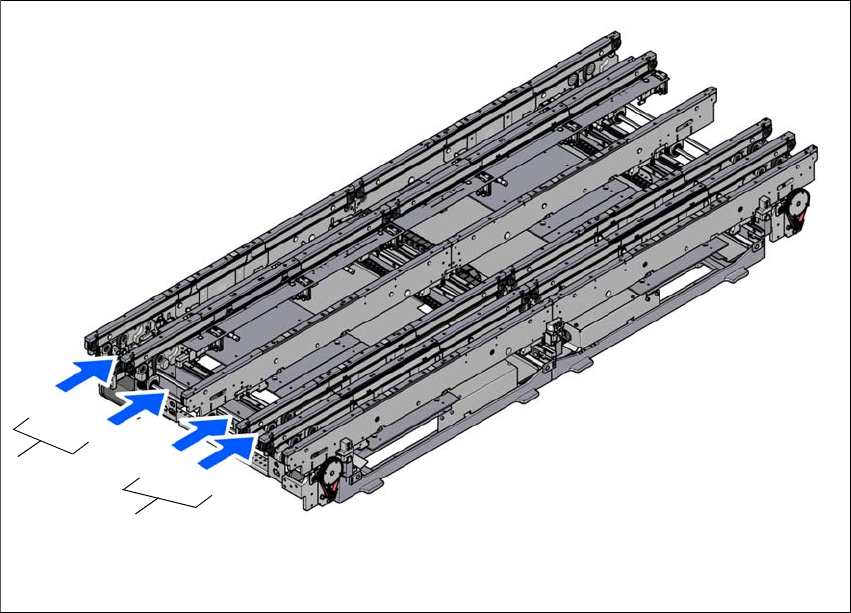
Fig. 3.7 - 5 SIPLACE Quad Lane Conveyor
(1) conveyor lane group 1
(1R) conveyor lane 1, right
(1L) conveyor lane 1, left
(2) conveyor lane group 2
(2R) conveyor lane 2, right
(2L) conveyor lane 2, left
3.7.4.1 Description
The SIPLACE quad lane conveyor can process up to eight boards at the same time. The conveyor
lanes 1R and 1L or 2R and 2L transport the boards in synchronous mode, while the two conveyor
lane groups 1 and 2 can transport the boards in both synchronous or asynchronous mode. The
two outer conveyor sides are fixed in the quad lane conveyor. The conveyor can be configured as
single lane, dual lane or quad lane, in the software, without any modifications to the hardware.
(2L)
(2R)
(1)
(1R)
(1L)
(2)