00196693-03_UM_SX4DX4_SR706_EN.pdf - 第320页
6 Station extensions User Manual SIPLACE SX4/DX4 6.4 Mechanical stopper From software version SC.706.xx Version 06/2012 EN 320 6.3.4 W arning label W216 for 1D barcode reade r The 1D barcode reader is classi fied as a la…

User Manual SIPLACE SX4/DX4 6 Station extensions
From software version SC.706.xx Version 06/2012 EN 6.3 PCB barcode scanner
319
6.3.2 Technical data - 1D barcode scanner
6
6.3.3 Technical data - 2D code reader
6
6
Dimensions (L x W x H)
40 x 30 x 20 mm
3
Weight 44 grams
Wave length 600 to 680 nm
Laser class Class 2, in line with DIN EN 60825-1, class II - CDRH
Scanning frequency 800 to 1200 scans/seconds
Code types Code 39, Code 128, Code 93,
Codabar, EAN, EAN 128, UPC,
2/5 Interleaved, Pharma Code, ISTB 128
Barcode length
Dual conveyor, asynchronous
Dual conveyor, synchronous
Max. 40 characters
Max. 40 characters
Data interface RS232, RS485
Electrical connection 15-pin D-Sub HD connector
Operating voltage 5 V- ± 5 %
Dimensions (L x W x H)
55 x 42 x 22 mm
3
Weight 125 grams
Code types 2D Data Matrix ECC 0, 50, 80, 100, 140 and 200
Data Matrix ECC200
QR Code, MicroQR Code
Barcode length
Dual conveyor, asynchronous
Dual conveyor, synchronous
Max. 40 characters
Max. 40 characters
Data interface RS232, USB 2.0
Electrical connection 15-pin D-Sub HD connector
Operating voltage 5 V- to 24 V-

6 Station extensions User Manual SIPLACE SX4/DX4
6.4 Mechanical stopper From software version SC.706.xx Version 06/2012 EN
320
6.3.4 Warning label W216 for 1D barcode reader
The 1D barcode reader is classified as a laser class 2 device.
6
Warning label W216 "laser class 2" for the 1D barcode reader,
item no. 03009347-01 (quantity per machine: up to 4)
PLEASE NOTE 6
When you install a PCB barcode scanner on the placement machine, you must attach laser
warning label W206 contained in the retrofit kit.
6.4 Mechanical stopper
Item No. 00519860-xx mechanical stopper
The mechanical stopper is fitted onto the sensor bar and can be moved mechanically. This stopper
is recommended if you want to use boards which have certain types of recesses on the front edge.
6
6
6
6
6
6
LASER RADIATION!
Do not look into beam
Laser class 2
User Manual SIPLACE SX4/DX4 6 Station extensions
From software version SC.706.xx Version 06/2012 EN 6.5 Docking station for the component trolley of the SIPLACE X series
321
6.5 Docking station for the component trolley of the
SIPLACE X series
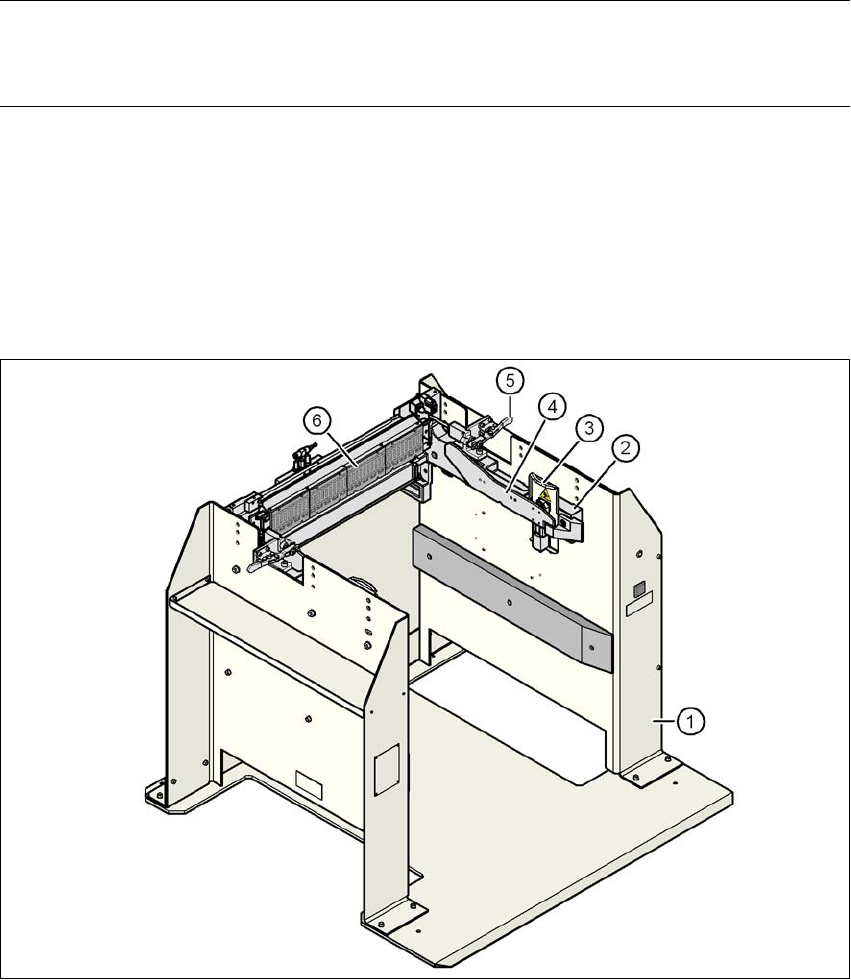
Item no. 00116933-xx docking station for SIPLACE X component trolley
PLEASE NOTE:
A docking station (multi docking station) with which component trolleys can be configured for 30,
40 and 60 tracks is available on request. 6
6.5.1 Description
The docking station is an additional component for the setup area. It forms the link between the
setup area and the component trolley for the SIPLACE X series. The docking station allows the
component trolleys to be set up with feeder modules and function tests and setup checks to be
carried out externally.
6
Fig. 6.5 - 1 Docking station, SIPLACE X series