00196693-03_UM_SX4DX4_SR706_EN.pdf - 第55页
User Manual SIPLACE SX4/DX4 2 Operational safety From software version SC.706.xx V ersion 06/2012 EN 2.5 Safety instructions for operating the SX4/DX4 machine 55 2.5 Safety instructions for operating the SX4/DX4 machine …
2 Operational safety User Manual SIPLACE SX4/DX4
2.4 Safety instructions for transporting the machine From software version SC.706.xx Version 06/2012 EN
54
2.3.3 Laser class 2
The following modules are assigned to laser class 2:
– PCB barcode scanner
– Component sensor on SpeedStar
– Component sensor on MultiStar
(The entire machine is classified as laser class 2 if the coplanarity laser module option is installed.)
2
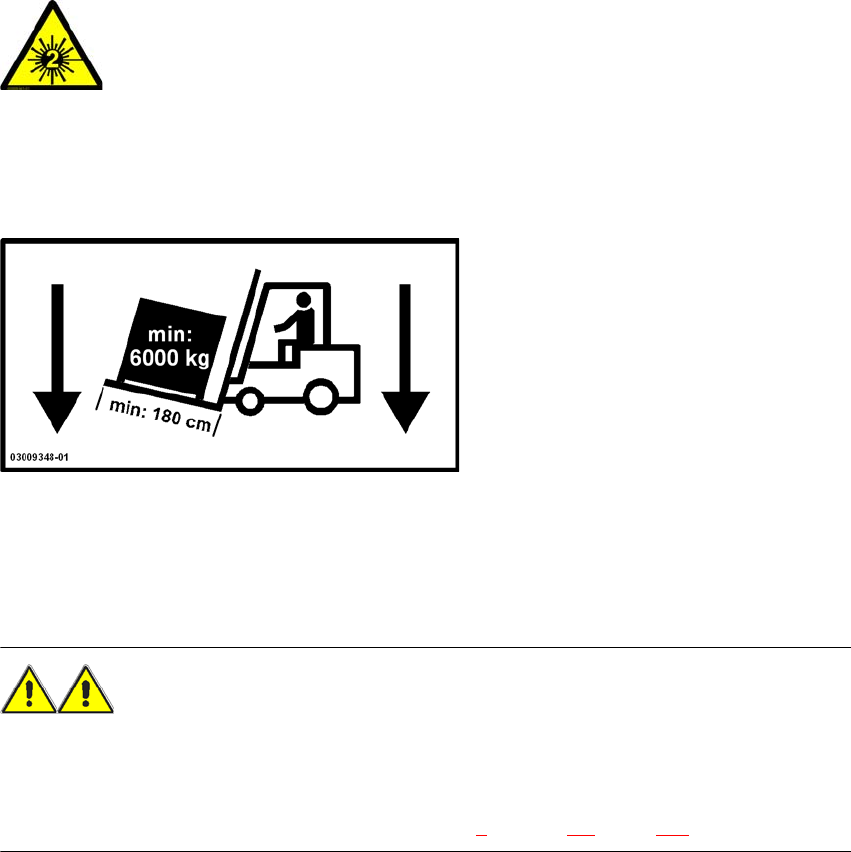
2.4 Safety instructions for transporting the machine
2
Use a fork-lift truck with the following specification to carry the machine:
Fork length: min. 1800 mm
Carrying power: min. 6000 kg
Clear width between forks: min. 350 mm 2
WARNING
RISK OF TIPPING 2
If the required specification cannot be applied to the fork-lift, there is a risk that the fork-lift will tip
over when carrying the machine.
Transportation of the machine is described in chapter 4, section 4.1, page 189.
2
Laser radiation
Do not look into beam!
User Manual SIPLACE SX4/DX4 2 Operational safety
From software version SC.706.xx Version 06/2012 EN 2.5 Safety instructions for operating the SX4/DX4 machine
55
2.5 Safety instructions for operating the SX4/DX4
machine
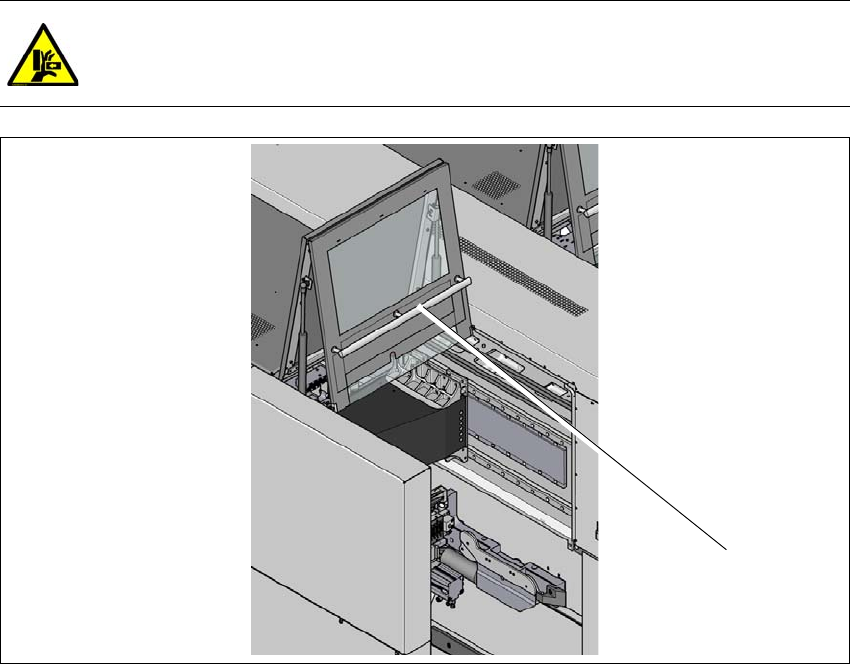
2.5.1 Safety instructions for closing the protective covers
To avoid risk of injury when closing the protective covers on the machine, the operator must in-
struct the personnel concerned to always follow the instructions below when handling the protec-
tive covers.
CAUTION
RISK OF CRUSHING HANDS
IF THE PROTECTIVE COVERS ARE NOT CLOSED CORRECTLY 2
2
Fig. 2.5 - 1 Safety instructions for closing the protective covers (example of SX4)
(1) Grab handles
To open or close the protective covers, always take hold of these by the grab handles.
When closing, do not reach into the gap between the protective cover and the machine panel.
When closing the protective cover, make sure that the area in which it is swiveled is free of
obstruction and that no other people are at risk of injury.
(1)

2 Operational safety User Manual SIPLACE SX4/DX4
2.5 Safety instructions for operating the SX4/DX4 machine From software version SC.706.xx Version 06/2012 EN
56
2.5.2 Manual insertion of board into the input conveyor
WARNING 2
Risk of injuries to hands when manually inserting a board into the input conveyor.
– The manual insertion of the board is only permitted during the machine installation phase
(machine calibration, test placement, etc.) and may only be performed by specially qualified
personnel.
– Manual insertion of boards is expressly prohibited on any machines released for production,
as these give unprotected access to the travel range of the gantry.
– The operating company is responsible for ensuring that the input and output conveyors are
covered to prevent anyone reaching into these areas with hands or arms. All upstream and
downstream modules (screen printers, conveyors, inspection systems, ovens, etc.) must take
these same precautions.
2
Observe the warning instructions when inserting boards into the input conveyor.
Start moving the board into the conveyor with the Move Board In function on the SC GUI.
2.5.3 Safety instructions for processing capacitors based on powdered metal
There is a risk associated with processing capacitors based on powdered metal (e.g. tantalum).
The risk is that
– an exothermic reaction, i.e. a sudden build-up of heat, may occur, if these components are
damaged. If the ambient conditions are unfavorable, and depending on the capacitance, this
buildup of heat can cause damage.
– This effect can occur when these components are cut.
Please contact your suppliers to clarify whether the components that you handle are affected.
In extremely rare cases, this risk can occur in the tape cutter of SIPLACE machines, with the re-
mote possibility of causing a smoldering fire in the waste tape.
The ambient conditions are unfavorable if:
(1) The components remain on the tape while the set tape cycle is checked (since the operator
can cycle the feeder module onward without removing components during this check).
(2) The components remain on the tape, e.g. due to a tear in the cover foil.