00196693-03_UM_SX4DX4_SR706_EN.pdf - 第290页
5 Working with the machine User Manual SIPLACE SX4/DX4 5.15 Docking the component trolley in or out From software version SC.706.xx Version 0 6/2012 EN 290 5 Fig. 5.15 - 1 Safety instructions for docking the component tr…
User Manual SIPLACE SX4/DX4 5 Working with the machine
From software version SC.706.xx Version 06/2012 EN 5.15 Docking the component trolley in or out
289
5.15 Docking the component trolley in or out
The following chapter shows diagrams of the SIPLACE SX4. The component changeover tables
for the SIPLACE SX4 are docked and undocked in the exactly same way as the DX changeover
tables for the SIPLACE DX4.
5.15.1 Safety instructions for docking component trolleys in and out
Also follow the safety instructions given in section 2.6.3, page 62.
CAUTION
When docking and undocking, make sure that there are no body limbs in the travel area of the
component trolley. 5
WARNING 5
To prevent accidents (risk of crushing), the component trolley may only be docked in or out by
one person.
In addition, the component trolley can only be docked in if the protective
covers are closed.
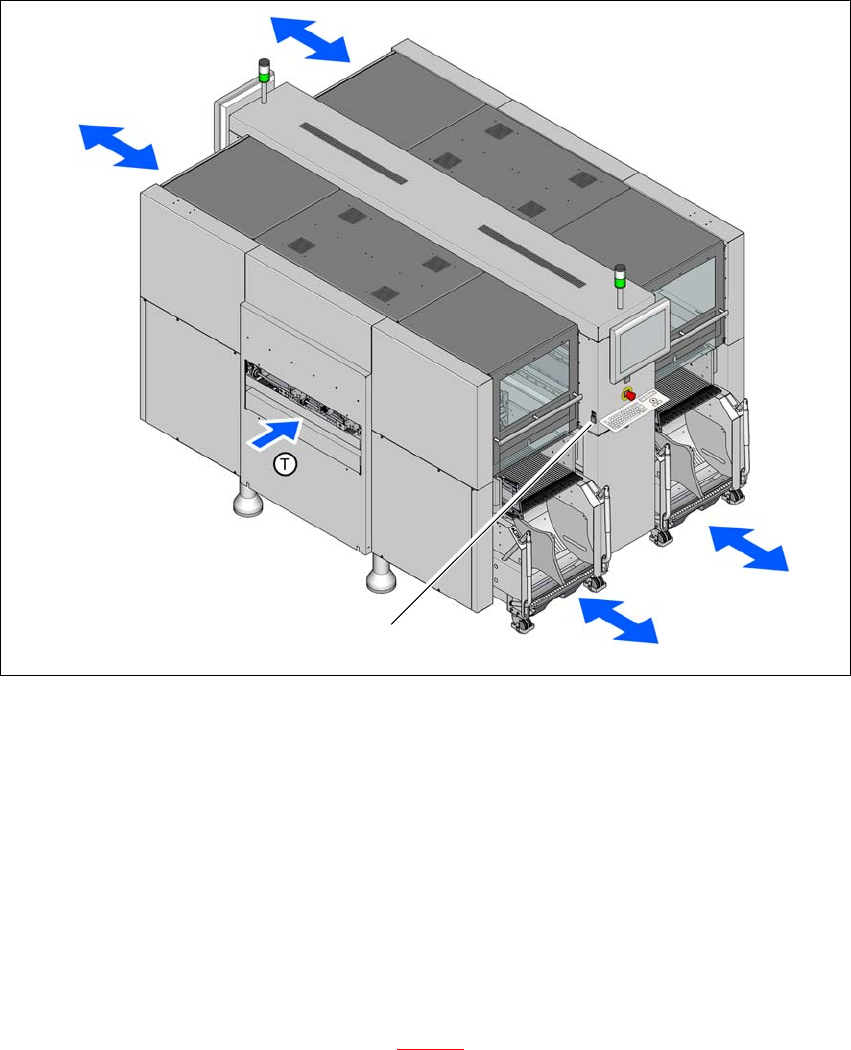
There is a button at each location (1,2,3 and 4). The safety concept for the component trolley
changeover specifies that the operator should push this button at the relevant machine location,
to dock or undock the component trolley.
5 Working with the machine User Manual SIPLACE SX4/DX4
5.15 Docking the component trolley in or out From software version SC.706.xx Version 06/2012 EN
290
5
Fig. 5.15 - 1 Safety instructions for docking the component trolley in or out
In addition, the component trolley can only be docked in if the protective
covers are closed.
(1) Button for docking and undocking the component trolley at location
(T) Direction of PCB transport
5.15.2 Docking out the component trolley
Press the button on the respective machine location until the component trolley is completely
undocked.
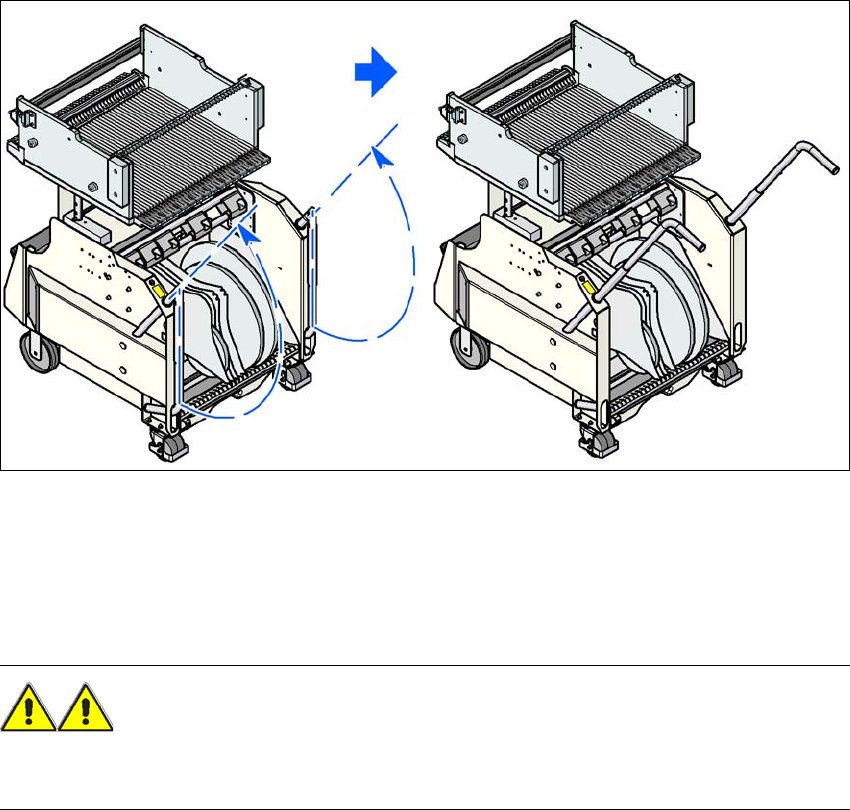
Swivel the two handles up (item 1 in fig. 5.15 - 2).
(1)
User Manual SIPLACE SX4/DX4 5 Working with the machine
From software version SC.706.xx Version 06/2012 EN 5.15 Docking the component trolley in or out
291
5
Fig. 5.15 - 2 Component trolley - swivel handles up to push
With both hands on the handles, pull the component trolley out of the machine.
5.15.3 Safety instructions for moving the component trolley
WARNING 5
To prevent accidents, ALWAYS follow the rules listed below when you move the component trol-
ley.
Always hold the handles with both hands when you want to move the component trolley.
Remember that a component trolley with the full complement of feeder modules can tip over
sideways or forward on gradients of 20° or more.
Make sure that the surface on which the trolley is moved has a significantly smaller gradient.
Be careful not to collide with obstacles. The trolley could tip forward if it is traveling fast
enough.