00196693-03_UM_SX4DX4_SR706_EN.pdf - 第281页
User Manual SIPLACE SX4/DX4 5 Working with the machine From software version SC.706.xx V ersion 06/2012 EN 5.11 Observing displays on the X feeder module 281 5.1 1.2 Feeder module with LED display The X feeder modules (2…
5 Working with the machine User Manual SIPLACE SX4/DX4
5.11 Observing displays on the X feeder module From software version SC.706.xx Version 06/2012 EN
280
5.11 Observing displays on the X feeder module
5.11.1 Feeder module with LCD display
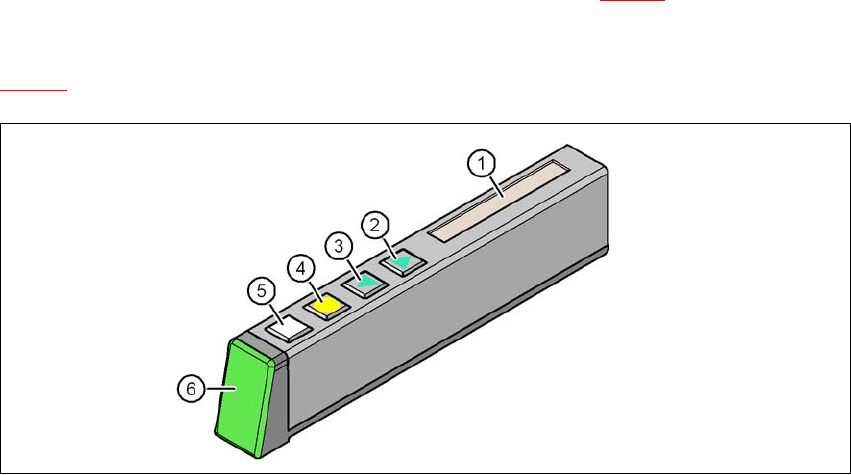
The X feeder modules have a multicolor status display (item 6 in fig. 5.11 - 1) for signaling the op-
erating
statuses and an LCD display (item 1 in fig.
5.11 - 1
).
5
Fig. 5.11 - 1 Buttons, LCD and status displays on the X feeder module
(1) LCD display
(2) FORWARD button
(3) BACK button
(4) FOIL button
(5) SET button
(6) Status display, multicolor
User Manual SIPLACE SX4/DX4 5 Working with the machine
From software version SC.706.xx Version 06/2012 EN 5.11 Observing displays on the X feeder module
281
5.11.2 Feeder module with LED display
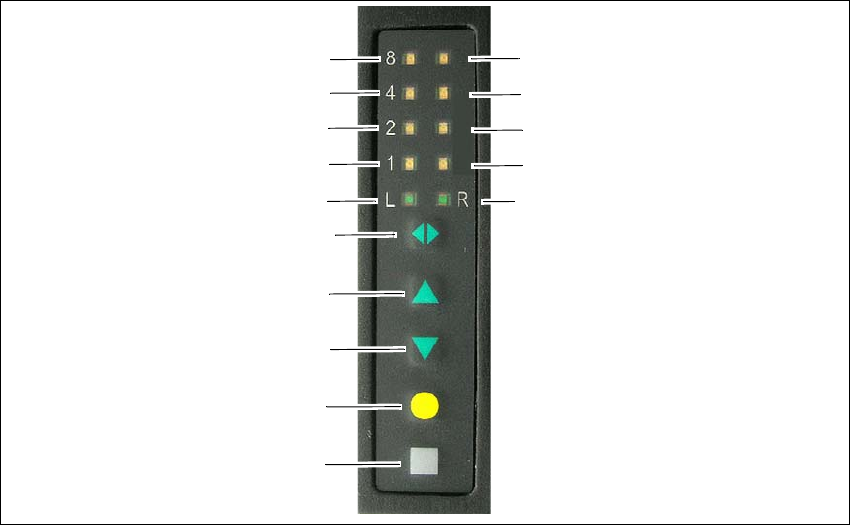
The X feeder modules (2x8 mm, smart feeder 12 mm and smart feeder 16 mm) have a multicol-
ored status display for each track and LED display, to indicate the operating states.
5
Fig. 5.11 - 2 Buttons, LED and status displaysexample of 2x8 mm X feeder module shown
(1) SET button
(2) FOIL button
(3) BACK button
(4) FORWARD button
(5) Track change button for switching between right and left
(6) LED L left track active
(7) LED 1 mm increment for left track
(8) LED 2 mm increment for left track
(9) LED 4 mm increment for left track
(10) LED 8 mm increment for left track
(11) LED R right track active
(12) LED 1 mm increment for right track
(13) LED 2 mm increment for right track
(14) LED 4 mm increment for right track
(15) LED 8 mm increment for right track
(1)
(2)
(3)
(4)
(5)
(6)
(7)
(8)
(9)
(10)
(15)
(14)
(13)
(12)
(11)

5 Working with the machine User Manual SIPLACE SX4/DX4
5.11 Observing displays on the X feeder module From software version SC.706.xx Version 06/2012 EN
282
5.11.3 Status display
–Green:
The feeder module is on standby and is contained in the current setup.
– Orange:
A warning is being signalized. The text of the warning appears on the LCD display.
– Red:
A malfunction has occurred. The error message is output on the LCD display.
–Off:
The feeder module is not in the current setup.
PLEASE NOTE 5
The machine controller switches off the status display of any feeder modules not included in the
setup. The "LED off" status only occurs when the programming system has preset a job on the
line. This takes some of the work away from the operator since he only has to watch those feeder
modules that are contained in the setup.
For the actual setup process - no setup information at the station, no job sent from SIPLACE Pro
to the station/line - the LED on each feeder module is activated after the setup has been made.
The operator is thus informed whether everything is OK.