00196693-03_UM_SX4DX4_SR706_EN.pdf - 第73页
User Manual SIPLACE SX4/DX4 2 Operational safety From software version SC.706.xx Version 06/2012 EN 2.7 Safety equipment 73 2.7.4 EMERGENCY STOP loop s and signaling circuit 2.7.4.1 Structure of the EMERGENCY ST OP loops…
2 Operational safety User Manual SIPLACE SX4/DX4
2.7 Safety equipment From software version SC.706.xx Version 06/2012 EN
72
Protective contactor combination K6 ( item 1 in fig. 2.7 - 6, page 71) 2
The protective contactor combination is contained in the power supply unit. It is used to monitor
the EMERGENCY STOP circuits and safety equipment.
There are three conditions that must be fulfilled in order to activate the protective contactor com-
bination:
– The "software release" or "Control ON" signal must be issued.
– The EMERGENCY STOP loop must be closed.
– The start button must have been pressed.
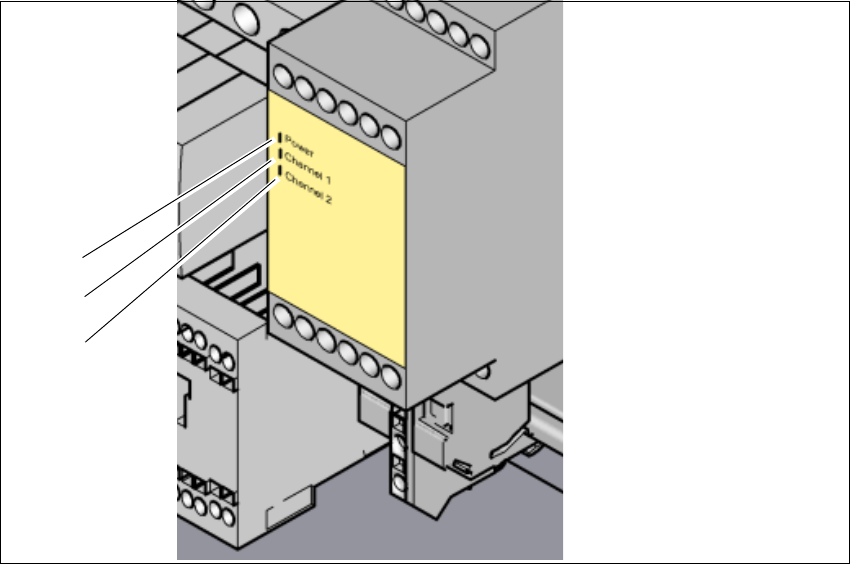
The front side of the protective contactor combination has three green LEDs for the operating dis-
play (see fig. 2.7 - 7
, page 73 )
– The "Power" LED indicates that voltage is present.
– The "Channel 1" and "Channel 2" LEDs shine if the start button has been pressed, the EMER-
GENCY STOP circuit is closed and the signaling circuit has not indicated any error states.
Service socket ( item 2 in fig. 2.7 - 6, page 71) 2
The service socket is contained in the power supply unit and is protected by the cover. It can only
be used if the machine is connected to the main power supply via a 5-wire connection (L1, L2, L3,
N, and PE). If a 4-wire connection is used, e.g. without N, the socket cannot be used.
WARNING 2
Always follow the safety instructions concerning potentially lethal voltages - even when the
machine is switched off. (See section 2.1.3 from page 32 and section 2.7.2.3 from page 69 .
User Manual SIPLACE SX4/DX4 2 Operational safety
From software version SC.706.xx Version 06/2012 EN 2.7 Safety equipment
73
2.7.4 EMERGENCY STOP loops and signaling circuit
2.7.4.1 Structure of the EMERGENCY STOP loops
The following contacts are connected in series and form the EMERGENCY STOP loop:
– Make contact elements for the four protective cover switches
– Normally open (NO) contacts for the two EMERGENCY STOP buttons
– Make contact elements for the four component trolleys/DX changeover tables
– Channels for the protective contactor combination SSK K6
In addition to analyzing the EMERGENCY STOP loop with the SSK K6, the software also checks
the signaling contacts of the monitored switches. If all contacts are closed (make contact), the soft-
ware sends a digital CAN bus output signal from the I/O control unit to the SSK K6.
2
Fig. 2.7 - 7 Signal LED on the protective contactor combination
(1) Mains / Power
(2) Kanal 1 / Channel 1
(3) Kanal 2 / Channel 2
(1)
(2)
(3)
2 Operational safety User Manual SIPLACE SX4/DX4
2.7 Safety equipment From software version SC.706.xx Version 06/2012 EN
74
2.7.4.2 Structure of the signaling circuit
The following modules in the signaling circuit are queried individually:
– The protective cover switches
– Signaling contact elements for the two component trolleys/DX changeover tables
– EMERGENCY STOP button
All the signaling contacts are closed when the machine is on standby. If a protective cover, for ex-
ample, is raised, the associated signaling contact opens. This status change is signaled to the
control computer via a digital CAN bus input signal from the I/O control unit. An error message to
this effect appears on the user interface.
2.7.4.3 Description of the functions of the EMERGENCY STOP loops
The following conditions must be fulfilled in order to start and operate the machine:
– All component trolleys/DX changeover tables must be docked in and connected.
– All protective covers must be closed.
– Both emergency stop buttons must be released.
– The minimum operating pressure must have been reached.
– The software release ("Control ON") must be enabled, so that the start signal from the "Start"
button can switch on the SSK protective contactor combination.
– 24V- are made available by the output of the AC/DC converter to the start button and the pro-
tective contactor combination (SSK).
– If one of the start buttons is now pressed, the protective contactor combination SSK K6 will
switch and activate the following components:
– 260 V - intermediate circuit voltage for the gantry axes
– 150 VDC intermediate circuit voltage for the star axes
– The Gantry Control Unit (GCU) for the X and Y axes is supplied with voltage via the in-
rush current limiter servo.
– 42 VDC operating voltage is switched to the used tape cutters.
– 42 V and 24 V are switched through for PCB conveyor control (TSP).
The machine is then ready for use.