00196693-03_UM_SX4DX4_SR706_EN.pdf - 第241页
User Manual SIPLACE SX4/DX4 5 Working with the machine From software version SC.706.xx V ersion 06/2012 EN 5.3 Switching on the SIPLACE line 241 5.3.3 User classification Certain functions or menus may onl y be executed …

5 Working with the machine User Manual SIPLACE SX4/DX4
5.3 Switching on the SIPLACE line From software version SC.706.xx Version 06/2012 EN
240
5.3 Switching on the SIPLACE line
5.3.1 Starting the SIPLACE Pro Line Control GUI program
Start the program on the line computer SIPLACE Pro Line Control GUI
via the Windows Start menu
Start --> Programs --> SIPLACE Pro --> LCGUI
or
with the icon on your desktop.
Enter your user data.
The system connects to the SIPLACE Pro server and opens the user interface.
5.3.2 What to consider before switching on the stations
CAUTION
Before you switch on the stations, please perform the following steps. 5
Check whether the stations are connected to the power and compressed air supplies.
Perform a sight check of the stations. Make sure that there are no obstacles in the travel
range of the gantries.
Make sure that the Z axes of all heads are in their uppermost end positions.

User Manual SIPLACE SX4/DX4 5 Working with the machine
From software version SC.706.xx Version 06/2012 EN 5.3 Switching on the SIPLACE line
241
5.3.3 User classification
Certain functions or menus may only be executed or can only accessed by specially trained per-
sonnel. A differentiation is made between the following operator levels:
– Production
– Advanced production
– Service (customer)
– Service (SIPLACE)
The operator levels "Advanced production" and "Service (customer)" can be password protected.
The operator level "Service (SIPLACE)" is already password protected.
For a detailed description of the user classification, refer to section 5.1
, page 233.
5.3.4 Switching on the station and starting the station software user interface
CAUTION
Only switch the station on if the monitor of the SIPLACE Pro computer shows the "Desktop", oth-
erwise communication problems could occur. 5
Switch the station on at the main power switch.
After switching on, check whether the manometers show the required operating pressure.
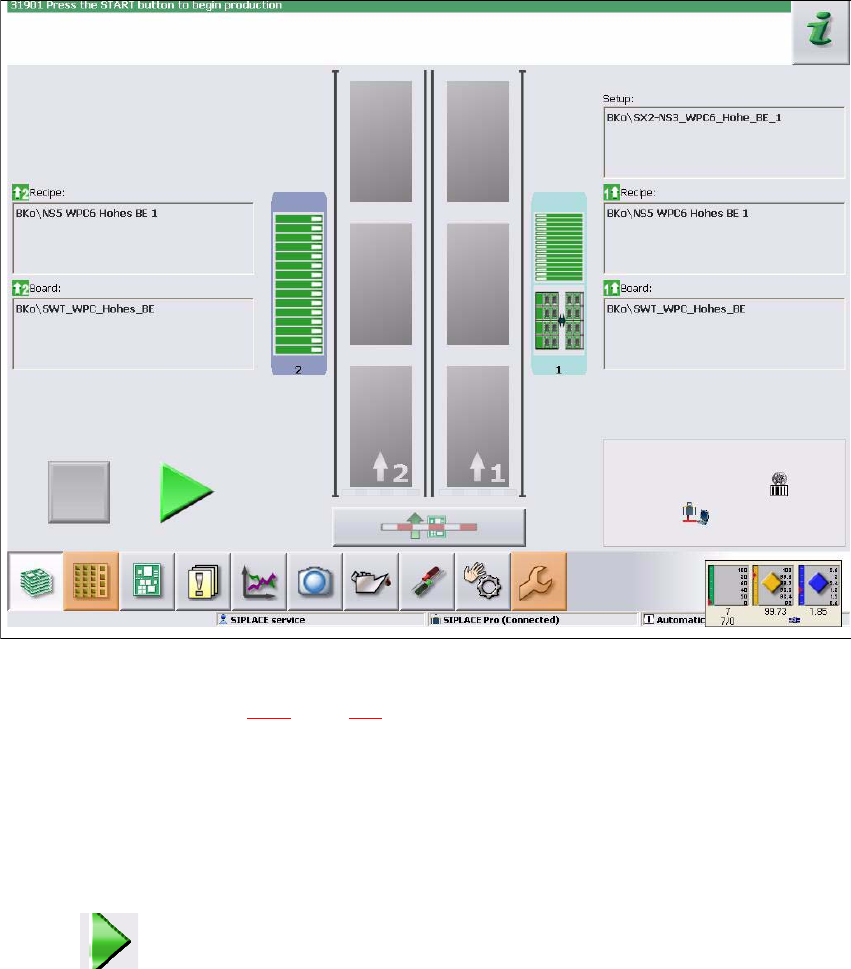
The station computer software is loaded and the "Production" view of the station software is
shown for the "Production" operator level (see following diagram).
5 Working with the machine User Manual SIPLACE SX4/DX4
5.3 Switching on the SIPLACE line From software version SC.706.xx Version 06/2012 EN
242
5
Fig. 5.3 - 1 "Production" view after loading the station software (example of SIPLACEX4 shown)
The status field (see section 5.5.1, page 247) shows the current status of the station and the action
to be performed.
Press the start button when you see the request "Press Start button".
Start buttons can be found on the input side, output side and on the operating panels to the
left and right of the station.
A reference run will be performed. After completion of this reference run, the station is ready
for operation.
The icon will be shown in the working area of the user interface (enabled).