00196920-07_SIPLACE_Pro_FeatureDescription_DE_EN.pdf - 第101页
SIPLACE Pro Fe ature Des cription Ausgabe 05/2014 Edit ion 101 8.4.7.2 Revised Di splay of the Height Entr ies Meanings In the m ain view of the Co m ponent Shape E ditor, the m eanings of the height entr ies are precise…
SIPLACE Pro Feature Description Ausgabe 05/2014 Edition
100
8.4.7 Simplified Component Shape Editor
The Component Shape Editor has been improved to simplify the component shape handling. For
this, the views of the Component Shape Editor have been reengineered. The main changes are
described in this section.
8.4.7.1 Automatic Settings when Selecting Pick-up Process
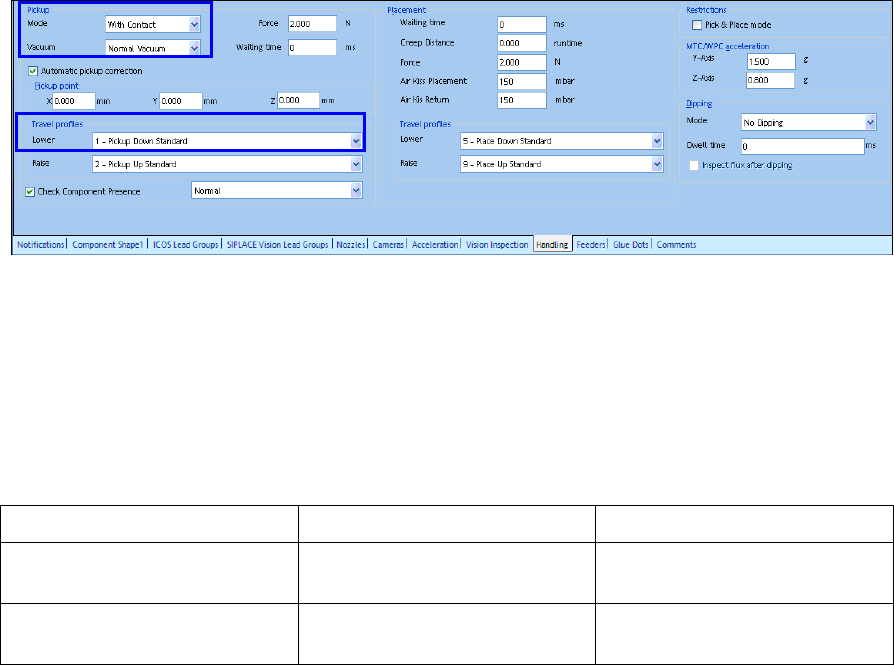
As soon as the user changes the pick-up mode to With Contact or Without Contact in SIPLACE
Pro Desk, a correct travel profile and vacuum are automatically set.
Figure 8-9: Setting pick-up mode
If the pick-up mode is changed to With Contact, SIPLACE Pro Desk automatically sets Normal
Vacuum as vacuum value and 1 – Pickup Down Standard as travel profile.
If the pick-up mode is changed to Without Contact, SIPLACE Pro Desk automatically sets Early
Vacuum as vacuum value and 17 – Down Contactless as travel profile.
The valid combinations of the pick-up modes and the corresponding settings are listed in the
following table.
Pick-up Mode Travel Profile Z-Axis Down Vacuum Mode
With Contact 17
35
Early vacuum
Without Contact 1 Early Vacuum
Normal Vacuum
Table 8-5: Pick-up modes and settings
SIPLACE Pro Feature Description Ausgabe 05/2014 Edition
101
8.4.7.2 Revised Display of the Height Entries Meanings
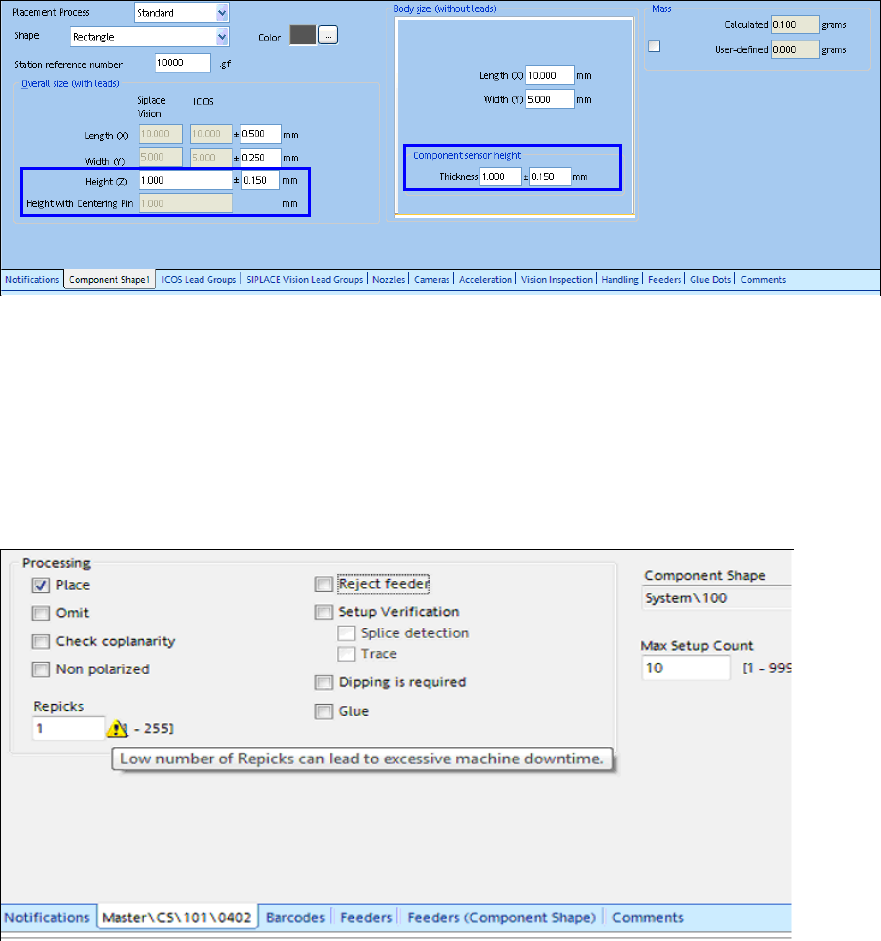
In the main view of the Component Shape Editor, the meanings of the height entries are precisely
displayed in order to make the difference between the height entries more comprehensible.
Figure 8-10: Height entries in the Component Shape Editor
8.4.7.3 Specified Pick-up Process for nnn5 and nnn6 Nozzles
Only contactless pick-up is performed with the nnn5 and nnn6 nozzle types.
8.4.7.4 Warning at Too Low Number of Re-picks
If the value for the number of re-picks is too low (value=1), this may cause frequent machine
breakdowns. In this case, a corresponding warning will be displayed in SIPLACE Pro Desk.
Figure 8-11: Number of re-picks too low
SIPLACE Pro Feature Description Ausgabe 05/2014 Edition
102
8.4.7.5 Setting Acceleration Reduction
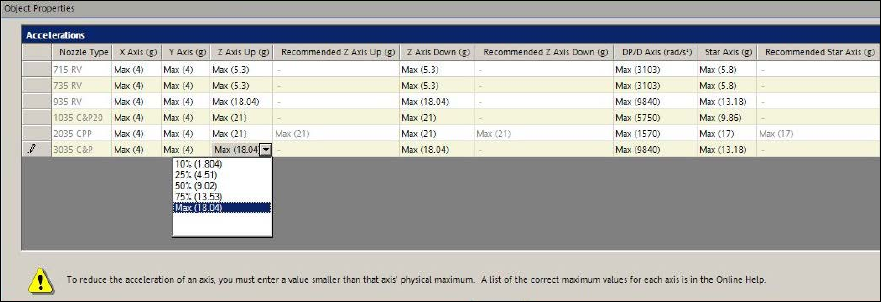
The following preset acceleration values can be selected in the Accelerations tab of the
Component Editor:
● Max (maximum acceleration)
● 75% (lightly reduced acceleration)
● 50% (medium reduced acceleration)
● 25% (highly reduced acceleration)
● 10% (extremely reduced acceleration)
The percentage values refer to the maximum acceleration of the possible placement heads. The
absolute values are displayed in brackets.
Figure 8-12: Selecting acceleration value
The Expert Mode allows entering values outside the recommended limits.
The values can be changed in the Data Maintenance Tool with the Suggest accelerations for
assigned Nozzles function.
Prerequisite
– The Allow entering values outside the recommended limits setting has to be enabled under
Settings – Options.