00196920-07_SIPLACE_Pro_FeatureDescription_DE_EN.pdf - 第139页
SIPLACE Pro Fe ature Des cription Ausgabe 05/2014 Edit ion 139 Component Sha pe Editor: Handling t ab Chan ge pick up positions and pickup poi nts X Feeder/Fe eders tab Change t olerance values X ICOS Lead G roups a nd S…

SIPLACE Pro Feature Description Ausgabe 05/2014 Edition
138
9.2.9 Changing Data without Running Empty
Previously, when data was changed in the setup, the machine always had to be run empty even if
the setup was only slightly changed. I.e., in case that all placement positions could be placed by
the same heads in spite of the changes in setup, components or component shapes.
For such small product changes, the machine does not have to run empty when the setup is
downloaded to the station.
First, the feature has to be enabled on the SIPLACE Pro Line Control GUI.
Figure 9-4: Changes valid for current board
Depending on the changes in the setup the changes will be effective immediately (= without
running empty) or for the next board (= running empty).
The following table shows an overview over the changes and the respective behavior at the station
(alphabetically sorted by the SIPLACE Pro Editors, in which the change will be set).
SIPLACE Pro Editor Changes in the setup Imme-
diately
effective
Effective
for the
next board
Component Editor:
Component tab Omit component
Check coplanarity
Non polarized
Number of repicks
Reject feeder
Setup Verification
Splice detection
Trace
Dipping is required
Assignment of the component
shape (the valid combinations
are defined in the board data)
X
X
X
X
X
X
X
X
X
X
Component Table Editor:
Feeder tab Change feeder type (other reel
size, tape feeder → label feeder,
label feeder → waffle-pack tray)
X
Waffle Pack Tray Editor:
Properties dialog box Change waffle pack tray
description
X
Feeders dialog box Change assignment of waffle
pack tray carrier
X

SIPLACE Pro Feature Description Ausgabe 05/2014 Edition
139
Component Shape
Editor:
Handling tab Change pickup positions and
pickup points
X
Feeder/Feeders tab
Change tolerance values
X
ICOS Lead Groups and
SIPLACE Vision Lead
Groups tabs
Change description of a
component shape in SIPLACE
Vision (measurements, lead
groups)
X
Nozzles tab Remove or add nozzles, if
available on the placement
head. Only the nozzle that is
intended for the component
must not be removed.
X
Confirm Reduced
Acceleration dialog box
Change acceleration values
X
Cameras tab Remove or add cameras. Only
the camera that is intended for
the component in the machine
must not be removed.
X
Board Editor:
Board, Fiducials,
Placements, Inkspots,
Precedences tabs
Change board data
X
Recipe Editor:
Board 1 / 2 tab
Change board data in the recipe
X
Nozzle Editor:
Customized Nozzle tab Add or change customized
nozzle
X
Setup Editor:
Head tab
Change placement heads
X
Nozzle Changer 1/2/3/4 tab
Change nozzle changer
X
Nozzle Configuration tab
Change nozzle configuration
X
Table 9-3: Data changes in the setup
SIPLACE Pro Feature Description Ausgabe 05/2014 Edition
140
9.2.10 Incomplete Waffle-Pack Tray Descriptions
Incomplete waffle-pack tray descriptions may now be edited at the station.
The user can create a new waffle-pack tray description in SIPLACE Pro and tag it as incomplete.
Only the height of the waffle-pack tray has to be set correctly. All other properties may be
completed by the operator at the station after the download.
As soon as the changed, completed waffle-pack tray description has been uploaded from the
station into the SIPLACE Pro database, the "incomplete" tag will be deleted for the correspondent
waffle-pack tray.
9.2.11 Position Detection of Waffle-Pack Trays
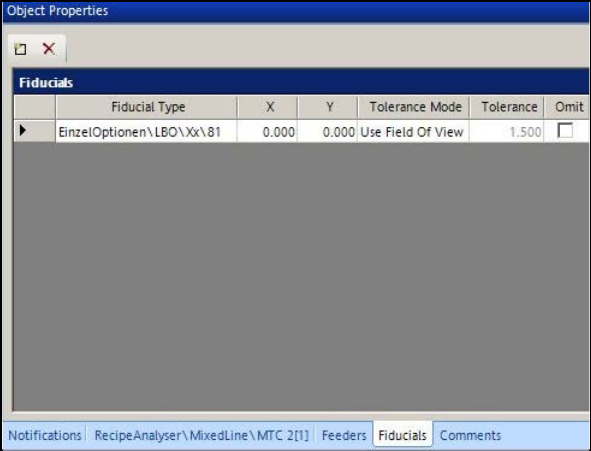
Similarly to boards, fiducials may be defined for waffle-pack trays to increase the placement
accuracy from the support. The fiducial definitions are created in the new Fiducials tab.
Figure 9-5: Defining fiducials for waffle-pack tray
Any number of fiducial positions may be defined. The station software selects and uses two of
them for the measurement.
9.2.12 Changing Acceleration Value for Waffle-Pack Tray
The acceleration values in Y- and Z-direction for MTC and WPC may be changed at the station and
uploaded to SIPLACE Pro.