00196920-07_SIPLACE_Pro_FeatureDescription_DE_EN.pdf - 第84页
SIPLACE Pro Fe ature Des cription Ausgabe 05/2014 Edit ion 84 7.3.15 Nozzle Report Using the N ozzle re ports, it is possib le to creat e a doc um entation of a s ingle no zzle and a list of nozzl es. In the lis t of sev…
SIPLACE Pro Feature Description Ausgabe 05/2014 Edition
83
7.3.9 Teaching of Placement Positions
From station software 705, placement position offsets (X, Y and angle) can be taught at the station
and uploaded to SIPLACE Pro.
In the PCB editor, the placement positions to be taught have to be marked. The taught placement
position offsets are taken into account when supplying data to stations with prior software versions
(e.g. station software version 40x and 50x). A change in the placement position offsets is
distributed to other stations in the line that place the placement position of the same name.
NOTICE
The SIPLACE Pro user "Service" has to have writing access to placement lists.
In addition, the user logged into the station has to have writing access to the placement
list that contains the uploaded placement position.
7.3.10 Split Table at Track and SiCluster Professional
Besides optimizing split tables in SiCluster Professional it is also possible to use this option for the
cluster jobs and their Result Jobs.
7.3.11 Whispering of Barcode Information
NOTICE
The feature can be activated with the "Whispering of Barcodes" license.
7.3.12 Long Board Option
NOTICE
The feature can be activated with the "Long Board Option" license.
7.3.13 Integrity Check for Multiple Jobs
Similar to the Multi Job Optimization and the Multi Cluster Job Optimization there is the Multi
Integrity Check in the Optimizer toolkit. From the structure tree of the recipes the recipes to be
checked are added to a recipe list and optimized in the desired sequence and according to the
settings.
At the same time, the optimization starts an adjustable number of processes and thus utilizes the
present multi core processors.
7.3.14 Query Tool
The underlined results of queries can be clicked on. The corresponding object is opened in
SIPLACE Pro Desk.
SIPLACE Pro Feature Description Ausgabe 05/2014 Edition
84
7.3.15 Nozzle Report
Using the Nozzle reports, it is possible to create a documentation of a single nozzle and a list of
nozzles.
In the list of several nozzles up to ten attributes can be selected. The nozzle attributes to be shown
can be changed in the report details.
The report can be started via the context menu in the structure view.
7.3.16 Warnings as Errors
All warning messages of the Optimizer can be upgraded to an error or downgraded to a warning
again.
7.4 New functions (V9.3)
7.4.1 SIPLACE Pro LED Pairing
SIPLACE Pro LED Pairing supports the programming process when using LEDs in electronic
assemblies. The LEDs to be used can often have different brightness classes. To achieve
homogenous brightness, these differences need to be compensated by fitting adjusted series
resistors in the circuits. On the software side, the compatible types need to be defined in the board
and optimized setup.
The LED Pairing tool supports description of these types in three individual steps:
1. Import and assignment of LED matrix files (LRX files), each placement list can have an LED
matrix file assigned to it.
2. Prepare: generate and optimize the job, recipe and setup templates, based on previously
optimized reference jobs and the assigned LED matrix file.
3. Produce: select the available LED brightness classes on the basis of the LED matrix file, then
automatic generate the recipes and setups used for production, on the basis of a recipe
template (for recipe changeover) or a real recipe (for new definition after change to another
LED brightness class).
The SIPLACE Pro LED Pairing tool is a licensed Windows application, which can also be started
from SIPLACE Pro Desk.
The LED matrix file format is described in the Online Help.
7.4.2 Improved sequence of nozzles on the head
The "Random Setup" feature (available since SIPLACE Pro 9.2) enables you to configure
components on another track of the same table or on another table in the line.
During the integrity check, SIPLACE Pro 9.3 optimizes the sequence of nozzles on the head. The
aim is to minimize the travel distances in accordance with the actual setup. This procedure also
has a beneficial effect on conventional optimization.
7.4.3 Improved user guidance for EDM Difference Editor
The comparison of two component shapes with line-specific Vision data in the SIPLACE EDM
Difference Editor has been improved. When applying modified data from the clearing pool to the
master data bank, any differences are now shown more clearly.
SIPLACE Pro Feature Description Ausgabe 05/2014 Edition
85
7.4.4 Setups have fewer empty tracks
When configuring a setup in the past, individual empty tracks could occur between configured
feeders or empty garages (e.g. when using 2x8 mm X feeders) sometimes arose. The Optimizer
has added an extra calculation step to ensure that significantly fewer empty tracks or garages
occur.
7.4.5 Nozzle usage shown for cluster jobs
After successful optimization of cluster jobs, which have been calculated with SiCluster
Professional, the nozzles needed for production can be shown.
This view can be accessed via the Nozzle Usage tab in the Statistics dialog of the
Run & Results tab.
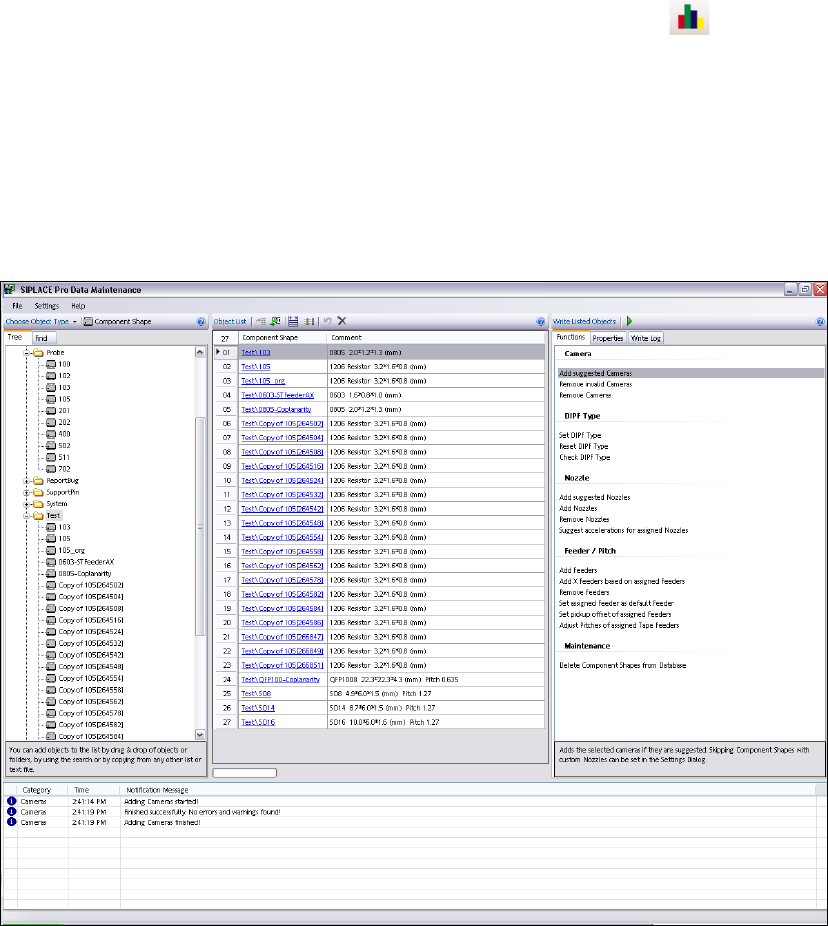
7.4.6 Data Maintenance Tool
The upgrade tool for component shapes and fiducials has been revised and renamed to Data
Maintenance Tool. It now offers a state-of-the-art, intuitive user interface.
Component shapes, components, fiducials, setups and trays can be processed with this tool. The
interface now enables you to locate, display and modify objects based on specific criteria.
For details, refer to the Online Help.