00196920-07_SIPLACE_Pro_FeatureDescription_DE_EN.pdf - 第13页
SIPLACE Pro Fe ature Des cription Ausgabe 05/2014 Edit ion 13 2.2.2 A ddition to Difference Editor Wizard In the Dif ference E ditor W izard follo wing obj ect types c an be c ompar ed: com ponent shape, placem ent list,…

SIPLACE Pro Feature Description Ausgabe 05/2014 Edition
12
2.1.4 Support of DataIO Road Runner
The DataIO Road Runner is a feeder which can program flash memory components in time. In
case the default descriptions of the pockets are insufficient, the user can teach own user defined
pocket fiducials, which are stored in SIPLACE Pro.
The DataIO Road Runner is supported by stations running with station software 602 and can be
setup on tables of the S feeder generation.
The DataIO Runner is listed in SIPLACE Pro as tray feeder type and can be setup on following
change over tables: Change Over Table 90, Change Over Table 72.
For the correct usage of this feeder type, please import the system trays, which are available in the
installation folder "SIPLACE Pro\Standard Library\Tray Definitions" in the file "DataIO RoadRunner
Trays.xml". After the import 4 new trays are added to the Wafflepack tray identity tree, which are
located by default in the "System\DataIO RoadRunner" folder. Use the trays according how many
flash memory components are programed by the feeder, like it is shown in the following.
"DataIO RoadRunner Tray 1x1 Components" -> 1 Flash Memory Component
"DataIO RoadRunner Tray 1x2 Components" -> 2 Flash Memory Components
"DataIO RoadRunner Tray 1x3 Components" -> 3 Flash Memory Components
"DataIO RoadRunner Tray 1x4 Components" -> 4 Flash Memory Components
2.2 Software Features (V4.0)
2.2.1 Licensing Options
In SIPLACE Pro 4.0 following licence options are offered. Completely new is the station option.
SW-Options
● Automatic Placement Program Download via PCB Barcode
● Cluster Optimizer
● Component Barcode Reader
● Long Board Option
● SIPLACE Pro Server
● Whispering Down the Line
Options for Station
● Component Shape/Fiducial Teach Wizard

SIPLACE Pro Feature Description Ausgabe 05/2014 Edition
13
2.2.2 Addition to Difference Editor Wizard
In the Difference Editor Wizard following object types can be compared: component shape,
placement list, component and fiducial.
Object type SIPLACE Pro 3.2 SIPLACE Pro 4.0
Component shape X X
Placement list - X
Board - -
Component X X
Fiducial X X
2.2.3 Filter Function in Tree Control for all Objects possible
In all tree views (product objects, equipment) in SIPLACE Pro 4.0 you can filter for objects. You
can filter for figures and letters. You could also use wildcards for filtering (\*\ = several figures, \?\ =
one figure). For more details please refer to the online help.
2.2.4 CAD & ASCII Import with/without Overwrite
In SIPLACE Pro 4.0 you can import ASCII and CAD data using the respective editors (ASCII
Centroid Import Wizard, CAD Data Import Wizard).
Completely new is the option to overwrite existing objects of the same name in the target folder.
2.2.5 Save ASCII Import Filter Comments
In SIPLACE Pro 4.0 it is possible to save the filter settings for an ASCII import. This data setting is
used as import filter with comments as option. And this data setting is added to the pop-up filter
menu. For more details, please refer to the online help.
2.2.6 View Panel Hierarchy / Tree View for Panels
In SIPLACE Pro 4.0 you can choose via the tree view individual panels to simplify the navigation on
a board.
2.2.7 Table Redesign
In SIPLACE Pro 4.0 all feeders in a setup can also be displayed in a tree view. You can select
feeders via a graphic, a table or via tree view in the feeders tab. All selected feeders are
highlighted in all displays at the same time. This simplifies the feeder navigation on one or several
changeover tables in a bigger setup.
SIPLACE Pro Feature Description Ausgabe 05/2014 Edition
14
2.2.8 Improvements of the Line Control GUI
In SIPLACE Pro 4.0 the LC GUI is improved as follows:
● The integrity check is supported in offline mode. Offline mode means that no line control server
is connected.
● You can add the same recipe more than once to the same production schedule.
● When using both conveyors in SIPLACE Pro 4.0 the LC GUI displays the active lane
(processing left, processing right).
● You can add new recipes to the production schedule or job at any position in the recipe list.
● When restarting the Line Control Server the user is asked (dialog box) to redownload the last
recipe. After the restart the last recipe is highlighted in red.
● If several LC GUI instances are open at the same time, all changes (addition or deletion of a
line) at one LC GUI instance are immediately accepted by all open LC GUI instances.
● Multi-selection of recipes in LC GUI possible:
● Integrity check is performed for all selected recipes.
● Deletion of all selected recipes is possible.
NOTICE
You can only download one recipe at a time even though multi-selection is possible.
2.2.9 Optimizer Feature: Don't change Component Location in Target Setup
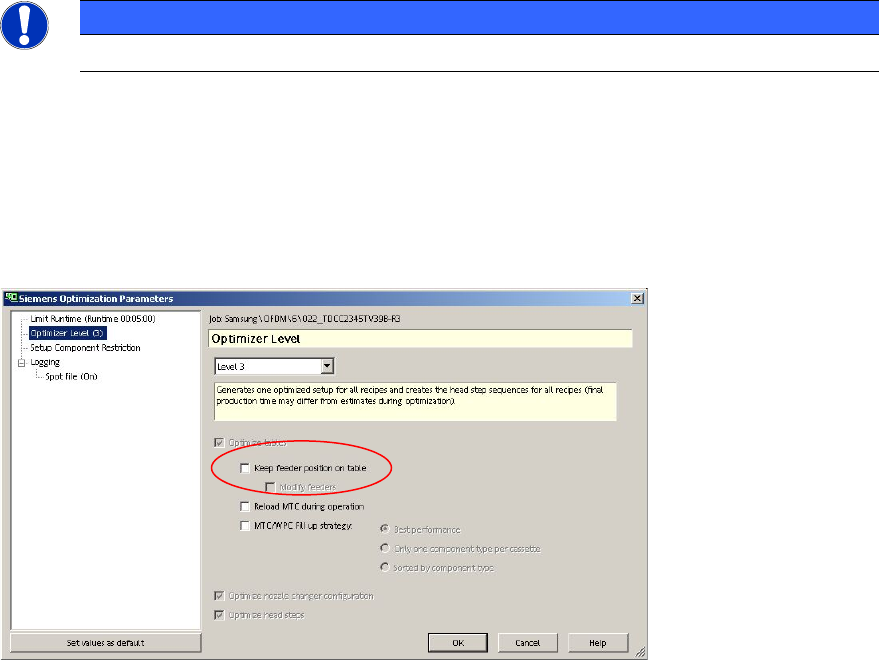
With the option "Keep feeder position on table" you can reduce the changeover time for operators.
Components from the initial setup remain until they are needed again in the final setup. This
reduces changeover times. For further details please refer to the online help.
You can access this option via the button "Configure…".