00196920-07_SIPLACE_Pro_FeatureDescription_DE_EN.pdf - 第34页
SIPLACE Pro Fe ature Des cription Ausgabe 05/2014 Edit ion 34 NOTICE Station s oftware 50 5 and 6 04 support th e Shut terles s - Feeder. F or stati on soft ware 505 the user m ust m ake sure th at the stat ion soft ware…

SIPLACE Pro Feature Description Ausgabe 05/2014 Edition
33
The following table shows which heads and tables are compatible to the new dip module LDU_X:
Twin head C&P 6/12 C&P20 P&P
X series(S feeder) No No No -
X-series (X feeder) Yes Yes No -
D series - No - No
3.1.5 Intelligent S Feeder with Automatic Pitch Download
In SIPLACE Pro 5.0 the user must not set the pitch of the S feeder manually at the feeder. This is
done automatically by the pitch download. You simply have to activate in Line Control GUI the
option "Overwrite Feeder Information on each Download".
Thus for all X and S feeders the pitch is set for all components or component shapes in the
component or component shape editor. For all feeder types equipped with this special component
the same pitch is valid.
Please consider following restrictions:
● Surftape feeders are not supported.
● No check of the current pitch. The pitch is only set when downloading. If the feeder is
exchanged later on the new feeder is not provided with the updated pitch from SIPLACE Pro.
● For each placement head SIPLACE Pro allows only one dip module.
● The user has to setup the dip module manually. The optimizer sets the dipped component
automatically.
● A manual pitch change at the feeder is not recognized by the station.
● All feeders that support the pitch download have a different version number. You find more
detailed information in the version description of station software 604.
3.1.6 Shutterless S Feeder (3 x 8 mm SL)
SIPLACE Pro 5.0 supports a new tape feeder – Shutterless-S Feeder 3 x 8 mm SL. The new
feeder type is similar to the 3 x 8 mm S feeder except for the two new pickup positions. These
pickup positions are shifted backwards by 4 mm in direction of the y-axis. The Shutterless Feeder
is useable on all S tables.
The Shutterless-Feeder can be setup on the following machines.
Station software Machine type
604 D1, D2, D3, D4
X2, X3, X4
605 S-25HM, S-27HM, HS-50,
HS-50+, HS-60, HF, HF/3
SIPLACE Pro Feature Description Ausgabe 05/2014 Edition
34
NOTICE
Station software 505 and 604 support the Shutterless-Feeder. For station software 505
the user must make sure that the station software 505.04 SP1 is installed on all PII
stations.
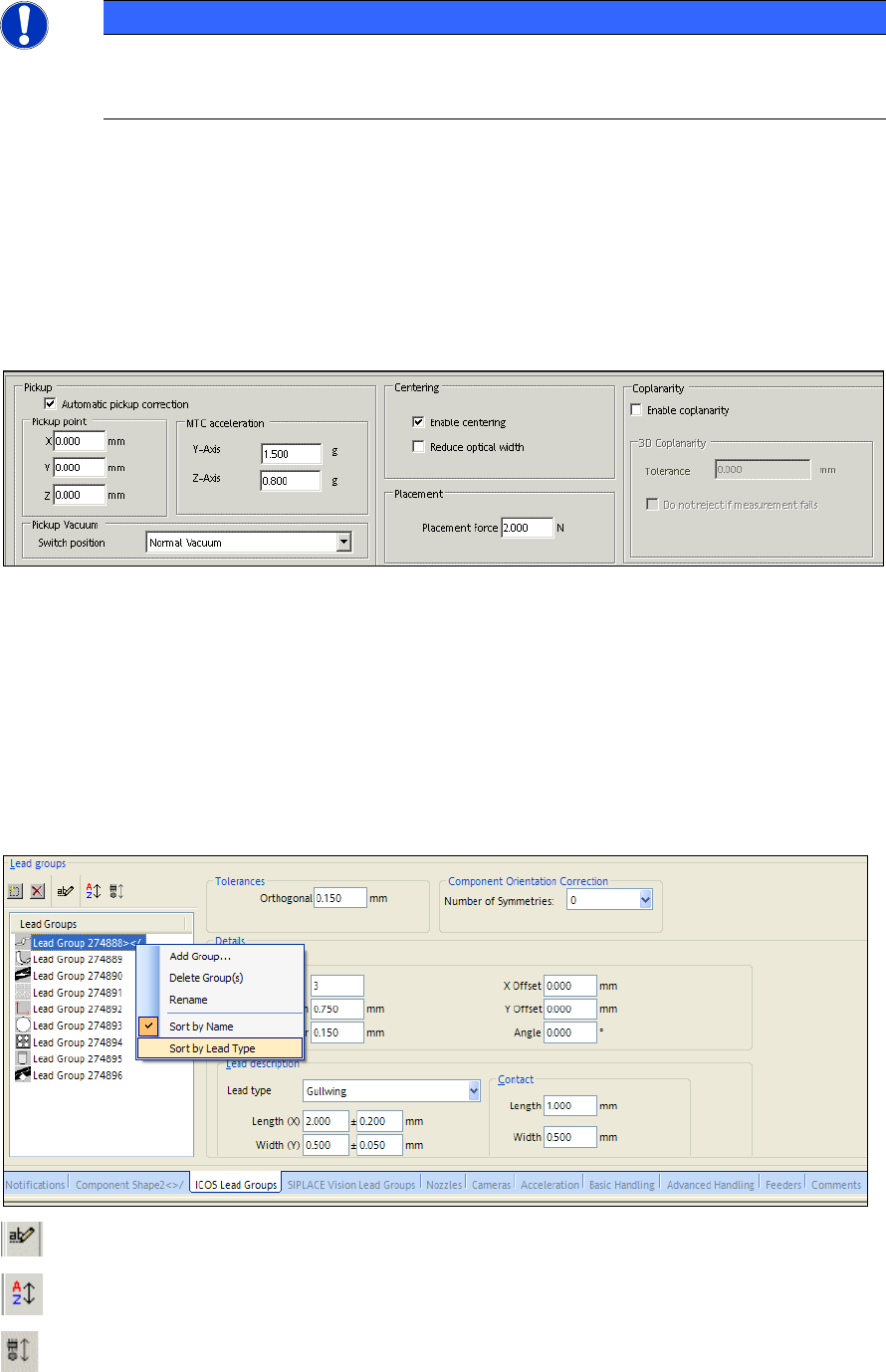
3.1.7 Coplanarity Tolerances in Component Shape Editor
SIPLACE Pro enables the component shape editor to activate following two features of the 3D
coplanarity. Make sure that you choose before the function "Coplanarity".
– Tolerance of coplanarity measurement: gives the maximum permissible deviation between the
calculated coplanarity level and the lead which is furthest away.
– Placement even if the measurement fails.
For more details please refer to the online help.
3.2 General Improvements in SIPLACE Pro Desk (V5.0 xx)
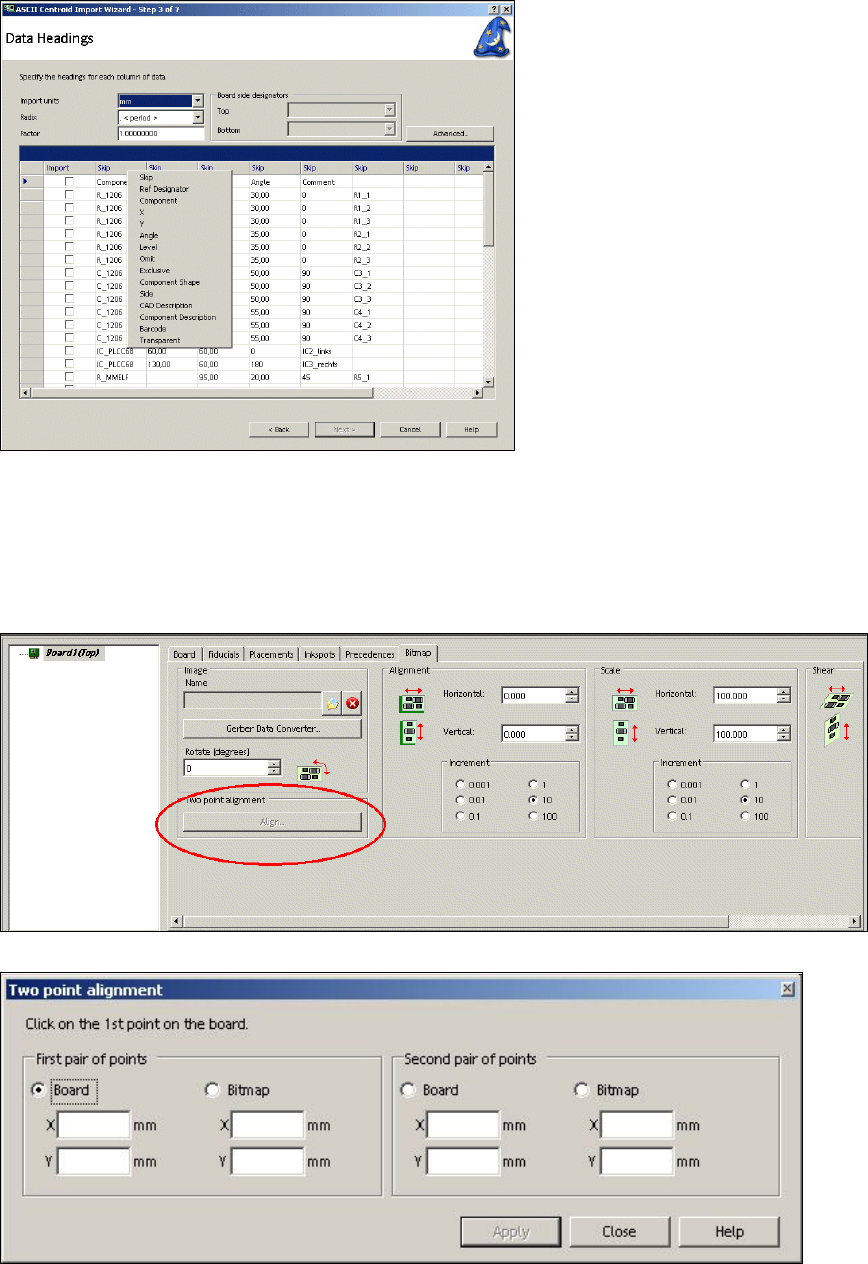
3.2.1 Redesign Lead Groups in Component Shape Editor
From SIPLACE Pro 5.0 on, in the component shape editor the lead groups are clearly arranged
(new functions: rename and sort).
(rename) renames the lead groups
(sort by name) sorts the lead groups by name in the list view
(sort by lead type) sorts the lead groups by type in the list view
SIPLACE Pro Feature Description Ausgabe 05/2014 Edition
35
3.2.2 New Functions in ASCII Centroid Wizard
In the ASCII Centroid Wizard (Step 3) of SIPLACE Pro 5.0 there is a new column "Transparent". In
case there is a column available with the identification 0/1 (0 = not transparent, 1 = transparent),
the user can assign the designation "Transparent" to this column. This makes it possible to display
individual components transparently.
3.2.3 Simple Alignment of a Graphic behind a Board in the Board Editor
In the board editor of SIPLACE Pro it is possible to align a graphic (bmp, jpg, gif) in a much simpler
way behind a board. You just have to define two pairs of points (board and graphic). For more
detailed information please refer to the online help.