00196920-07_SIPLACE_Pro_FeatureDescription_DE_EN.pdf - 第23页
SIPLACE Pro Fe ature Des cription Ausgabe 05/2014 Edit ion 23 2.3.6 Feeder A dapter for L inear Feed er of X Seri es Up to no w only X - f eeders ( = tape feed ers) c ould be se tup on X - tables. In order t o allo w lin…
SIPLACE Pro Feature Description Ausgabe 05/2014 Edition
22
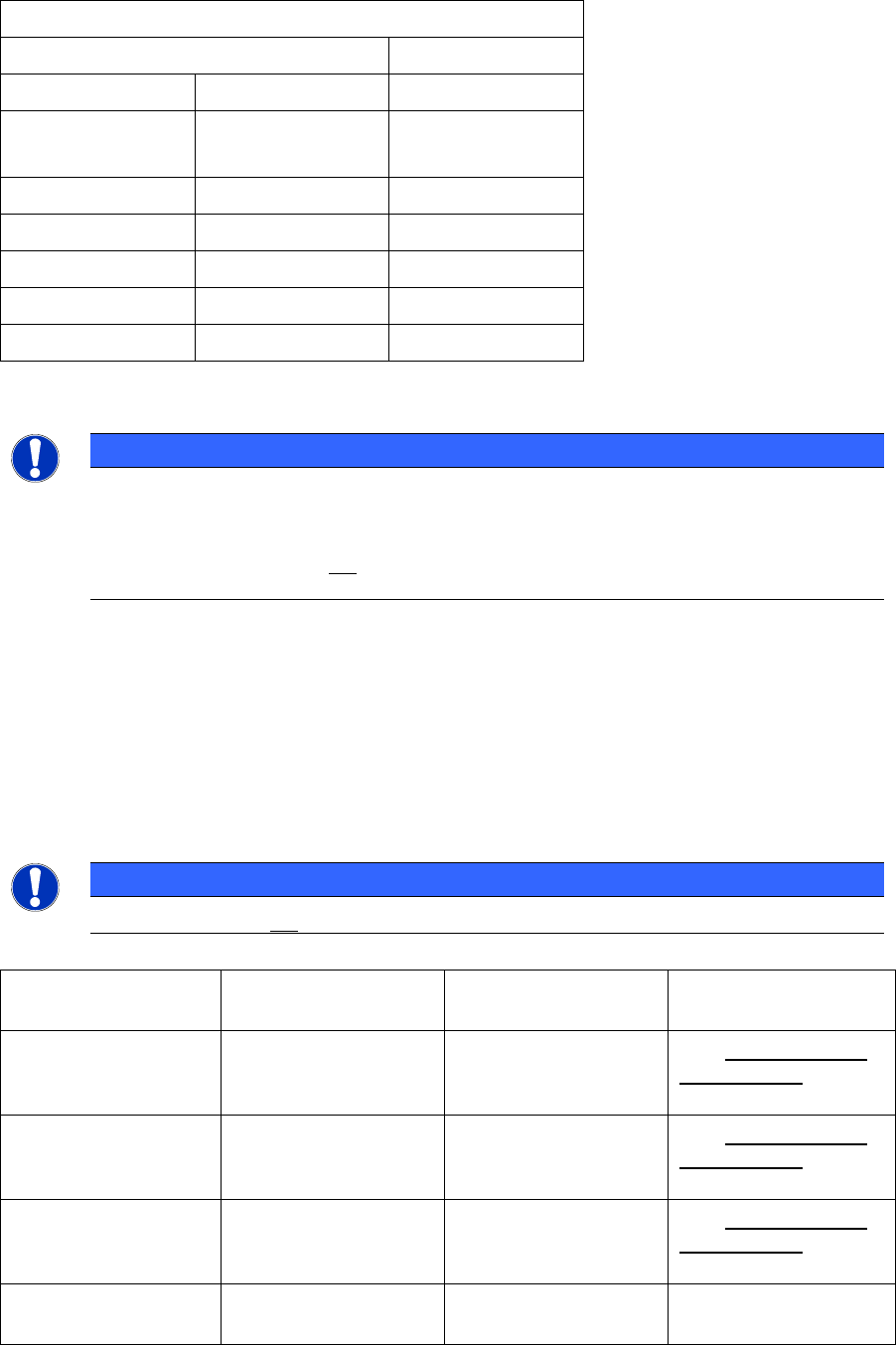
For SIPLACE X3 and SIPLACE D3 machines withTwin Head on location 2 following combinations
are possible. The only restriction is that on the SIPLACE D3 no C&P 20 head could be setup.
SIPLACE X3 / SIPLACE D3
Placement area 1
Location 1 Location 4 Status
C&P6 C&P6
C&P12 C&P12
C&P20* C&P20*
C&P6 TWIN Preferred
C&P12 TWIN Not supported
TWIN TWIN Supported
*) not possible on SIPLACE D3
NOTICE
– Each Twin Head could be replaced by a High ForceTwin Head.
– SIPLACE Pro checks no illegal combinations!
– The Twin Head could not be configured together with a C&P20 Head in one
placement area.
2.3.5 MTC 2 in Dual Gantry Placement Areas
With station software 603 tray feeding in MTC 2 is possible for all X series machines.
The MTC 2 can be setup on location 2 and location 4 only.
Please consider following restriction for the MTC 2:
NOTICE
The MTC 2 should not be used together with C&P 20 heads.
Possible nozzle changer configurations when using MTC 2:
Head type Nozzle Changer on
Row 1
Nozzle Changer on
Row 2
Restriction
TH No Yes Only second nozzle
changer row is
allowed.
C&P12 No Yes Only second nozzle
changer row is
allowed.
C&P6 No Yes Only second nozzle
changer row is
allowed.
C&P20 No No Not allowed with
MTC 2
SIPLACE Pro Feature Description Ausgabe 05/2014 Edition
23
2.3.6 Feeder Adapter for Linear Feeder of X Series
Up to now only X-feeders (= tape feeders) could be setup on X-tables. In order to allow linear
feeders on X- tables you could use a feeder adapter. Already existing linear feeder types could be
setup with this feeder adapter on X tables. In SIPLACE Pro this feeder adapter combination is
listed as individual feeder type.
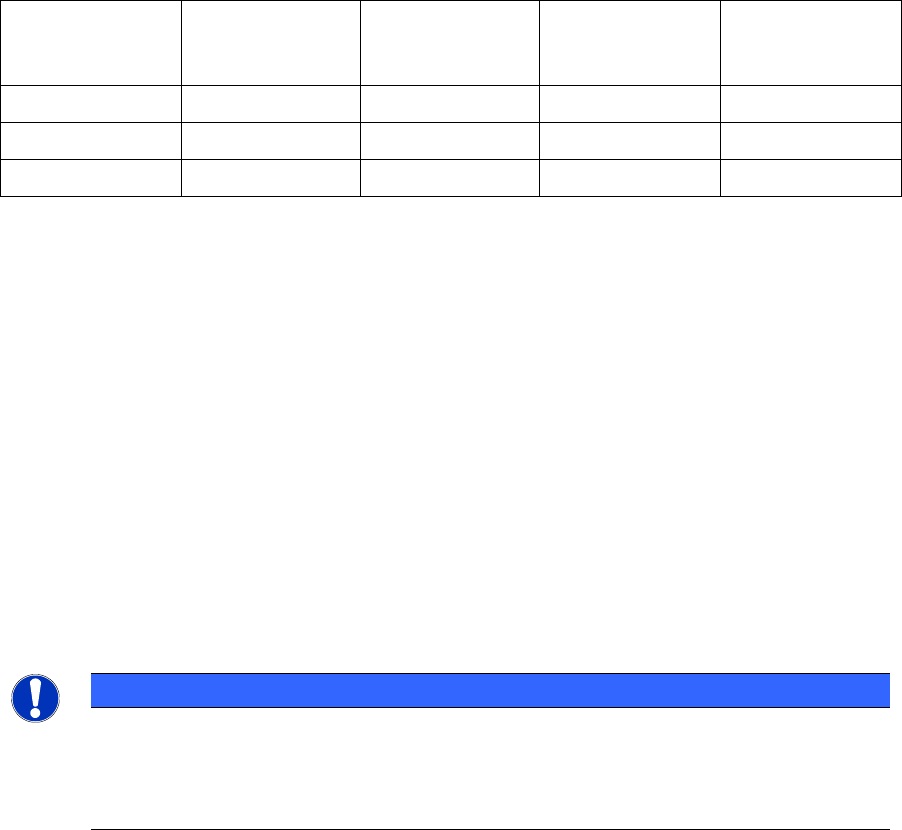
Following Linear Feeders can be setup with the feeder adapter on X Series machines with station
software 603.
Existing Feeder
Type
New Feeder
Type
Feeder Code Division Number of
tracks on
X-Table
Linear 95 Linear 3x95 AX 514 3 3
Linear 15 Linear 2x15 AX 516 2 3
Linear 30 Linear 30 AX 517 1 3
2.3.7 New Feeder Types
Following Feeder types have been added:
Arbitray Tray Carrier (ATC) X: Tray feeder for X tables (Tray in the trough)
Label Presenter: Feeder for all machine types with S feeder interface
(HS-Tables, HF-Tables, S-Tables, CF/CS-Tables)
Label Presenter AX: Feeder for x series machines, together with feeder adapter
You find all details on the compatibility of each feeder type in Appendix A: Supported Hardware.
2.3.8 3-D Coplanarity Module
The new 3-D Coplanarity Module (PP3-D Coplanarity Module) could only be configured on X series
machines (X2, X3, X4) and the SIPLACE D3 running with station software 603. In contrast to the
predecessor the new coplanarity module measures the whole surface of the component.
NOTICE
– The new coplanarity camera can only be setup on location 3 of an X series machine
and not in combination with a C&P head, in contrast to a flip chip camera.
– You could configure on each station of the X series a coplanarity module or as
alternative a 3-D-BGA Sensor together with a Twin Head or a High Force Twin Head.
SIPLACE Pro Feature Description Ausgabe 05/2014 Edition
24
2.3.9 New categorization for different setup verification systems
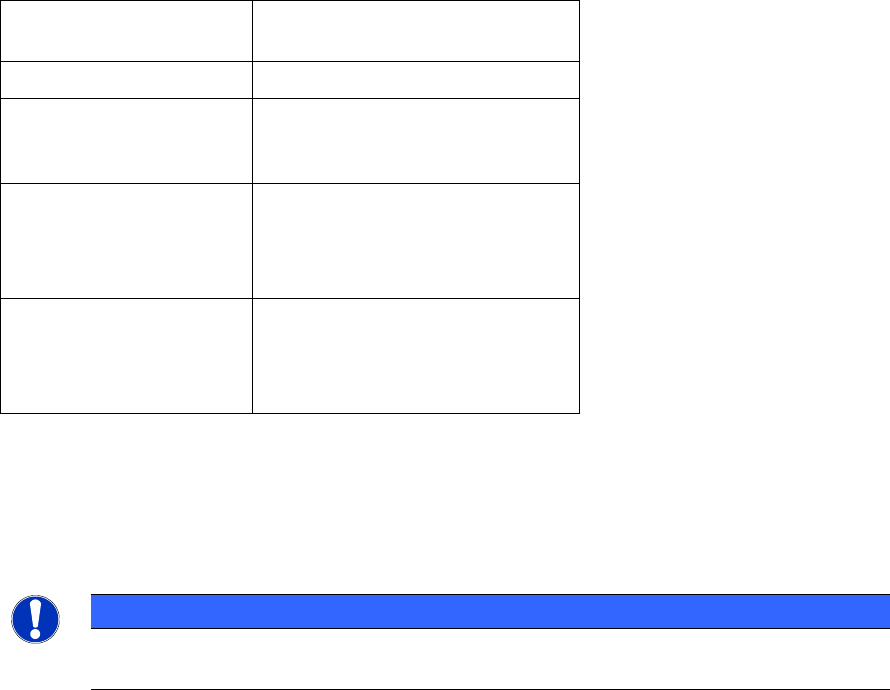
SIPLACE Pro 4.1 changes the activation of setup verification systems with component barcode.
The existing 3 old barcode scanners (Siemens, SIPLACE Mobile Verifier (SMV) and SIPLACE
Setup Center) are allocated to the new setup verification systems as follows:
Setup verification
systems
Existing setup verification
systems
internal (unforced) Siemens hand-held scanner
external (unforced)
SIPLACE Setup Center without
communication to the machine
(= unforced setup verification)
external (without CLI
component level
indicator)
SIPLACE Setup Center without
component level indicator means
without quantity barcodes but with
splice sensor)
external (forced with CLI
component level
indicator)
SMV (SIPLACE Mobile Verifier)
SIPLACE Setup Center
The option setup verification is licensed for following systems:
● external (forced without component level indicator CLI)
● external (forced with component level indicator CLI)
Please consider following restriction for the setup verification system:
NOTICE
The Optimizer supports only lines that have the same setup verification system ("internal
unforced" or "external unforced" or "external forced").
2.4 General Improvements in SIPLACE Pro Desk (V4.1)
2.4.1 Multi-selection in graphical editor
Multi-selection in grids (i.e. placement list, fiducial list) could be also displayed in the graphical
editor.
2.4.2 Change parameters of multiple selected rows in grids
In the lists of different editors (placement list editor, board editor, setup editor, restriction editor and
line editor) you could change selected value(s) for multiple selected rows in grids at one time.
Selected values are changed via context menu "change value(s) for selected items" of multiple
selected rows.