00196920-07_SIPLACE_Pro_FeatureDescription_DE_EN.pdf - 第47页
SIPLACE Pro Fe ature Des cription Ausgabe 05/2014 Edit ion 47 3.13 Features for Optimiz ati on in SIPLACE Pro Desk (V5. 2) 3.13.1 Proactiv e consisten cy check of j obs and recipes In SIPLAC E Pro th e consist ency ch ec…
SIPLACE Pro Feature Description Ausgabe 05/2014 Edition
46
3.12 Features in SIPLACE Pro Optimizer (V5.2)
3.12.1 Display of travel areas and stopper positions in the Recipe Analyzer
The graphic display of all objects contained in a recipe is optimized in order to visualize even better
the numerous hardware combinations of placements heads, locations, travel areas and station
types.
– For stopper positions
– For travel areas for heads and segments
For the time being these features are only available in the licensed recipe analyzer of the SIPLACE
Pro Optimizer
You find more detailed information in the online help.
3.12.2 Memory optimized SIPLACE Multi Job Optimization
In the settings of the Multi Job Optimization of SIPLACE Pro Optimizer you can choose among two
options for optimizing long job lists:
– Main process: All jobs run in one process.
– Separate process: Each job runs in a separate process. For each job the whole virtual memory
space is available (default setting).
3.12.3 New sorting criteria for SIPLACE Multi Job Optimization
The Multi Job Optimization of SIPLACE Pro has following additional columns:
– Runtime
– Recipe Count
– Initial Setup
– Line
– Feeder Inventory
– Restriction
– Optimization Date
SIPLACE Pro Feature Description Ausgabe 05/2014 Edition
47
3.13 Features for Optimization in SIPLACE Pro Desk (V5.2)
3.13.1 Proactive consistency check of jobs and recipes
In SIPLACE Pro the consistency check can be done for one for more recipes of a job.
This function checks the validity of the optimization results.
The button "Check recipe integrity" checks if the results shown are valid (consistent). If for example
data (components, nozzles etc.) have been changed since the last optimization run the results that
are shown possibly do not correspond to the updated data. During this check a corresponding
message is shown after the first inconsistent behaviour. The data muss be checked and optimized
again.
3.13.2 Fast Optimization for huge jobs with many recipes
In SIPLACE Pro 5.2 jobs consisting of more than one recipe can be quickly optimized in
optimization level 2. This additional option "Fast Mode" consumes less time but more memory
capacity for optimization (default setting off).
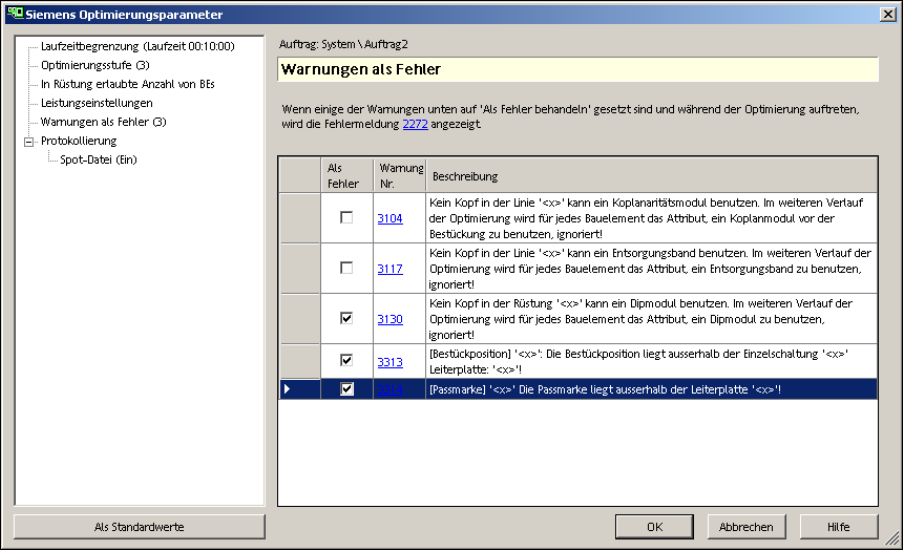
3.13.3 Warning in SIPLACE Pro as error message possible
In SIPLACE Pro you could now display warning messages as error messages as for example for
the dip module. Now the same job can be downloaded to SIPLACE lines with/out dip module. The
optimization paramters have to be adapted accordingly. It is possible to show a warning message
(i.e. dip module missing) as error message.
This procedure can be applied to other error messages.
SIPLACE Pro Feature Description Ausgabe 05/2014 Edition
48
3.14 Features of LC GUI (V5.2)
3.14.1 New mode for integrity checks
In SIPLACE Pro following integrity checks have changed.
Mit SIPLACE Pro 5.2 sind folgende Machbarkeitstests verändert worden:
– Modified mode:
Permit redistribution of components (optimum line performance – fast mode).
– New mode:
Permit redistribution of components (optimum line performance – slow mode).
Both modes have the same function but for the latter mode the integrity check is slower since three
possible solutions are established.
– free distribution of all components
– reuse of the existing component distribution
– reuse of the existing placement sequence
The shortest cycle time is chosen among these three possbile solutions.
3.14.2 Optimized Troubleshooting with SIPLACE Pro Error Reporting Tool
"AppSight Blackbox" is a trace tool that is integrated into the existing SIPLACE Error Reporting
Tool. The "AppSight Blackbox" records events and supports analyzing and finding the cause of
most defects. The "AppSight Blackbox" could be started and closed automatically during an error
report after having started the Error Reporter Service in order to reproduce the error.
3.15 Improved usage of multi-core processor systems (V5.2 SP1)
With SIPLACE Pro 5.2 SP1, improvements were made to support multi-core systems. These
improvements lead to faster response times. Also, several optimizations can run simultaneously on
multiple processor cores, which in turn reduces the time to calculate results.
In the Optimizer GUI's Multi Job Optimizer, there is a new parameter accessible in the Settings
dialog to determine how many processes are allowed to run in parallel. This number can be
different from the number of processors, but is limited to 16. For more details, please refer to the
online help.
Furthermore, several clients can query the database simultaneously, which improves the response
time of the entire system.