00196920-07_SIPLACE_Pro_FeatureDescription_DE_EN.pdf - 第90页
SIPLACE Pro Fe ature Des cription Ausgabe 05/2014 Edit ion 90 8.2.2 SIPLACE Glu e Fe e der A new SIPL ACE Gl ue Feeder is suppor ted fr om s tation software version 706. T his allo ws you to position dots of ad hesive o …
SIPLACE Pro Feature Description Ausgabe 05/2014 Edition
89
8.2 New Functions (V10.0)
8.2.1 Smart Pin Support
A support pin is a board support which helps prevent any bending or swinging of the boards during
placement.
The new function Smart Pin Support enables these support pins to be automatically placed on the
lifting table. This uses a gripper which picks the support pins up from special magazines and places
them in the set positions.
The positions of the support pins can be defined for each board side, in the Board Editor. Support
pin positions can be omitted for each placement area in the Recipe Editor.
The Smart Pin Support function can be configured and enabled/disabled in the Setup Editor.
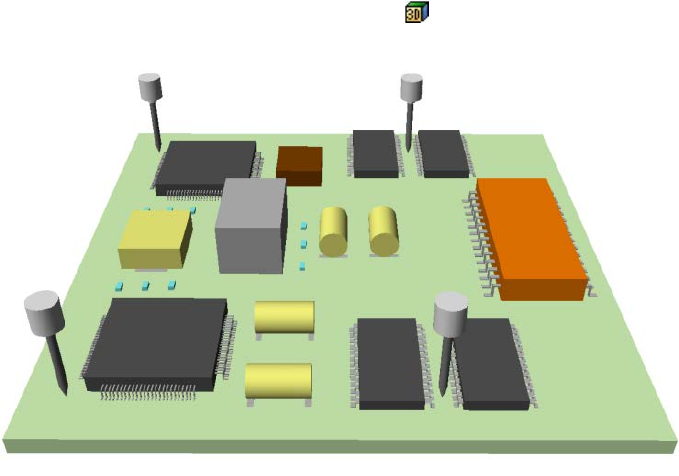
A 3D diagram of the board and support pins helps detect any possible collisions between support
pins and components.
This 3D diagram can be accessed via an icon in the Board Editor, the CS Editor and in the
recipe analyzer for head steps.
Figure 8-1: 3D diagram Smart Pin Support
Smart Pin Support is supported by SX V2 (with one and two gantries) machines.
For more information, refer to the SIPLACE Pro Online Help and the operating guide for Smart Pin
Support.
SIPLACE Pro Feature Description Ausgabe 05/2014 Edition
90
8.2.2 SIPLACE Glue Feeder
A new SIPLACE Glue Feeder is supported from station software version 706. This allows you to
position dots of adhesive on a component, before it is placed. These dots of adhesive can then be
checked by the SIPLACE Vision system.
The required positions for the adhesive can be defined in the Component Shape Editor and you
can also define whether the Vision system should exclude individual dots of adhesive from its
inspection.
This adhesive function can be enabled and disabled in the Component Editor and the Placement
Position Editor. When the line computer data is imported, the component adhesive setting
(enabled/disabled) is applied.
The SIPLACE Glue Feeder is a special feeder which needs to be manually configured as a fixed
feature on a certain table track and which is not automatically configured by the optimization
process.
The optimization process assigns components which need adhesive to those heads which the
SIPLACE Glue Feeder can reach.
8.2.3 Configuring Spare Tracks with Random Setup during the Production
Process
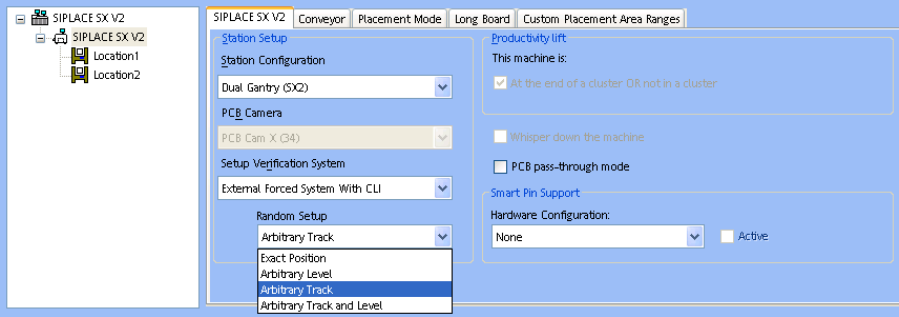
From station software version 706 there are two additional settings available for working with
Random Setup: Arbitrary Track and Arbitrary Track and Level.
Figure 8-2: Random Setup settings
These settings allow you to use spare tracks within the same location, while the machine is
running. This function is only available for X feeders (Arbitrary Track), for levels in MTC/WPC or for
feeders and levels in MTC/WPC.
● When using spare tracks in the machine, you do not need to perform a new download.
● The operator can configure the spare tracks on any free tracks within that location.
● The machine recognizes these spare tracks automatically and can pick up from them as soon
as the original track has run empty.
See also the operating manual SIPLACE Random Setup.
SIPLACE Pro Feature Description Ausgabe 05/2014 Edition
91
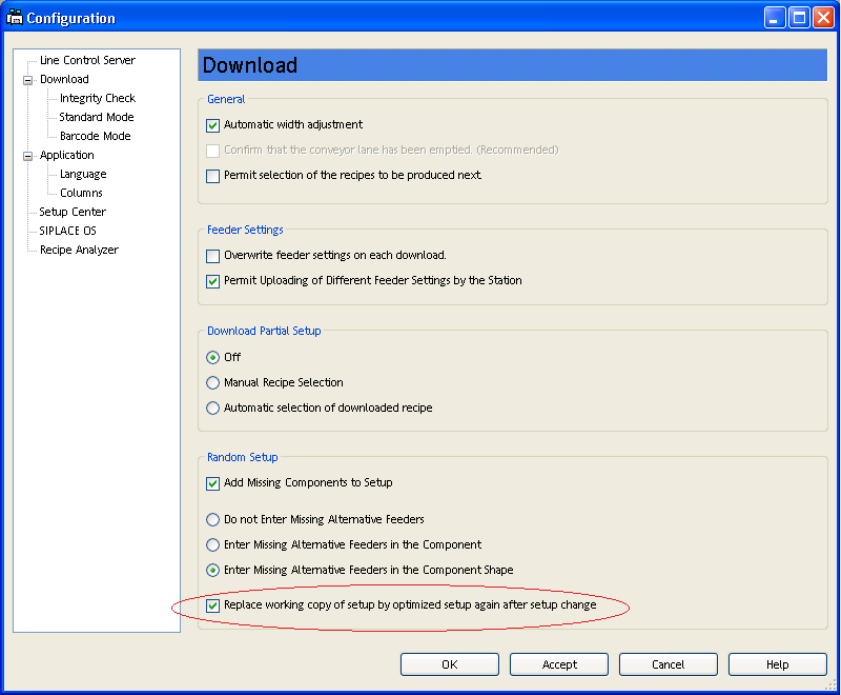
8.2.4 Working Copy Setup Replaced with Optimized Setup for Random Setup
In Random Setup mode, after downloading the first recipe which refers to the next optimized setup,
all recipes which refer to working copies of the previously optimized setup will be linked back to the
previously optimized setup itself. The working copies of the setups generated by Random Setup
will then be deleted.
Figure 8-3: Replacing working copy setup