00196920-07_SIPLACE_Pro_FeatureDescription_DE_EN.pdf - 第67页
SIPLACE Pro Fe ature Des cription Ausgabe 05/2014 Edit ion 67 5.16 Improving the Us abilit y of SIPLACE Pro Desk 5.16.1 Deleting Un used Tab les When Del eting a Setu p If a setup is delete d, it is now poss ible to d el…
SIPLACE Pro Feature Description Ausgabe 05/2014 Edition
66
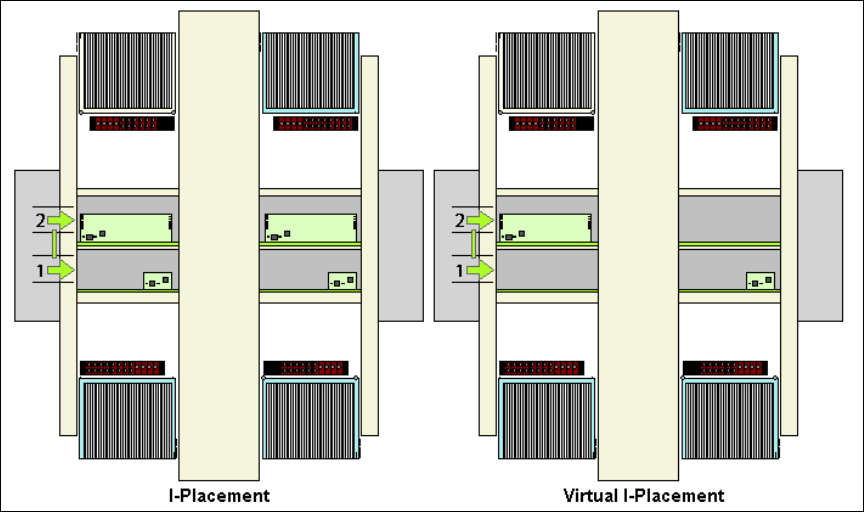
5.14 New Placement Mode "Virtual I-Placement"
SIPLACE Pro 7.0 allows for machines with two placement areas (e.g. SIPLACE X4) in the
Conveyor mode: Dual Asynchronous to produce PCBs in the respective conveyor track
independently of each other. This can be necessary, e.g., if in the front part of an X4i line machines
are operated in the I-Placement mode and if there is an X4 machine at the end of the line, that
does not support I-Placement. In this case right and left conveyor track can be separated by
means of Virtual I-Placement.
function can be activated in the setup editor (V IPlacement Right or V IPlacement Left).
5.15 SIPLACE Vision Compatibility Check for Fiducials
SIPLACE Pro 7.0 enables the SIPLACE Vision compatibility check for all fiducial types.
SIPLACE Pro checks which vision system is at least necessary in order to measure a fiducial
teached at the station. The following functions were added with SIPLACE Vision version 41x.
● Placing if there is no inkdot (inverse inkdot)
● Brightness check within circles
These functions can only be used if all stations in the line use the station software from 703.xx
onward. This function is not downward compatible with older SIPLACE Vision versions.
You can disable these data in SIPLACE Pro via the Delete SIPLACE Vision Data button.
SIPLACE Pro Feature Description Ausgabe 05/2014 Edition
67
5.16 Improving the Usability of SIPLACE Pro Desk
5.16.1 Deleting Unused Tables When Deleting a Setup
If a setup is deleted, it is now possible to delete tables, that are not used any longer, as well.
5.16.2 Deactivating the Renaming of Objects in the Tree View Via "Double-Click"
If you double-click on an object in the tree view the "Renaming" function is enabled. In order to
prevent objects from being unintentionally renamed during a double-click action (e.g. during
drag&drop actions), you can disable this function. Renaming objects, however, is possible via the
context menu in the respective tree view. You can enable or disable the function Enable Double
Click Renaming in Identity Tree under Tools => Settings => Options.
5.16.3 Zooming the Graphical Display In and Out Using the Mouse Wheel
You can zoom the graphical display of the respective editor in and out using the mouse wheel.
Place the cursor in the graphical display of the editor and move the mouse wheel forward and
backward. The display is zoomed in or out correspondingly.
SIPLACE Pro Feature Description Ausgabe 05/2014 Edition
68
New and Modified Machine Support (V7.1)
5.17 Support of the Multistar CPP Placement Head
5.17.1 Reworked Upgrade Tool for Component Shapes and Fiducials
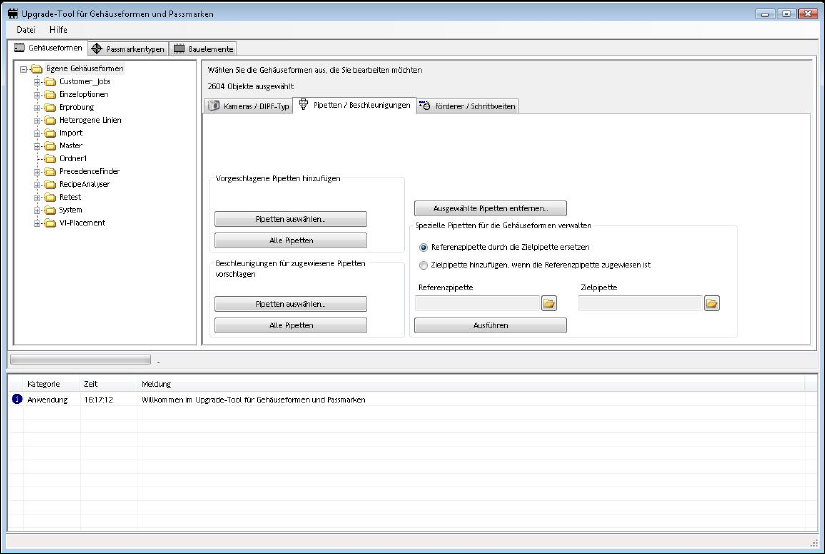
The Component Shape and Fiducial Upgrade for SIPLACE Vision tool was reworked. The new
CPP head nozzles and the CPP component sensor are supported. An acceleration value for all
component dimensions is calculated based on a globally determined density. If this value differs
from the maximum possible acceleration value at the head it can be accepted or rejected
correspondingly in a dialogue.
To update the feeder specific pitch for components, component shapes and setups is provided.
By means of the new filter function it is now possible to make a specific selection between all
nozzles of series 20xx/28xx and cameras. Optionally, newly calculated accelerations can be
displayed first and then be confirmed or rejected.
Additional new functions make it possible to replace, add or delete nozzle types.
This is useful, if, e. g., you want to replace the nozzle types in the course of a placement head
change (from C&P20 head to CPP MultiStar).
For detailed information, please refer to the online help in SIPLACE Pro Desk.