00196920-07_SIPLACE_Pro_FeatureDescription_DE_EN.pdf - 第64页
SIPLACE Pro Fe ature Des cription Ausgabe 05/2014 Edit ion 64 New a nd modifie d Functions (V7.0) 5.7 Setti ng the Specific Fe eder Pitch In the com ponent and the c omponent s hape edit or it is now pos sible to s et a …

SIPLACE Pro Feature Description Ausgabe 05/2014 Edition
63
5.5.1 Overview of the Component Supply
Station software 703.xx supports the following new feeder types.
Feeder type Name
Waffle pack changer
WPC5
Linear feeder with adapter on
X table
IPTE MSF 60 AX
IPTE MSF XL80 AX
5.5.2 New Nozzles
The following new nozzles are available for the CPP head.
Nozzle series Name
20xx
2028 CPP
2057 CPP
5.5.3 New Nozzle Changers
The following new nozzle changers are available for the C&P 20 head and the Twin Head.
Nozzle changer Namr
C&P20 10xx 4 Nozzle changer for the C&P20
head with 4 magazines for the
nozzle series 10xx.
NC Twin Flexible 8 Nozzle changer for the Twin
Head with up to 8 magazines
for the nozzle series 5xx.
5.6 Support of WPC5
SIPLACE Pro 7.0 supports the new waffle pack changer type WPC5. The WPC5 has got 28 levels
for waffle packs and can be used on SIPLACE SX machines. For detailed descriptions and
possible configurations, please refer to the relevant SIPLACE SX documents.
SIPLACE Pro Feature Description Ausgabe 05/2014 Edition
64
New and modified Functions (V7.0)
5.7 Setting the Specific Feeder Pitch
In the component and the component shape editor it is now possible to set a feeder specific value
for the Feeder Pitch. That means that the Feeder Pitch for component shape or component can
be set differently for each assigned feeder. In addition, the Feeder Pitch can now be changed in
the setup without having to change the values in the component editor or the component shape
editor.
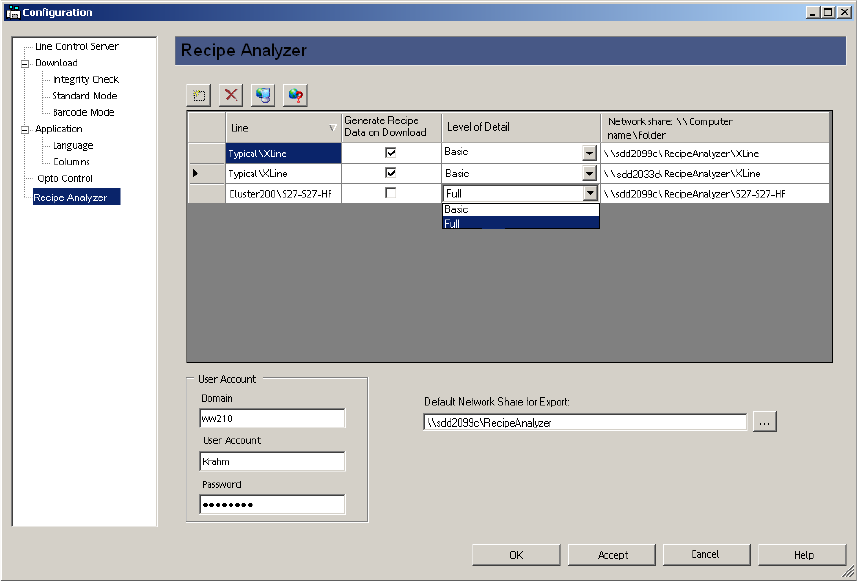
5.8 Generating Recipe Analyzer Data during Download (Option)
A separate license is required in order to use this function. It is possible in SIPLACE Pro 7.0 to
have the recipe analysis generate data automatically while the recipe is being sent to the station
(download). This data is generated in XML format and can be provided in a shared directory.
The network share is configured in LCGUI.
This data can then e. g. be processed and evaluated by an external application.
For a detailed description of the data structure please refer to the "Interface Description - Recipe
Analyzer API" document with the item no. [00196138-xx].
SIPLACE Pro Feature Description Ausgabe 05/2014 Edition
65
5.9 Reworked Recipe Analyzer Tool (Option)
The Recipe Analyzer was reworked. A separate license is required in order to use this function. It
is now possible to effectively display all placement positions with reduced accelerations. The
Recipe Analyzer tool provides the new Accelerations tab for that.
Using this function, customers can now clean up their data from reductions in order to keep only
the necessary reductions within the data.
For detailed information please refer to the online help in SIPLACE Pro Desk.
5.10 Displaying Reduced Accelerations in the Optimization Results
The Optimization Results – Recipe dialogue of the Job Editor shows the number of components
that are placed with reduced speed. Thus it is possible to recognize immediately if the optimization
result has been influenced by reduced accelerations and how many components will be placed with
reduced accelerations.
5.11 Alternative Camera Position for X4i Possible
The camera in SIPLACE X4i machines can be installed in a different position at the factory. This
option allows for the conveyor width 268 in the placement mode "Alternating".
In the station editor you define if the SIPLACE X4i is equipped with this option. In the Default-
Station Configuration list select the Revision2 (HCU/GCU) option.
5.12 PCB Bypass at the Station
With this new function it is possible to have PCBs bypass a specific station in the line (e.g. for
maintenance purposes at this station). If this function is activated in the setup editor this station is
only used as a PCB conveyor. In the graphical display of the station (Desk and LCGUI) a yellow
arrow is shown.
5.13 Placement Head Bypass
During optimization or the feasibility test it is not possible to assign placements to a placement
head.
If this function is activated in the setup editor, the location with the corresponding placement head
is marked yellow in the graphical display (Desk and LCGUI).