00196920-07_SIPLACE_Pro_FeatureDescription_DE_EN.pdf - 第68页
SIPLACE Pro Fe ature Des cription Ausgabe 05/2014 Edit ion 68 New a nd Modifie d Machi ne S upport (V7. 1) 5.17 Support of the Multistar CPP Placement H ead 5.17.1 Reworked Upgrade Tool for Component Shapes and Fiducials…
SIPLACE Pro Feature Description Ausgabe 05/2014 Edition
67
5.16 Improving the Usability of SIPLACE Pro Desk
5.16.1 Deleting Unused Tables When Deleting a Setup
If a setup is deleted, it is now possible to delete tables, that are not used any longer, as well.
5.16.2 Deactivating the Renaming of Objects in the Tree View Via "Double-Click"
If you double-click on an object in the tree view the "Renaming" function is enabled. In order to
prevent objects from being unintentionally renamed during a double-click action (e.g. during
drag&drop actions), you can disable this function. Renaming objects, however, is possible via the
context menu in the respective tree view. You can enable or disable the function Enable Double
Click Renaming in Identity Tree under Tools => Settings => Options.
5.16.3 Zooming the Graphical Display In and Out Using the Mouse Wheel
You can zoom the graphical display of the respective editor in and out using the mouse wheel.
Place the cursor in the graphical display of the editor and move the mouse wheel forward and
backward. The display is zoomed in or out correspondingly.
SIPLACE Pro Feature Description Ausgabe 05/2014 Edition
68
New and Modified Machine Support (V7.1)
5.17 Support of the Multistar CPP Placement Head
5.17.1 Reworked Upgrade Tool for Component Shapes and Fiducials
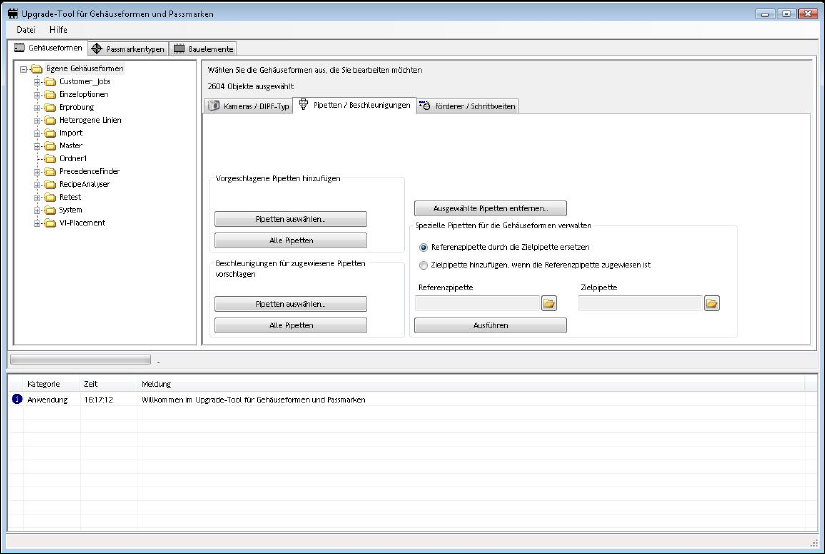
The Component Shape and Fiducial Upgrade for SIPLACE Vision tool was reworked. The new
CPP head nozzles and the CPP component sensor are supported. An acceleration value for all
component dimensions is calculated based on a globally determined density. If this value differs
from the maximum possible acceleration value at the head it can be accepted or rejected
correspondingly in a dialogue.
To update the feeder specific pitch for components, component shapes and setups is provided.
By means of the new filter function it is now possible to make a specific selection between all
nozzles of series 20xx/28xx and cameras. Optionally, newly calculated accelerations can be
displayed first and then be confirmed or rejected.
Additional new functions make it possible to replace, add or delete nozzle types.
This is useful, if, e. g., you want to replace the nozzle types in the course of a placement head
change (from C&P20 head to CPP MultiStar).
For detailed information, please refer to the online help in SIPLACE Pro Desk.
SIPLACE Pro Feature Description Ausgabe 05/2014 Edition
69
New and Modified Functions (V7.1)
5.18 SiCluster Professional (Constant Tables)
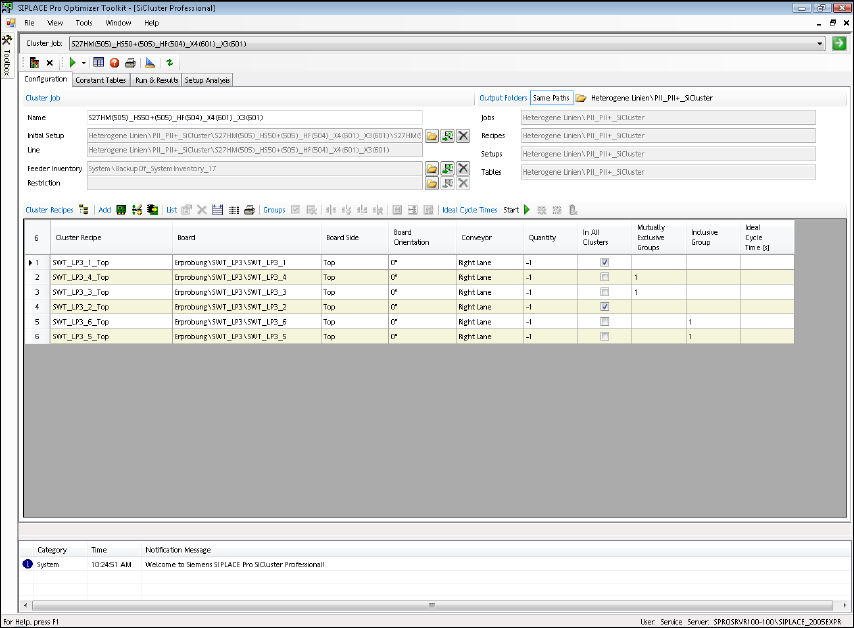
With the new SiCluster Professional Optimizer Toolkit we offer additional optimizing possibilities.
SiCluster Professional calculates several family setups for an amount of PCBs or recipes in a line
that use equally set-up, i. e. constant, tables. One or more tables can be used unchanged in all
setups at the same location. You can select the locations in the line where the tables are to be
constant. A license is required to use this function.
Start SIPLACE Pro Optimizer Toolkit => SiCluster Professional.
SiCluster Professional is of use to you due to:
● reduced effort during pre-setup
● less table changes during setup changes on the line
● reduced effort for setup verification
● reduced effort for component storage and retrieval
SiCluster Professional saves costs due to:
● reduced number of changeover tables and feeders
● less components that are integrated in setups
● less component losses caused by setup changes
● less floor space required for storing the changeover tables