00196920-07_SIPLACE_Pro_FeatureDescription_DE_EN.pdf - 第162页
SIPLACE Pro Fe ature Des cription Ausgabe 05/2014 Edit ion 16 2 Figure 9- 32 : Defining rules f or com ment columns If availa ble, labe ls are disp la yed in alphab etical ord er in the upper p art of the dialog box . In…
SIPLACE Pro Feature Description Ausgabe 05/2014 Edition
161
9.3.9 Line Control GUI – Enhancements for SIPLACE Order Manager
The Line Control GUI of SIPLACE Pro has been enhanced and displays information about the
SIPLACE Order Manager.
9.3.9.1 Displaying Board Comments in the Production Schedule
Such information as oven profiles and screen printer numbers is very important at the line in order
to decide the best production sequence for the recipes within family setups. Comments may be
entered in the board description for such process attributes and will then be displayed as additional
columns in the production schedule on the Line Control GUI.
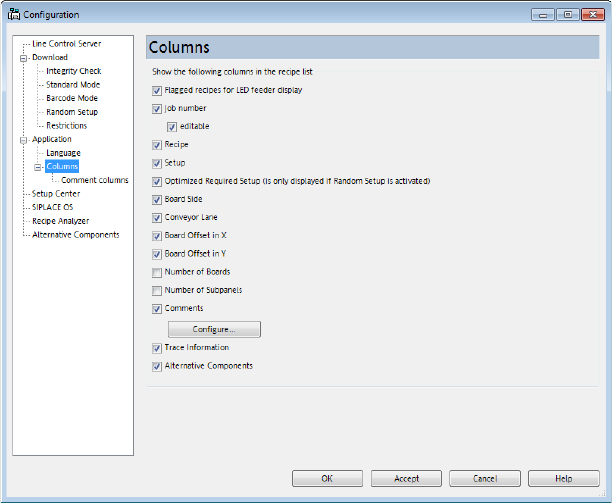
At first, the comment columns have to be defined and enabled in the Line Control GUI under
Configuration – Application – Columns:
Figure 9-31: Defining and enabling comment columns
When enabling the Comments option and clicking on the Configure... button, the following dialog
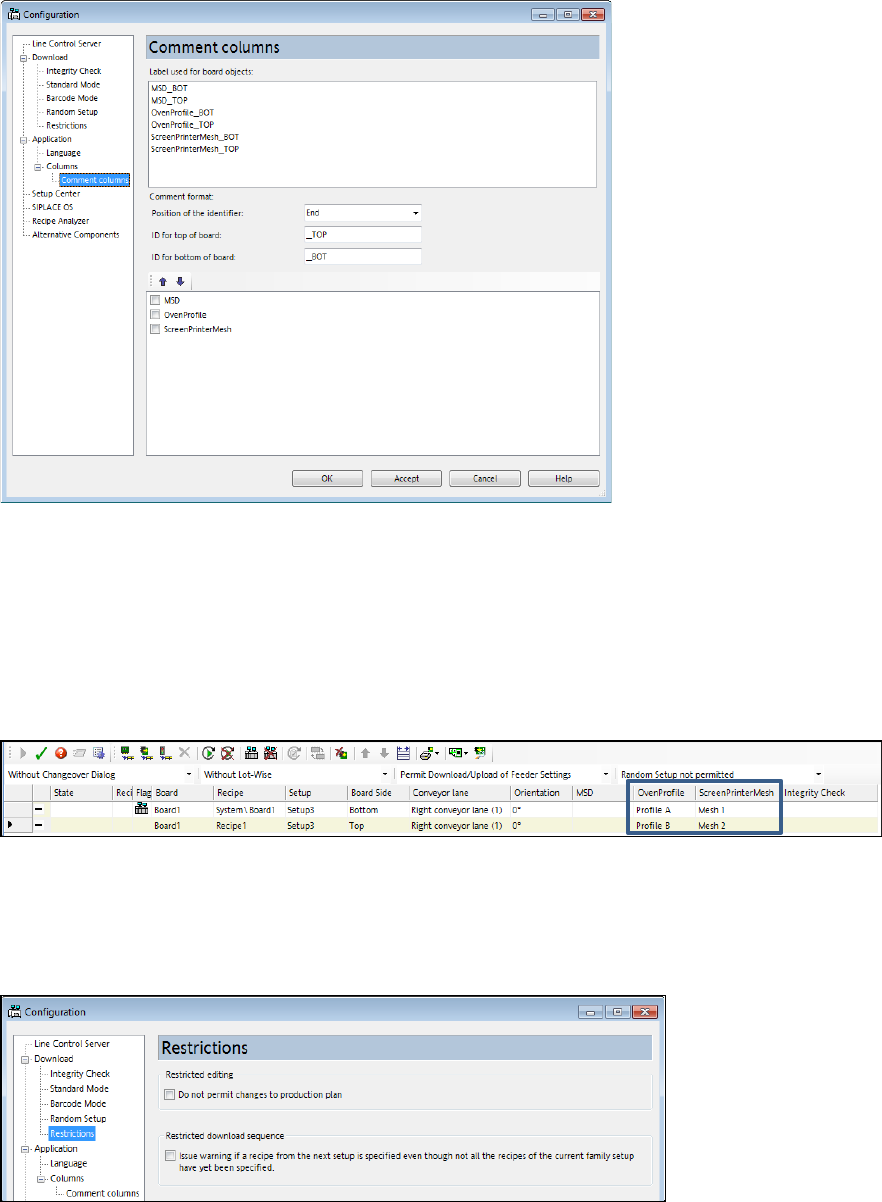
box will open in which the rules for the comment columns can be defined.
SIPLACE Pro Feature Description Ausgabe 05/2014 Edition
162
Figure 9-32: Defining rules for comment columns
If available, labels are displayed in alphabetical order in the upper part of the dialog box.
In the middle part of the dialog box, rules can be specified for these comment formats.
The result columns are displayed in the lower part of the dialog box. The columns that shall be
displayed on the Line Control GUI can be enabled here. Additionally, the column order can be
defined with the arrow buttons.
The comment columns are only displayed on the Line Control GUI, they cannot be changed here.
Figure9-33: Displaying comment columns on the Line Control GUI
9.3.9.2 Restrictions for the Production Schedule
Two restrictions may be set for the production schedule under Configuration – Download –
Restrictions.
Figure 9-34: Setting restrictions

SIPLACE Pro Feature Description Ausgabe 05/2014 Edition
163
– Restricted editing
The recipe list in the production schedule cannot be edited if this option is enabled.
– Restricted download sequence
If this option is enabled, a warning will be displayed if a recipe of the following setup is specified
although not every recipe of the current family setup is downloaded. A list with the not yet
downloaded recipes will also be displayed.
However, the operator may ignore this warning.
No warning is displayed if already downloaded recipes are repeatedly downloaded. If an
already downloaded recipe shall be treated as not yet downloaded, a new recipe has to be
created in the production schedule.
The Line Control Server stores the last 100 downloads at most. Older downloads are treated as
not yet downloaded.
NOTICE
PCB barcode mode is not supported because the download sequence of the recipes is
automatically controlled in this mode.
As default, both options are disabled.
9.3.10 SIPLACE SiCluster Multiline – Support in SIPLACE Pro
SiCluster Multiline is an important component for electronically supported production planning. For
several boards and/or recipes and two or more placement lines, it generates a favorable
distribution of the recipes to the lines. SiCluster Multiline complies with the following requirements:
– Calculates a medium- or long-term assignment of boards to lines with a minimum component
commonality (no setup order or sequence).
– Distributes the boards on condition that a specified line production time will not be exceeded.
– Supports different setup concepts for the lines in a factory (changeover tables, setup concept
A-B, constant tables).
– Considers user-definable restrictions: Include, Exclude, in the same line, bind to line, exclude
from line.
SiCluster Multiline offers:
– improved line load sharing
– shorter production time on all SMT placement lines
– lower number of different components on all lines
– an improved initial situation to calculate constant tables (with SiCluster Professional)
– a reduced number of required setups and hence a reduced number of required feeders and
tables
– more boards in the family setup / fixed setup and thus longer runtimes for a setup and so less
changeovers
– lower manual planning effort