00196920-07_SIPLACE_Pro_FeatureDescription_DE_EN.pdf - 第69页
SIPLACE Pro Fe ature Des cription Ausgabe 05/2014 Edit ion 69 New a nd Modifie d Functi ons (V7.1) 5.18 SiCluster P rofessional (Consta nt Tables) W ith the new SiC luster Prof essiona l Optim izer Toolk it we off er add…
SIPLACE Pro Feature Description Ausgabe 05/2014 Edition
68
New and Modified Machine Support (V7.1)
5.17 Support of the Multistar CPP Placement Head
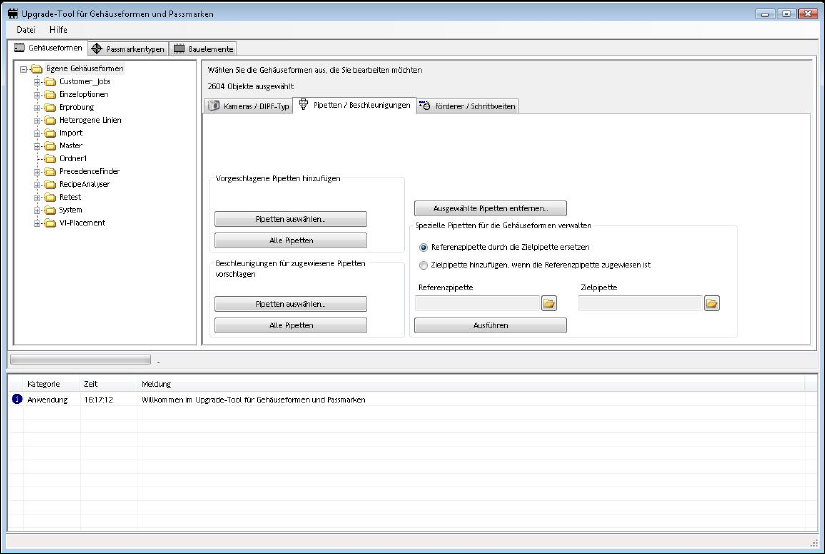
5.17.1 Reworked Upgrade Tool for Component Shapes and Fiducials
The Component Shape and Fiducial Upgrade for SIPLACE Vision tool was reworked. The new
CPP head nozzles and the CPP component sensor are supported. An acceleration value for all
component dimensions is calculated based on a globally determined density. If this value differs
from the maximum possible acceleration value at the head it can be accepted or rejected
correspondingly in a dialogue.
To update the feeder specific pitch for components, component shapes and setups is provided.
By means of the new filter function it is now possible to make a specific selection between all
nozzles of series 20xx/28xx and cameras. Optionally, newly calculated accelerations can be
displayed first and then be confirmed or rejected.
Additional new functions make it possible to replace, add or delete nozzle types.
This is useful, if, e. g., you want to replace the nozzle types in the course of a placement head
change (from C&P20 head to CPP MultiStar).
For detailed information, please refer to the online help in SIPLACE Pro Desk.
SIPLACE Pro Feature Description Ausgabe 05/2014 Edition
69
New and Modified Functions (V7.1)
5.18 SiCluster Professional (Constant Tables)
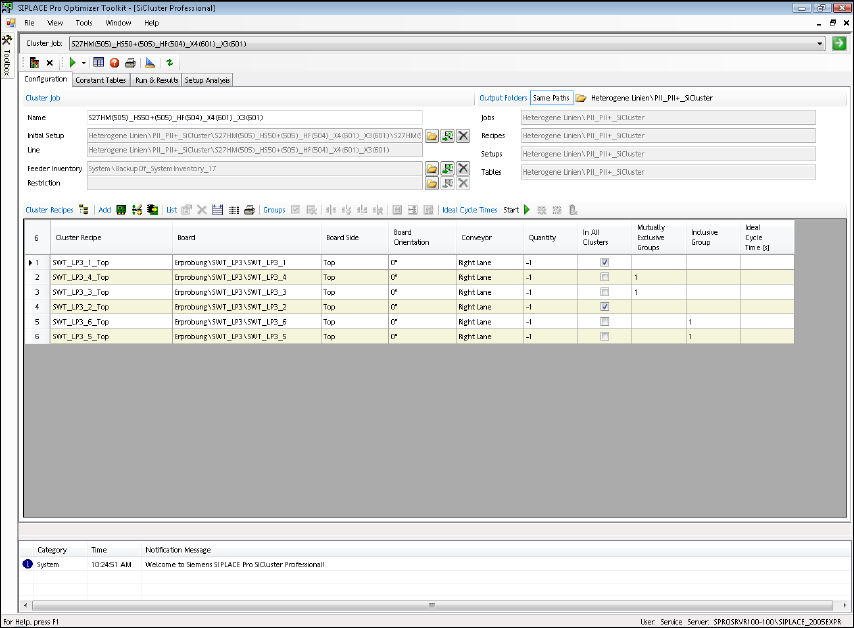
With the new SiCluster Professional Optimizer Toolkit we offer additional optimizing possibilities.
SiCluster Professional calculates several family setups for an amount of PCBs or recipes in a line
that use equally set-up, i. e. constant, tables. One or more tables can be used unchanged in all
setups at the same location. You can select the locations in the line where the tables are to be
constant. A license is required to use this function.
Start SIPLACE Pro Optimizer Toolkit => SiCluster Professional.
SiCluster Professional is of use to you due to:
● reduced effort during pre-setup
● less table changes during setup changes on the line
● reduced effort for setup verification
● reduced effort for component storage and retrieval
SiCluster Professional saves costs due to:
● reduced number of changeover tables and feeders
● less components that are integrated in setups
● less component losses caused by setup changes
● less floor space required for storing the changeover tables
SIPLACE Pro Feature Description Ausgabe 05/2014 Edition
70
You can use changeover tables and feeders that become available on other lines. Thus, less
additional equipment is required when investing in a new line.
You can use SiCluster Professional for all SIPLACE placement machines on all lines. Its use is not
only restricted to the latest machine generation.
5.18.1 Setting Options
In SiCluster Professional, you can set the focus that is of special importance to you: You can either
focus on the minimum number of setup families or the highest possible line performance, or
you choose a compromise between both.
A basic criterion for SiCluster Professional is the ideal cycle time that is determined during an
optimization phase. The ideal cycle time is determined during the initialization phase of the
SiCluster Professional optimization. Here, the recipes are optimized separately. Defined inclusive
groups, e. g. for top and bottom sides of PCBs, are optimized together.
You achieve new setting options by determining the extent to which the constant and the free
tables may be set up (max. Fill Level [%]). In addition, you can set the run time of the individual
optimization phases. Here, we have already determined useful pre-settings for you.
The SiCluster Professional GUI supports you during parallel optimization. Thus and with the aid of
your multi core processors, you can achieve a better solution even faster. You can carry out
computing time intensive tasks in the background without being slowed down.
5.18.2 Evaluation and Comparision Functions
The Determine commonality of components supplies precious information on your recipe stating
which components exist and the frequency of their ocurrence. In addition, you can have individual
components be explicitly set up on constant tables, if you do not want to have this decision made
by the algorithm alone.
The calculated optimization results are presented in a table and in a graphic, so that you can
quickly compare the results and determine the best variant. The Setup Analysis allows for a
detailed inspection of the calculated results.
The quality of an optimization result also depends of course on the number of feeders and tables
used: The statistics function Feeder Usage prepares the necessary evaluation data for you. Thus,
you can promptly decide on an optimum solution.
SiCluster Professional provides all calculated data via the Windows clipboard for further processing
(e. g. copying and pasting into Microsoft Excel).
5.18.3 Note on Licensing
SiCluster Professional is offered as a licensed option for which you always need a factory license
and additional line licenses – according to the number of lines on which you want to use constant
tables.
5.18.4 Documentation
Refer to the online help of the SIPLACE Pro Optimizer Toolkit for more detailed information.