00196920-07_SIPLACE_Pro_FeatureDescription_DE_EN.pdf - 第170页
SIPLACE Pro Fe ature Des cription Ausgabe 05/2014 Edit ion 170 If several c omponen ts are listed f or one refer ence desi gnator in the BOM f ile, the f irst com ponent will be ad ded to the placem ent list. Addition al…
SIPLACE Pro Feature Description Ausgabe 05/2014 Edition
169
9.3.17 Importing Components from BOM File into Placement Lists
In a so-called BOM file (Bill of Material) it is defined which components shall be placed on which
placement positions. Frequently, the BOM file is administered by an ERP system (Enterprise
Resource Planning) from which it can be exported as a text file.
With the new BOM Merger tool a BOM text file can be imported by SIPLACE Pro and the
contained part numbers (= components) inserted or exchanged in available placement lists.
Prerequisites
– At least one placement list containing component placement positions must have been defined
for the board in the board description.
– The user must have the corresponding authorizations (reading boards, reading and editing
placement lists, reading and creating components).
The BOM Merger can be started in SIPLACE Pro Desk under Tools – Import – BOM Merger.
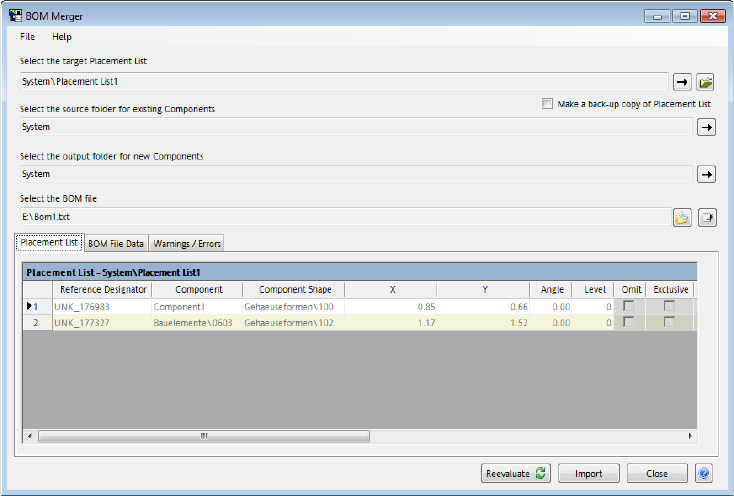
Figure 9-42: BOM Merger
The following information has to be entered in the BOM Merger:
– Target placement list in which the new data shall be entered.
– Source folder in which the BOM Merger shall search for available components.
– Output folder in which the BOM Merger reads components or creates new components.
– BOM file containing the data.
The component names will be exchanged for all placement positions in the BOM file for which
matching reference designators are found in the placement list.
If the component is available in the component source folder, only a link is added between
placement position and component. If the component is not available in the component source
folder, a new component will be created in the component target folder and a link will be added
between the placement position and the new component. A matching component shape has to be
assigned manually for the new component (outside of the BOM Merger).
SIPLACE Pro Feature Description Ausgabe 05/2014 Edition
170
If several components are listed for one reference designator in the BOM file, the first component
will be added to the placement list. Additional components will be added as alternative components
in the order they are listed in the BOM file.
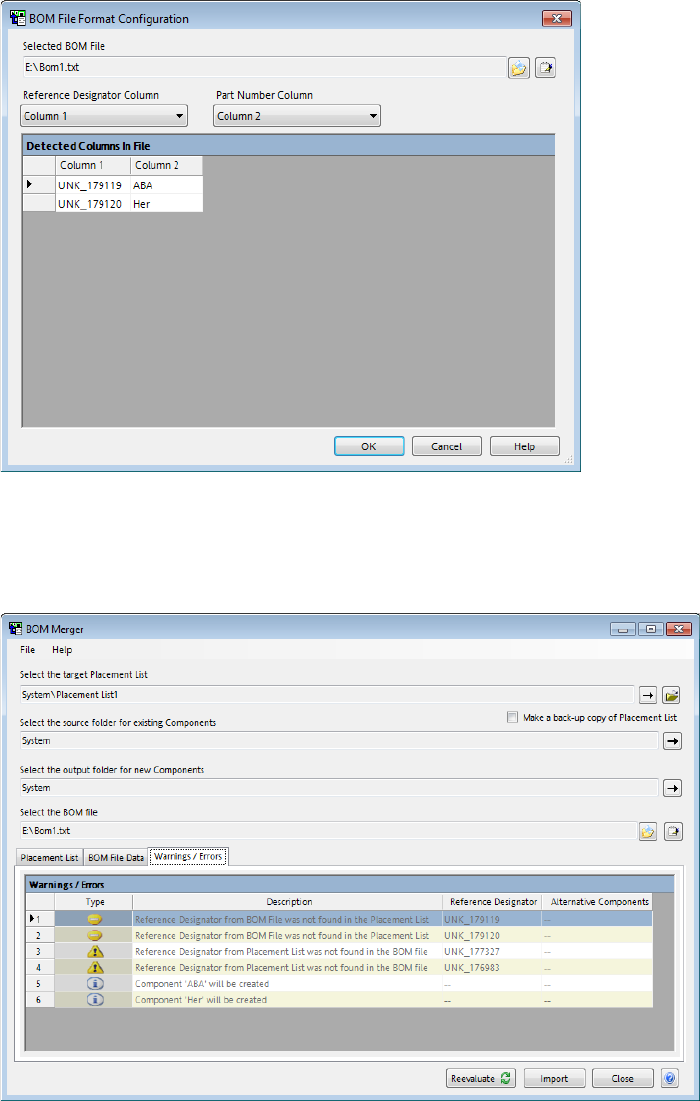
The following dialog box will be displayed when the BOM file is opened:
Figure 9-43: Configuring the BOM file
The columns that contain the reference designators and the part numbers have to be set and
confirmed in the corresponding select lists.
Error messages and warnings are listed in the Warnings / Errors tab.
Figure 9-44: Error messages and warnings
An error message will be displayed if a reference designator is defined several times or if a
component placement position is specified in the BOM file that cannot be found in the placement
list. The BOM file must then be corrected (via the Notepad button) before the BOM Merger can
continue working.
SIPLACE Pro Feature Description Ausgabe 05/2014 Edition
171
A warning will be displayed if the placement list contains component placement positions for which
no matching reference designator can be found in the BOM file. Either the concerned placement
list can then be corrected in SIPLACE Pro Desk or the concerned component placement positions
can be omitted.
By clicking the Reevaluate button, the corrected entries will be transferred and checked by the
BOM Merger.
Before the new data gets inserted into the placement list via the Import button, a copy of the
placement list may be optionally created by clicking the Make a back-up copy of Placement List
button.
9.3.18 Aligning (LED) Components
If the corresponding hardware has been installed, components can be aligned with the new LED
Offset Camera (47) 19x19 camera type. Surface features such as e.g. illuminated areas of LED
components, can then be centered corresponding to the placement position. This function is
supported together with the CPP placement head as of this SIPLACE Pro version.
Example Process with LED component:
The LED component is picked up and put on a glass plate on camera 47. First, it will be measured
from the bottom by this camera and then from the top by the PCB camera. The result of the
measurement from the bottom is starting basis for the measurement from the top. Thus, an offset
of the illuminated area to the component connections is determined. After that, the LED component
will be picked up from the glass plate and be placed with the determined offset so that the
illuminated area is centered corresponding to the placement position and not, as usual, aligned to
the connection leads.
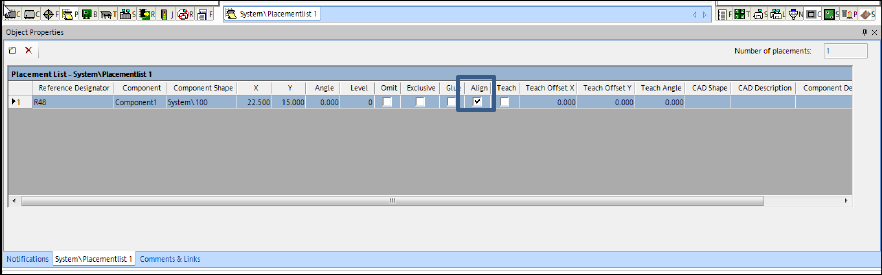
The function can be enabled in the Align column under the Placement List – Placements tab in
the Placement List Editor.
Figure 9-45: Enabling alignment