00196920-07_SIPLACE_Pro_FeatureDescription_DE_EN.pdf - 第52页
SIPLACE Pro Fe ature Des cription Ausgabe 05/2014 Edit ion 52 4.2.1 Overview of the Component Supply Station s oftware 70 2.xx s upports the f ollowing alread y existin g feeder t ypes. Feeder T ype Name Tape Feeder 8 mm…
SIPLACE Pro Feature Description Ausgabe 05/2014 Edition
51
4.1.4 Calculating the Mass of Component Shapes
Object Type Name Description
In the Component Shape Editor: the Component Shape tab shows the calculation of the mass for
the component shapes.
For a safe placement sequence in the Collect&Place mode the mass of a component must be
taken into account. Based on the geometrical component dimensions (without leads) and a given
calculation formula SIPLACE Pro determines this value automatically. If due to the component
dimensions the automatic mass calculation produces a significantly heavier component than the
actual one (e. g. if the cooling element is hollow), you can enter the mass value manually.
4.1.5 Reduced Acceleration of Component Shapes
The acceleration value for the z axis is now taken into account during upwards and downwards
movements. In the Component Shape Editor: the Acceleration tab shows tow new columns: Z
Axis Up (g) and Z Axis Down (g).
When assigning new nozzles to component shapes SIPLACE Pro is able to calculate the
acceleration values automatically. In the Component Shape Editor: the Nozzles tab provides the
Automatic calculation of reduced accelerations option. In the Component Shape Editor: the
Accelerations tab shows new columns with the "recommended" values for z and star axis.
4.1.6 Reworked Upgrade Tool for Component Shapes and Fiducials
The Component Shape and Fiducial Upgrade for SIPLACE Vision tool was reworked. The new
CPP head nozzles and the CPP component sensor are supported. An acceleration value for all
component dimensions is calculated based on a globally determined density. If this value differs
from the maximum possible acceleration value at the head it can be accepted or rejected
correspondingly in a dialogue.
By means of the new filter function it is now possible to make a specific selection between all
nozzles of series 20xx/28xx and cameras. Optionally, newly calculated accelerations can be
displayed first and then be confirmed or rejected.
For detailed information please refer to the online help in SIPLACE Pro Desk.
4.2 Support of Station Software 702.xx
SIPLACE Pro 6.0 supports station software 702.xx on the machine types X2, X3, X4 and X4i.
This ensures the following basic functions:
● The C&P20 head can be set up at all locations.
● The CPP head can be set up at all locations.
● The Twin Head and Twin Head HF (High Force) can be set up at all locations of X2, X3 and
X4machines.
● The Linear Dipping Unit (LDU) is supported for C&P20 and CPP head.
● The complete X feeder scope is supported.

SIPLACE Pro Feature Description Ausgabe 05/2014 Edition
52
4.2.1 Overview of the Component Supply
Station software 702.xx supports the following already existing feeder types.
Feeder Type Name
Tape Feeder
8 mm X
12 mm X
16 mm X
24 mm X
32 mm X
44 mm X
56 mm X
72 mm X
88 mm X
Matrix Tray Feeder MTC 2
Manual Tray Feeder
Carrier X
Arbitrary Carrier X
Linear Feeder with
adapter on X table
Linear 3x95 AX
Linear 2x15 AX
Linear 30 AX
Accessories with adapter
on X table
Label Presenter AX
Reject Conveyor AX
Linear Dipping Unit X
4.2.2 Possible Clearance under the PCB
Station Type Station Software Permitted Settings
X2, X3, X4 702.xx Setting in a range of 0 mm to 40 mm
(default: 20 mm).
X4i 701.xx, 702.xx Setting in a range of 0 mm to 25 mm
(default: 20 mm).
SIPLACE Pro Feature Description Ausgabe 05/2014 Edition
53
4.2.3 Linear Dipping Unit at the X Table (Dipping Mode)
SIPLACE Pro 6.0 supports dipping of components with the linear dipping unit at the X table (LDU-
X) for the Twin Head, the C&P-20 head and the CPP head.
Head Station Software Mode
C&P (6/12) <=605.xx Dipping Vision
Twin Head all Dipping Vision & Vision Dipping
C&P 20 <605.xx ---
C&P 20 >=605.xx Dipping Vision & Vision Dipping
CPP >=702.xx Dipping Vision & Vision Dipping
4.3 Quad Lane Conveyor
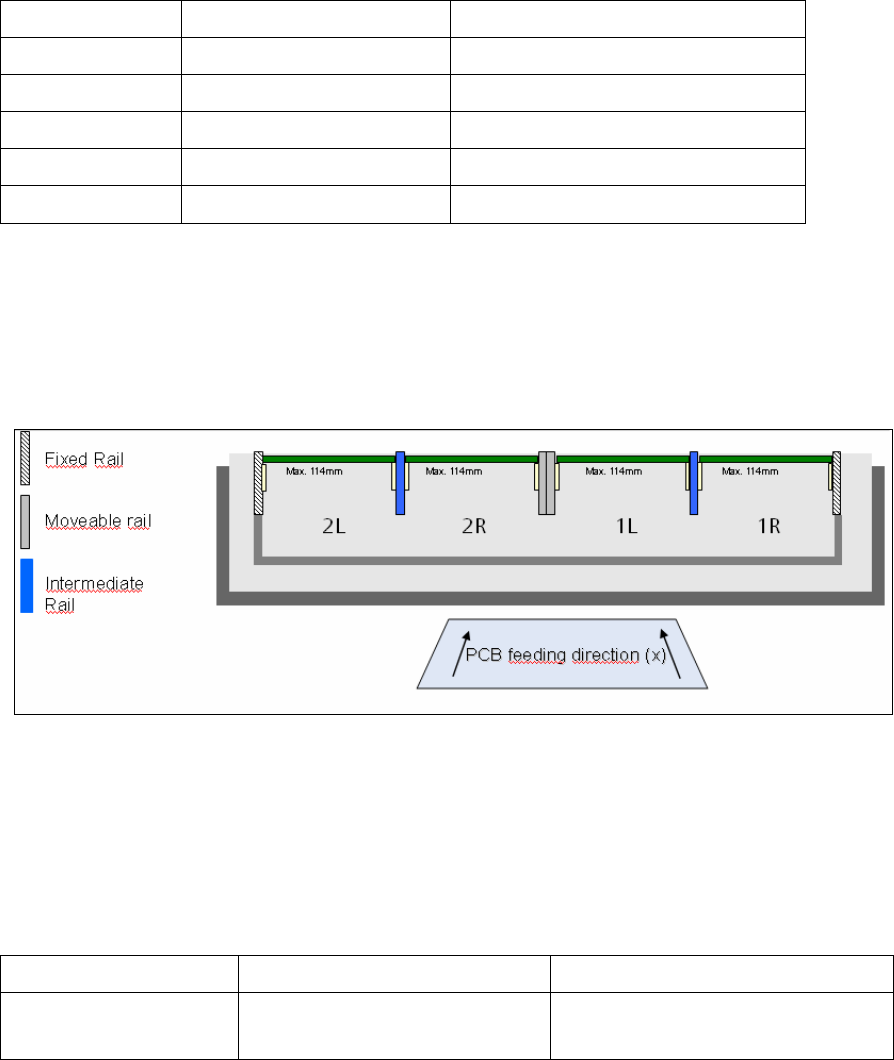
SIPLACE Pro 6.0 supports the Quad Lane conveyor for the X series and for X41 machines. The
Quad Lane conveyor consists of 4 lanes, the so-called sub lanes Lane1 Right, Lane 1 Left and
Lane 2 Right, Lane 2 Left (1R/1L and 2R/2L).
As in previous SIPLACE Pro versions recipes are produced on lanes 1 and 2 and then sent to the
station (download), however not on the two sub lanes Right and Left. Within the recipe the PCBs
can then be defined for either the right and/or the left side.
4.3.1 New Hardware Options in the Line Editor
In the Line Editor the new transport system type is configured.
Station Type Object Type Name
X2, X3, X4 and
X4i
Transport system type Quad Conveyor Modular X