00196920-07_SIPLACE_Pro_FeatureDescription_DE_EN.pdf - 第154页
SIPLACE Pro Fe ature Des cription Ausgabe 05/2014 Edit ion 154 9.2.30 Definition of Proce ss Attribu tes Process attributes f or boar d sides and lines can be de fined in S IPLACE Pro. For this, SIPLACE Pro Des k and the…
SIPLACE Pro Feature Description Ausgabe 05/2014 Edition
153
If External virtual inkspot Handling is enabled a corresponding icon is displayed in the setup and
recipe view.
If External Board Barcode or External Board and Panel are selected, a barcode icon is
displayed in the setup and recipe view.
9.2.27 Improved Modification Generator
The evaluation by the Modification Generator will be displayed as a changeover instruction via the
Report – Changeover instruction dialog box. This evaluation can be printed.
The different evaluation sections, with regard to the contents, can now be enabled, disabled and
then printed via detailed options.
9.2.28 New Pin Types: THT Round Pin and THT Square Pin
Two new pin types have been introduced to place THT components (Through Hole Technology):
THT round pin and THT square pin. In the Component Shape Editor the height of the
components has to be described as follows:
– Height = pin length + base unit height
– A creeping distance with height = pin length has to be defined in the Handling tab.
Thus, an inspection with correct focussing can be performed in SIPLACE Vision.
9.2.29 Nozzle Start Angle for Asymmetrical Nozzles in four 90° Steps
As of this SIPLACE Pro version, the nozzle start angle for asymmetrical nozzles can be defined in
four 90° steps (0, 90, 180 and 270 degrees) in the Component Shape Editor. SIPLACE Line
Control sends the set nozzle start angle to the station.
Precondition: Station software V6x or V7x.
The station software versions 40x and 50x only support the nozzle direction (horizontal = 0°,
vertical = 90°). Angle entries will be adjusted by SIPLACE Line Control for these station types as
follows:
0° = 0°
90 = 90°
180° = 0°
270° = 90°
SIPLACE Pro Feature Description Ausgabe 05/2014 Edition
154
9.2.30 Definition of Process Attributes
Process attributes for board sides and lines can be defined in SIPLACE Pro.
For this, SIPLACE Pro Desk and the Data Maintenance Tool have been enhanced.
9.2.30.1 Process Attributes in SIPLACE Pro Desk
Process attributes can be entered for board sides and lines. By means of the process attributes,
the user can define process capabilities of the line and process requirements of the board sides.
The boards will then be distributed to the lines based on these process attributes (among others).
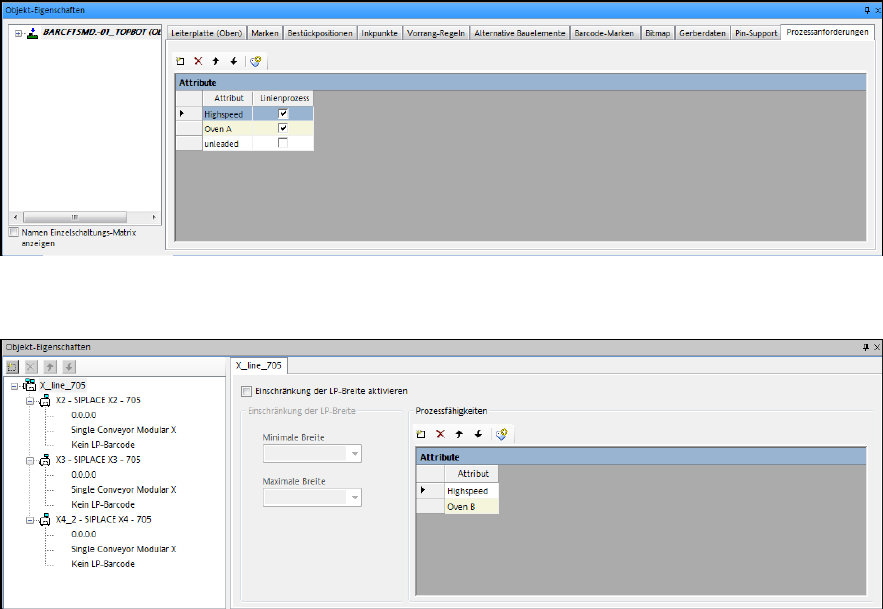
For the entry of the process attributes there is a new tab Process Requirements in the Board
Editor and Process Capabilities in the Line Editor respectively.
The user can enter any text as process attribute or select one from the list with available process
attributes in the system.
Figure 9-21: Board Editor – Defining process attributes
Figure 9-22: Line Editor – Defining process attributes
SIPLACE Pro Feature Description Ausgabe 05/2014 Edition
155
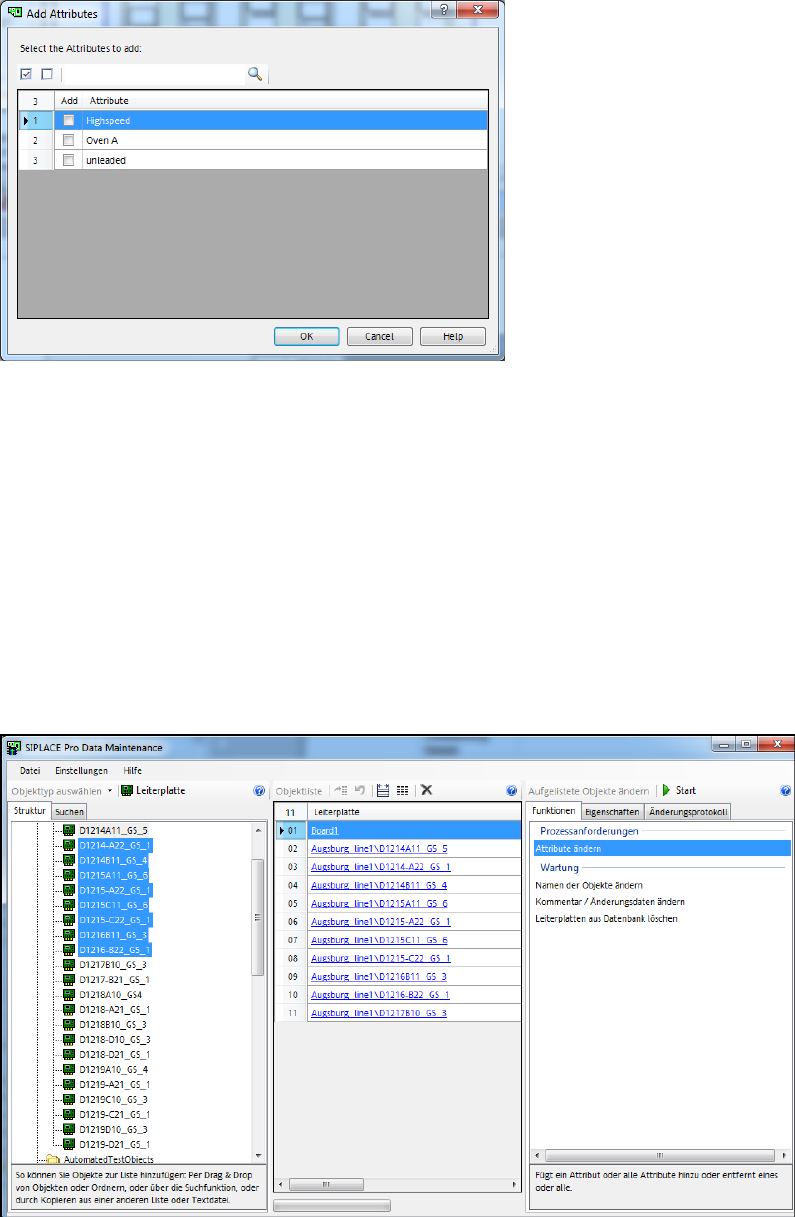
From the tool bar a dialog box can be called in which all existing process attributes are listed. From
this list one or multiple process attributes may be selected to be entered for the board side or line.
Figure 9-23: Process attribute dialog box
9.2.30.2 Process Attributes in Data Maintenance Tool
The Data Maintenance Tool has been enhanced so that the process attributes can be assigned
quickly and easily to multiple objects without having to handle each object separately.
Additionally, the Line object type can now be handled in the Data Maintenance Tool.
Process attributes for boards and lines can be added or removed via the Change Attribute
function.
For both actions, the user can enter a process attribute manually or select one from the list with
available process attributes in the system.
If boards are handled, the user also has to select if the top side, bottom side or both board sides
shall be treated.
Figure 9-24: Process attributes for boards