00196920-07_SIPLACE_Pro_FeatureDescription_DE_EN.pdf - 第40页
SIPLACE Pro Fe ature Des cription Ausgabe 05/2014 Edit ion 40 3.5.2 Support of SIPL A CE X4 i w ith Stati on Softw are 7 01 SIPLAC E X4 i machine t ype is runn ing with s tation s oftware 70 1 onl y. The SIP LACE X4 i is…
SIPLACE Pro Feature Description Ausgabe 05/2014 Edition
39
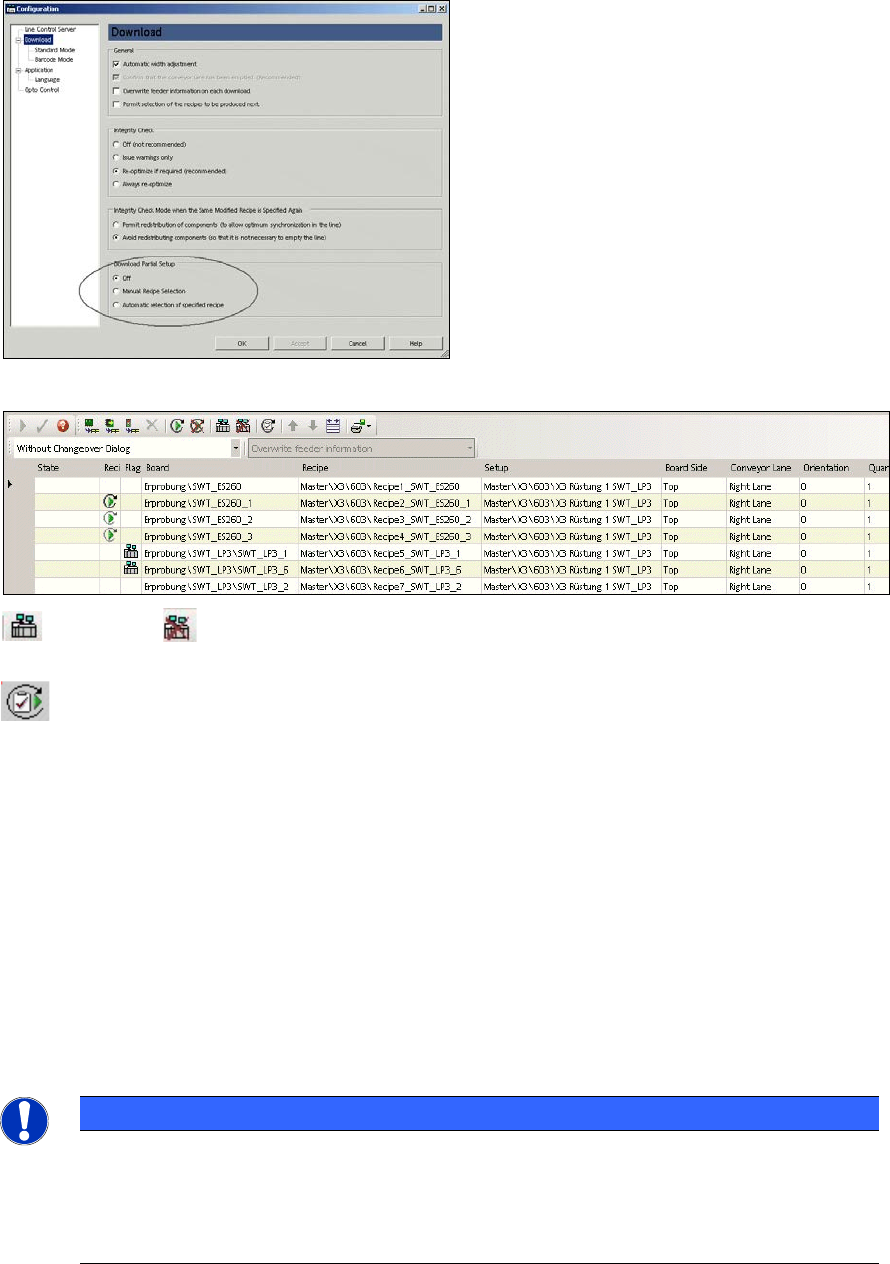
enables and disables the download of partial setup for the marked line/recipe. These
icons are only possible during manual recipe selection.
switches over to another recipe to be produced (job or production schedule).
3.5 Features in combination with Station Software 605 and 701 (V5.1)
3.5.1 Support of SIPLACE Machines with Station Software 605 and 701
SIPLACE Pro 5.1 supports the SIPLACE machine types of X Series and D Series running with the
new station software 605 as well as the SIPLACE X4i running with station software 701.
You find a more detailed list in Appendix C: Platform – Station Software – Machine.
SIPLACE Pro 5.1 supports a new version of the vision system on all stations running with station
software 605 or 701.
NOTICE
In SIPLACE Pro 5.1 and station software 605/701 the position of the fixed conveyor side
is given by SIPLACE Pro. This implicates that the user has to enter in SIPLACE Pro the
position of the fixed conveyor side in the line editor when upgrading from 60x to 605
before the first program download. This prevents the conveyor sides travelling
unexpectedly to another position.

SIPLACE Pro Feature Description Ausgabe 05/2014 Edition
40
3.5.2 Support of SIPLACE X4i with Station Software 701
SIPLACE X4i machine type is running with station software 701 only. The SIPLACE X4i is
characterized by the rotated gantries at location 2 and 4 as well as by the new nozzle changer NC
C&P 20 10xx 2x2 equipped with 4 magazines. Each magazine has 12 pockets. On the SIPLACE
X4i 2 different tables can be used: Tabe 34X and Table 40X. Table 34X has to be used at location
2 and 4 since the C&P20 head cannot pick components on tracks 1-6. Table 40X is used by default
at location 1 and 3 since the head can pick components anywhere.
The SIPLACE X4i machine types (can be configured with all machines of the X and D series in one
line.
X4i restrictions:
Following options are not supported on the SIPLACE X4i (Station Software 701)
– Whispering down the Machine
– Whispering down the Line
– Long Board Option
– PCB Barcode Operation
– Productivity Lift: instead of productivity lift the 3
rd
lane can be used.
– Stationwise download
3.5.3 I Placement with SIPLACE X4i
SIPLACE X4i enables I Placement that means the independent placement of both placement
heads within one placement area. I Placement is a placement mode for C&P heads on a SIPLACE
X4i. I Placement is a placement mode for C&P heads of the X4i. I Placement is activated via Setup
-> Station -> Tab: Transport (I Placement or Alternating). The shorter distance to the gantry and the
independent placement in the placement area lead to a higher performance.
3.5.4 Increased Placement Performance for Twin Head – Benchmark 5000 cph
With SIPLACE Pro 5.1 the Twin Head on X series machines and on SIPLACE D3 machines can
place up to 5000 cph.
3.5.5 WPC 4 for SIPLACE D3, X3, X2 Machines with S Tables
SIPLACE Pro 5.1 supports the wafflepack changer WPC 4 on SIPLACE machines D3, X3 and X2
with new WPC 4 D3/X and the new table type "Table WPC 90".
The new table type can be setup at locations 2 and 4 of SIPLACE X3 and at location 3 of SIPLACE
D3 and X3. In contrast to the currently available WPC the WPC 4 D3/X can only be setup on
tracks 25-90. Tracks 1-24 are reserved for other feeder types.
3.5.6 Support of Reject Feeder with X Adapter
With SIPLACE Pro 5.1 the Reject Feeder (Reject Conveyor AX) can be used for the X series (X2,
X3, X4) with station software 605.
SIPLACE Pro Feature Description Ausgabe 05/2014 Edition
41
3.6 Features of SIPLACE Pro Optimizer GUI (V5.1)
3.6.1 Recipe Analyzer
With SIPLACE Pro 5.1 the Recipe Analyzer is added as new Tool in the SIPLACE Pro Optimizer
GUI. The Recipe Analyzer contains after a successful optimization all data of the optimized recipe.
The recipe consists of the setup and the placement data. The optimizer data describe the detailed
processing of the PCB in the machine. Thanks to these detailed optimizer data of the head cycles
the user is able to find and analyze errors in a faster and quicker way. Thus the placement steps
could be analyzed in an offline mode much more easier. For example which placement head
places which component on which segment in which sequence.
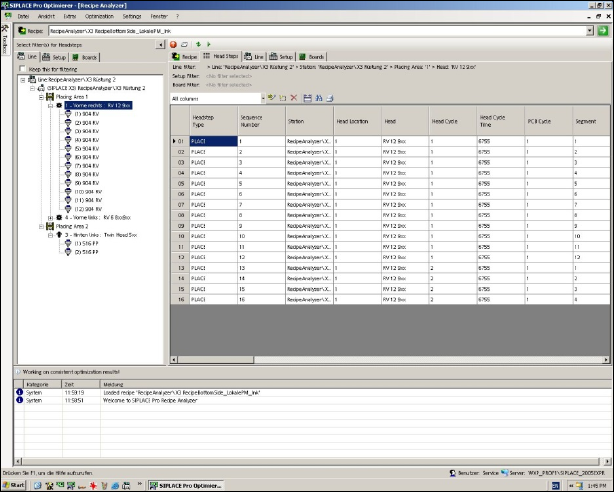
The Recipe Analyzer is used for analyzing data for all placement steps. The Recipe Analyzer
displays on the left hand the tree structure of all objects (line, setup, board) and on the right hand
the graphic view (recipe, line setup, board, head step). The user can filter objects like location or
segment (e.g. individual head steps for the filtered segment) out of the tree structure or out of the
graphic objects like location or segment (e.g. individual head steps for the filtered segment).
Fig.: Recipe Analyzer
Further functions of the Recipe Analyzer:
– Display sequence of placement steps
– Export XML file: XML file can be used as basis for programming an AOI (Automatic Optical
Inspection) or as error analysis together with quality data
– Display NC file profile
For more detailed information how to use the Recipe Analyzer please refer to the online help.