00196920-07_SIPLACE_Pro_FeatureDescription_DE_EN.pdf - 第29页
SIPLACE Pro Fe ature Des cription Ausgabe 05/2014 Edit ion 29 2.8 Features of the Differ ence Editor (V4.1) 2.8.1 Comparison of Boards in the Differen ce Editor In the bo ard editor , cluster have no w unique nam es aut …
SIPLACE Pro Feature Description Ausgabe 05/2014 Edition
28
● Socket
● SOJ
● SOXX
A component that has been setup not correctly (wrong pickup angle) can be placed however due to
different angle measurements (SOT in 0° position). Precondition is that you enter the number of
symmetries correctly in the component shape editor.
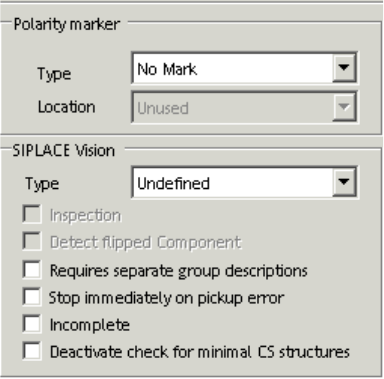
2.7.5 Deactivate check for minimal component shape structures
It is possible to deactivate the check for minimal component shape structures (Component Shape
Editor: Deactivate for minimal CS structures). This check allows to measure small component
shapes like 0201 by cameras that are not appropriate according to their specification.
Note: If you deactivate the check for minimal component shape structures you can influence the
placement quality and the placement accuracy.
2.7.6 Incomplete component shape description with SIPLACE vision system V33
The vision system V33 allows an incomplete description of a component shape. You only have to
mark the check box "Incomplete" in the component shape editor. But you have to make sure, that
you enter the basic body size dimensions (W, L, H) in the component shape editor so that the
component could be picked up. You can complete the description of the component shape
afterwards at the station using the Fiducial Teaching Wizard. By default all component shapes are
described completely in SIPLACE Pro Desk.

SIPLACE Pro Feature Description Ausgabe 05/2014 Edition
29
2.8 Features of the Difference Editor (V4.1)
2.8.1 Comparison of Boards in the Difference Editor
In the board editor, cluster have now unique names automatically given by the system. This allows
the Difference Editor Wizard to compare panels and cluster (= multi panels) due to unique names.
2.8.2 Improved Comparison of Component Shapes in the Difference Editor
In the component shape editor, lead groups have now unique names. These are default names
automatically given by SIPLACE Pro. This allows the Difference Editor Wizard to compare different
lead groups due to unique names.
2.9 Optimizer Features (V4.1)
2.9.1 Multi Job Optimization (SIPLACE Optimizer GUI 4.1)
The SIPLACE Pro Multi Job Optimization is integrated in a new application programm that can be
started via Start -> Programs -> SIPLACE Pro -> Optimizer GUI 4.1.
The Multi Job Optimization optimizes serveral jobs one after the other.
In the SIPLACE Pro Optimizer you can start the Multi Job Optimization and the Cluster Job Wizard
at the same time. SiCluster needs to be licensed.
NOTICE
The Multi Job Optimization allows to change values for all selected jobs. The Optimizer
GUI is not provided with an undo function. New optimized setups are overwritten in the
database (for Optimizer Level 3 only!)
2.10 Features of the Query Tool (V4.1)
2.10.1 New Search Function for Components in the Query Tool
In the SIPLACE query tool you can search for "Components with location". Result of this query is a
list of required components and setup information like setup name, station name, table location,
feeder track and feeder pocket or tower (for carrier).
SIPLACE Pro Feature Description Ausgabe 05/2014 Edition
30
2.11 Features of the LC GUI (V4.1)
2.11.1 Integration of SIPLACE P(ro Optimizer Messages in the Line Control GUI
In the LC GUI you can start the optimizer messages via the context menu and work with them.
2.11.2 Integrity Check without Repartitioning of Placement Steps
With the new download mode – Avoid redistributing components – the user is not forced anymore
to empty the line if there are certain changes on the board. The sequence of the head steps is kept.
The production is not interrupted and time is saved because the machine or line does not need to
be emptied.
In SIPLACE Pro 4.1 this new mode – Avoid redistributing components – is activated by default. But
if components need to be repartioned even though this mode is activated, a message is displayed
to inform the user that a repartitioning is necessary.
Following changes do not result in a repartitioning:
– Modification of the angle on the board or in the feeder
– Modification of the placement position on the board or pickup position in the feeder
– Other feeder module (change from tape feeder to linear feeder)
You activate this new option in the configuration menu of the LC GUI (Tools -> Configuration).
Die Aktivierung dieser neuen Option erfolgt in der Konfiguration der LC-GUI (Extras ->
Konfiguration).