00196920-07_SIPLACE_Pro_FeatureDescription_DE_EN.pdf - 第151页
SIPLACE Pro Fe ature Des cription Ausgabe 05/2014 Edit ion 151 The selec ted panels of a b oard are counted in the Recipe E ditor . Figure 9- 19 : Recipe Editor – Counting boards / panels The Quantity box conta ins two a…
SIPLACE Pro Feature Description Ausgabe 05/2014 Edition
150
9.2.24 Automatically Set Up and Fixed Nozzles on One Placement Head
The nozzle setup for the segments of a placement head are defined in the Setup Editor
(Undefined,Omit Segment, Fixed Nozzle).
If Fixed Nozzle was defined for a segment in previous SIPLACE Pro versions, all segments of the
placement head were treated as fixed. If Undefined was defined for another segment, this
segment was treated as unusable by the optimizer and could not be used during placement.
As of this SIPLACE Pro version, it is allowed to set up additional nozzles even if fixed nozzles
already exist on the head. Only the segments with nozzle setup Fixed Nozzle are now treated as
fixed. Omitted segments are ignored and segments that are set to Undefined may be set up with
the corresponding nozzles.
9.2.25 Counting Panels
As of this SIPLACE Pro version, panels can be counted specifically.
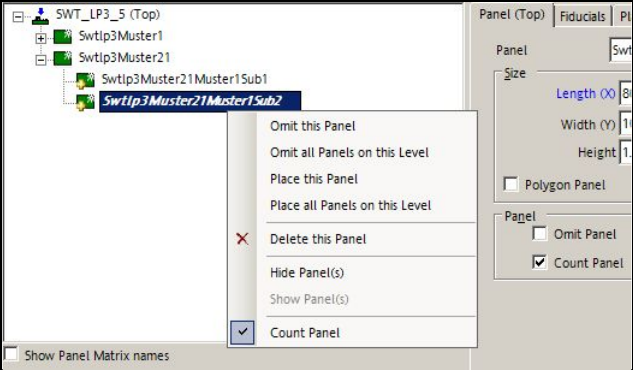
In the Board Editor can be defined which panels on each board shall be counted.
Figure 9-18: Board Editor – Counting panels
If the Panel tab is selected in the Board Editor, the Count Panel function may be enabled either
directly in the tab or in the tree view with the right mouse button.
Precondition: a placement list must have been assigned to the panel.
If panels shall be counted, all desired panels on the board have to be correspondently tagged. Top
side and bottom side have to be considered separately.
SIPLACE Pro Feature Description Ausgabe 05/2014 Edition
151
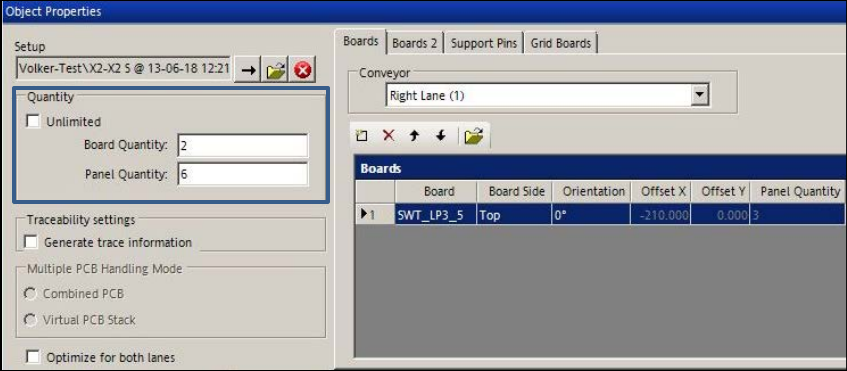
The selected panels of a board are counted in the Recipe Editor.
Figure 9-19: Recipe Editor – Counting boards / panels
The Quantity box contains two available options: Unlimited or Board Quantity / Panel Quantity.
If Board Quantity has been selected, the number of boards can be entered. Hereupon, the
number of panels is calculated and vice versa.
The number of boards can be defined for each recipe in the Production Schedule on the Line
Control GUI.
If the columns shall be displayed for this function, the appropriate setting can be made under
Settings – Application – Columns on the Line Control GUI.
SIPLACE Pro Feature Description Ausgabe 05/2014 Edition
152
9.2.26 Virtual Ink Spot Handling
As of this SIPLACE Pro version, virtual ink spots can be detected via an external Manufacturing
Execution System (MES) and the SIPLACE Board Gate Keeper (BGK) and released for the
stations in the line with the feature Whisper Down the Line (WDTL). Thus, the ink spots don't
have to be read by the PCB camera at each station.
The MES receives the ink spot information. The BGK inquires the ink spot information from the
MES and behaves like a preceding station to the first station in the line. The PCB barcode and the
ink spot information are transmitted via WDTL by the BGK to the first station. Thereafter, the ink
spot information is transferred via WDTL from the first station to the succeeding stations.
Prerequisites
– Station software version => 707.0
– The "Whispering Down the Line" license is required for each station in the line.
– The Whisper Down the Line option must be enabled for all stations.
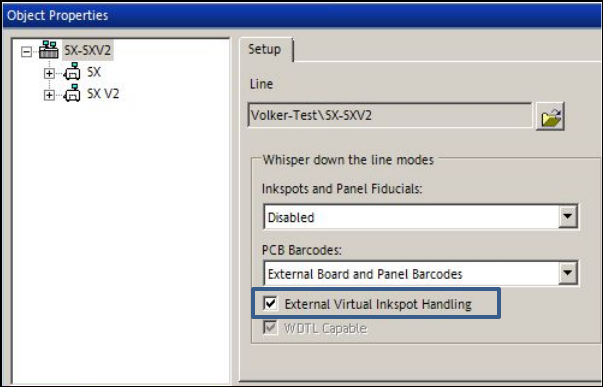
The External Virtual Inkspot Handling feature must be enabled in the Setup Editor in SIPLACE
Pro.
Figure 9-20: Virtual Inkspot Handling
Additionally, the PCB Barcodes drop-down list has been enhanced and contains the following
available options:
– Deactivated
Default, function disabled.
– PCB Barcodes (Boards and Panels)
With this (old) setting, the PCB and panel barcodes are transferred by the first station in the line
via WDTL to the succeding stations.
– External Board Barcode
With this new setting, the PCB barcode is transmitted by the BGK to the first station in the line
via WDTL. If panel barcodes are defined on the board, these will be read by the PCB camera at
the first station and then transferred to the succeeding stations via WDTL.
– External Board and Panel Barcodes
With this new setting, the PCB and panel barcodes are transmitted by the BGK to the first
station in the line via WDTL and then transferred to the succeeding stations via WDTL.