00196920-07_SIPLACE_Pro_FeatureDescription_DE_EN.pdf - 第96页
SIPLACE Pro Fe ature Des cription Ausgabe 05/2014 Edit ion 96 8.4 New Func tions (V10. 1) 8.4.1 SIPLAC E X - Series S – X3 S , X4 S , X4 i S P l acement M achine s SIPLACE Pro suppor ts the X3 S (thre e gantri es), X4 S …
SIPLACE Pro Feature Description Ausgabe 05/2014 Edition
95
8.3 New Components (V10.1)
Component Designation Description
Conveyor system SIPLACE X-Series S For X3 S, X4 S, X4i S
Head Very High Force Pick&Place
Head
For SX V2: placement force up to 70 N
Station software
version
706.1 DX-Series: DX1, DX2 and DX4
SX-Series: SX, SX V2 and SX4
X-Series: X2, X3, X4 and X4i
X-Series S:X3 S, X4 S and X4i S
Feeder type TrayStak Feeder AX For X4i S
Table 8-2: New components V10.0
8.3.1 New Positions and Supported PCB Widths for Fixed Rails in SX1/SX2 V2
The following new positions and PCB widths have been implemented for fixed rails in the SX1/SX2
V2 conveyor system:
Fixed Rail Fixed Rail Position PCB Width Distance of Fixed
Rail
Right/Left
Outer
268 250 286
536
Right/Left
259.7
242
277.2
Table 8-3: Fixed rail positions in SX1/SX2 V2
The outer rail position may be set in SIPLACE Pro but is not supported by the 60x station software.
SIPLACE Pro Feature Description Ausgabe 05/2014 Edition
96
8.4 New Functions (V10.1)
8.4.1 SIPLACE X-Series S – X3 S, X4 S, X4i S Placement Machines
SIPLACE Pro supports the X3 S (three gantries), X4 S and X4i S (four gantries) placement
machines of the new SIPLACE X-Series S.
The MTC2 (on X3 S and X4 S only), 40X and DX component table types are supported.
Smart Pin Support is supported. When Smart Pin Support is used, each gantry has to be equipped
with a pin picker. Additionally, the maximum board length and the setup area are restricted.
The new conveyor system for the SIPLACE X-Series S is supported.
8.4.2 New SIPLACE X-Series S Conveyor System
A new conveyor system has been introduced for the SIPLACE X-Series S placement machines.
The new conveyor system consists of five sections: input section, processing section 1,
intermediate section, processing section 2, output section and supports single and dual conveyor
lane mode. Additionally, input and output belt extensions can be configured.
The maximum board length is 450mm without the Long Board option. The maximum board width
results from the fixed rail position and the conveyor mode (dual or dual as single).
8.4.3 Station Software Version 706.x
SIPLACE Pro supports the 706.x station software version on the X-, SX- and DX-series placement
machines.
8.4.4 New TrayStak Feeder AX Feeder Type
The new TrayStak Feeder AX feeder type is supported on the X4i S placement machine on the
locations 2 and 3 for CPP (Collect&Place + Pick&Place) placement heads.
The TrayStak Feeder AX has one level with a waffle-pack tray for which the size is defined in the
setup, and a stacked inventory of further waffle-pack trays that obeys the FIFO rule. The current
waffle-pack tray cannot be exchanged by another tray of the inventory until all components have
been picked up.
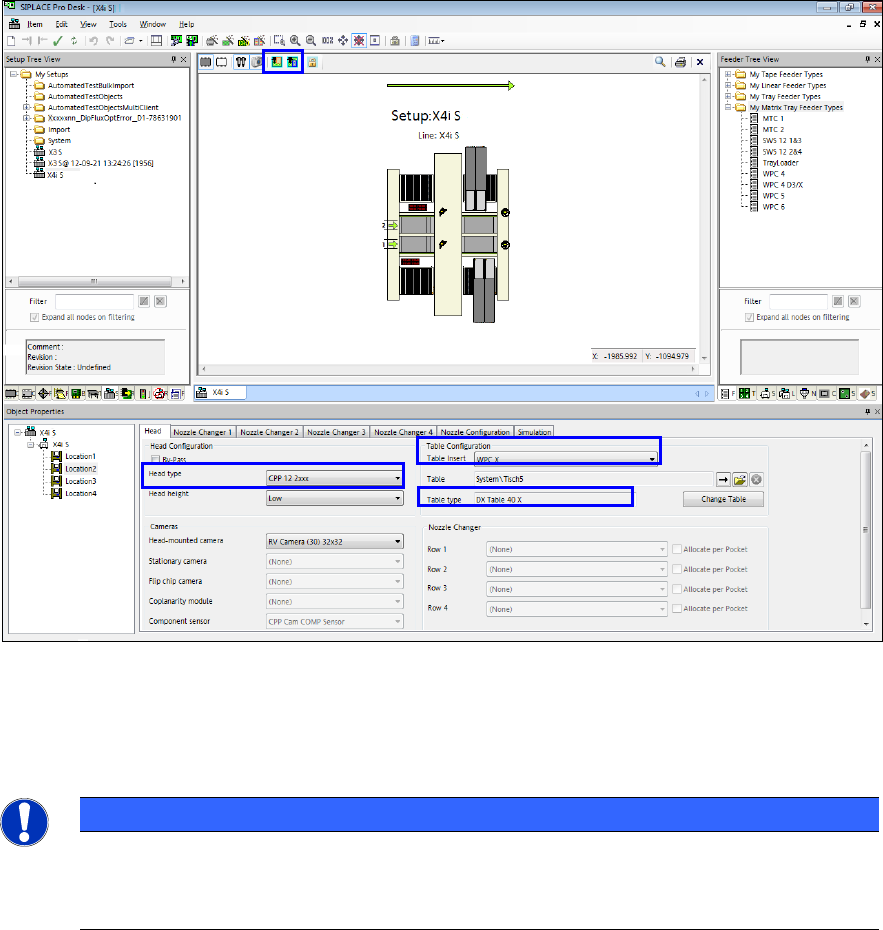
To set up the TrayStak Feeder AX, a table of type DX Table 40 X has to be configured in SIPLACE
Pro Desk on the locations 2 and 3. Additionally, the WPC X table insert has to be selected on these
locations in order to release the traveling range of the placement head for the feeder.
SIPLACE Pro Feature Description Ausgabe 05/2014 Edition
97
Figure 8-7: Configuring TrayStak Feeder AX
Head type, Table Insert and Table type have to be respectively set for Location 2 and Location 3.
Thereafter, the TrayStak Feeder has to be drawn from the Feeder Tree View to Location 2 and
Location 3 in the setup.
NOTICE
Positioning the Feeders
The tray has to be completely positioned in the travel range (visible via the marked
Show / Hide Traveling ranges buttons).
If 2 TrayStak Feeder AX are installed together with an LDU-X (Linear Dipping Unit), the table has to
be manually selected in the station software.