00196920-07_SIPLACE_Pro_FeatureDescription_DE_EN.pdf - 第141页
SIPLACE Pro Fe ature Des cription Ausgabe 05/2014 Edit ion 141 9.2.13 Simplifie d Component Shape Editor The Com ponent Shap e Editor has been impr oved. 9.2.13.1 Setting P lacement Force and Travel P rofiles Placem ent …
SIPLACE Pro Feature Description Ausgabe 05/2014 Edition
140
9.2.10 Incomplete Waffle-Pack Tray Descriptions
Incomplete waffle-pack tray descriptions may now be edited at the station.
The user can create a new waffle-pack tray description in SIPLACE Pro and tag it as incomplete.
Only the height of the waffle-pack tray has to be set correctly. All other properties may be
completed by the operator at the station after the download.
As soon as the changed, completed waffle-pack tray description has been uploaded from the
station into the SIPLACE Pro database, the "incomplete" tag will be deleted for the correspondent
waffle-pack tray.
9.2.11 Position Detection of Waffle-Pack Trays
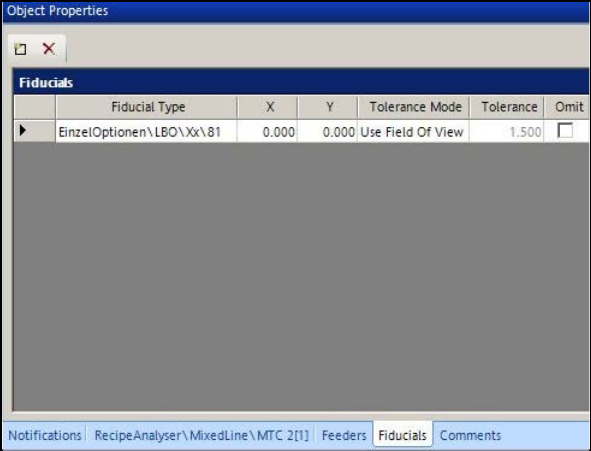
Similarly to boards, fiducials may be defined for waffle-pack trays to increase the placement
accuracy from the support. The fiducial definitions are created in the new Fiducials tab.
Figure 9-5: Defining fiducials for waffle-pack tray
Any number of fiducial positions may be defined. The station software selects and uses two of
them for the measurement.
9.2.12 Changing Acceleration Value for Waffle-Pack Tray
The acceleration values in Y- and Z-direction for MTC and WPC may be changed at the station and
uploaded to SIPLACE Pro.
SIPLACE Pro Feature Description Ausgabe 05/2014 Edition
141
9.2.13 Simplified Component Shape Editor
The Component Shape Editor has been improved.
9.2.13.1 Setting Placement Force and Travel Profiles
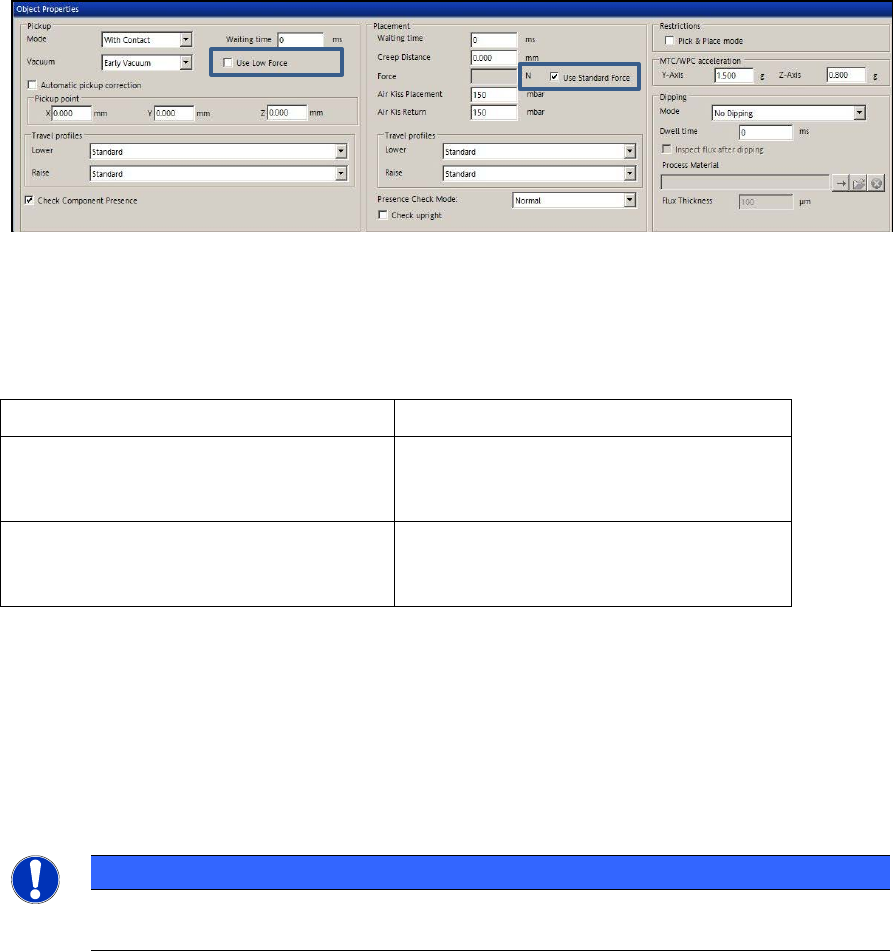
Placement force and travel profiles are set in the Handling tab. The corresponding setting options
have been reduced and simplified.
Figure 9-6: Setting placement force and travel profiles
By enabling the Use Low Force option for pickup and the Use Standard Force option for
placement, the default values are used for the placement force.
The following options can be selected for the travel profiles:
Travel profiles for pickup Travel profiles for placement
Lower: Standard
Special
Lower: Standard
Crawl
Special
Raise: Standard
Slow Start
Creep Start
Raise: Standard
Crawl
Table 9-4: Travel profile options
The assignment of the new options to the previous settings can be found in the Online Help for
SIPLACE Pro.
9.2.13.2 Detection of Upright Components
In the Handling tab of the Component Shape Editor a check for upright components can now
explicitly be activated in the Check Presence Mode by enabling the Check upright field.
NOTICE
The check for upright components is only possible in connection with a component
sensor.
SIPLACE Pro Feature Description Ausgabe 05/2014 Edition
142
9.2.13.3 Automatical Setting of Process Parameters
As of this SIPLACE Pro version, valid component shapes can be defined faster.
If a Placement process is selected for a component shape in the Component Shape Editor, the
required process parameters (such as cameras, nozzles, travel profiles and placement forces) will
be set automatically.
9.2.14 Additional Check Parameters for Components
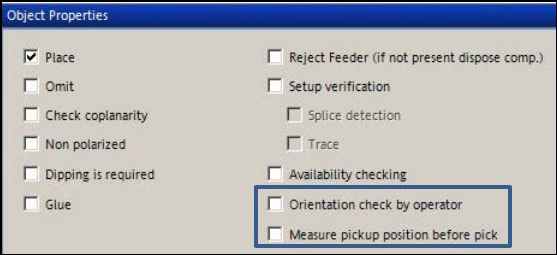
Two new options are available in the Component Editor:
– Orientation check by operator
– Measure pickup position per pick
Figure 9-7: New options in the Component Editor
9.2.14.1 Orientation check by operator
If the pickup angle was changed for components in a new tape feeder or waffle-pack tray and this
is not immediately detected, the components might be placed incorrectly. In order to avoid such
incorrect placements it is now possible to check if the orientation of a component is correct or not.
For this purpose, the affected components have to be tagged in the Component Shape Editor
and the orientation check enabled in the Component Editor.
If the check is enabled, the station stops as soon as the relevant component has to be placed and
prompts the operator to perform a check. The operator at the station may correct the angular
position in error case.
9.2.14.2 Measure pickup position before pick
For improved pickup reliability, the component top side can be measured automatically with the
PCB camera before pickup to determine the exact position of the component within the tape
pocket.