00196920-07_SIPLACE_Pro_FeatureDescription_DE_EN.pdf - 第38页
SIPLACE Pro Fe ature Des cription Ausgabe 05/2014 Edit ion 38 Parameter dialogue wit h the new option in OL2 3.3.3 Sav e Optimizer SPOT F iles in a Separat e Def ault Fo lder In SIPLAC E Pro 5. 0 the SP OT files created …
SIPLACE Pro Feature Description Ausgabe 05/2014 Edition
37
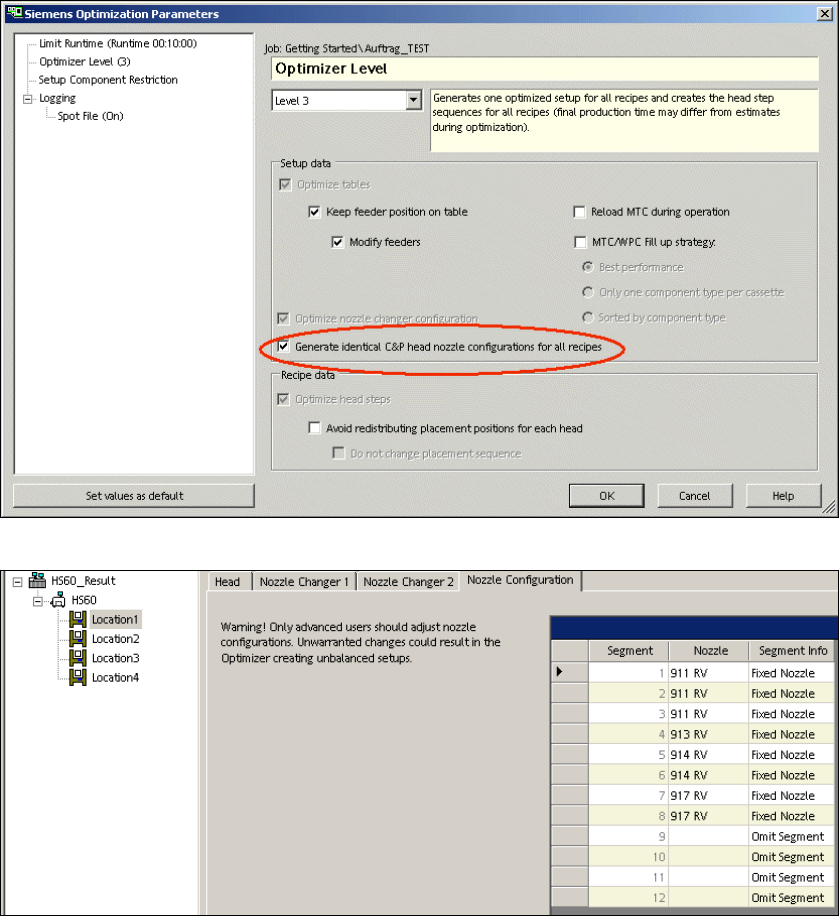
Results in the Setup of "Identical Nozzle Configuration"
3.3.2 Avoid Redistributing Components on Placement Heads
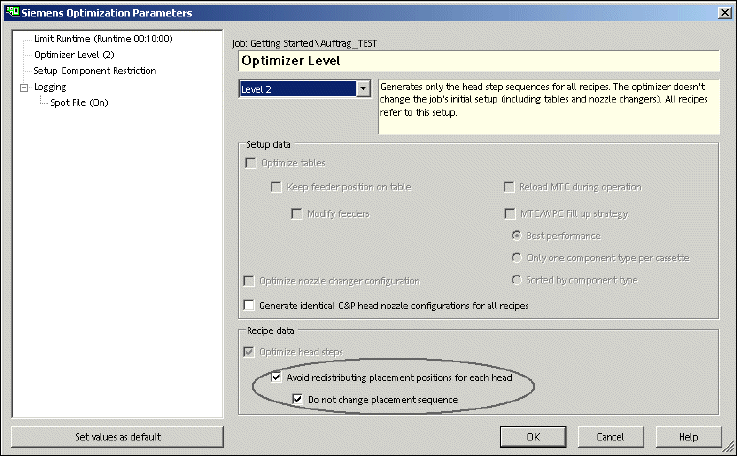
In SIPLACE Pro 5.0 there is the new option "Do not change placement sequence". This option can
only be activated in optimizer level 2 and in expert mode. This new option is an addition to the
already existing option "Avoid redistributing placement positions for each head".
This new option avoids redistributing the placement positions for each head. And in this additional
option the placement sequence during optimization remains the same.
Activate this function if you have already achieved an optimal production during successful
optimization but you need to optimize again. The optimization results you have already achieved
for the production time remain the same after a new optimization.
SIPLACE Pro Feature Description Ausgabe 05/2014 Edition
38
Parameter dialogue with the new option in OL2
3.3.3 Save Optimizer SPOT Files in a Separate Default Folder
In SIPLACE Pro 5.0 the SPOT files created by the optimizer are saved in a default folder SPOT or
in a different user-specific folder. For more details please refer to the online help.
3.4 Features of LC GUI (V5.0 xx)
3.4.1 Download of Partial Setups
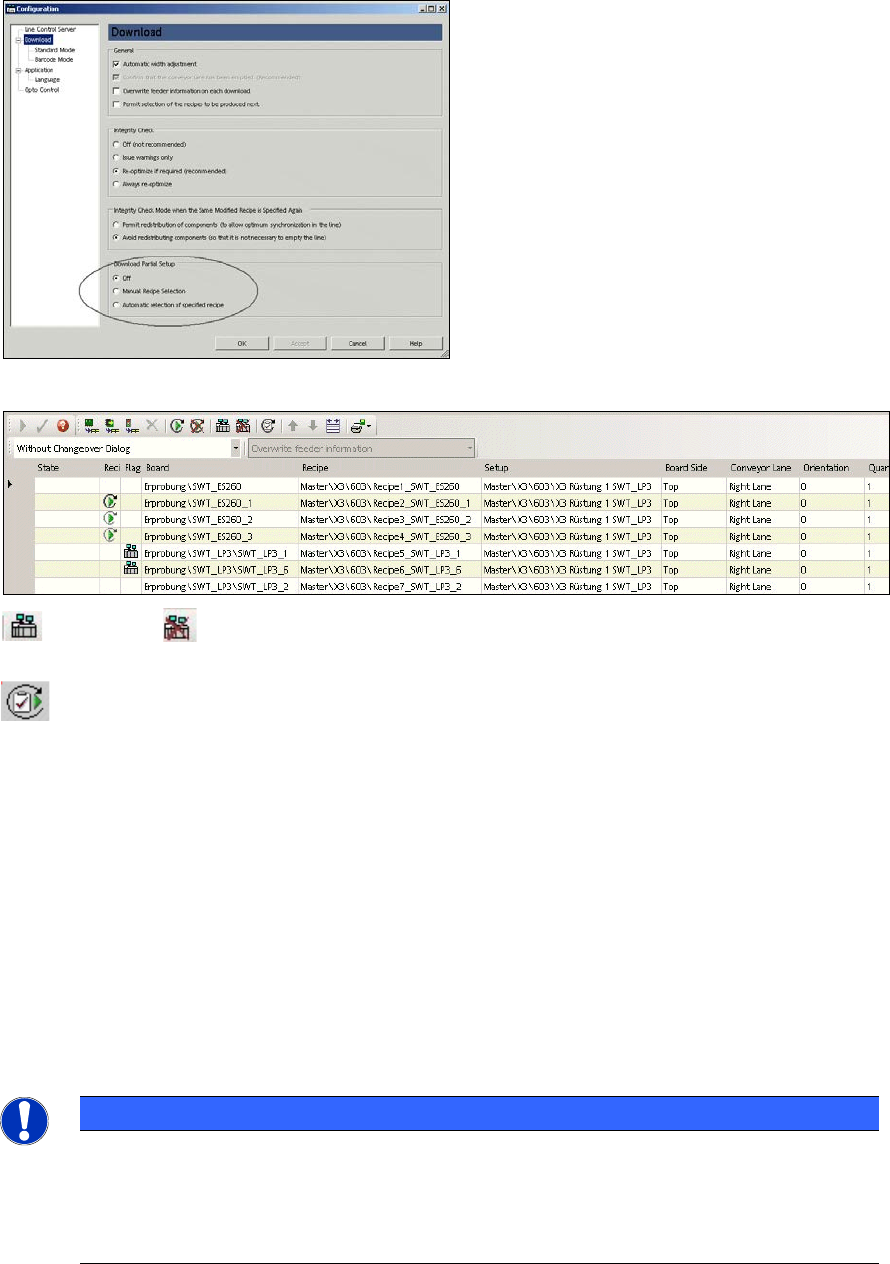
SIPLACE Pro 5.0 enables a download of partial setups. First of all you have to activate the
download of partial setups via Configuration -> Download -> Partial Setup. The setups which are
sent to the stations contain only those components which are needed for the selected recipes. The
recipe selection can be done manually or refers automatically to the downloaded recipe. For more
details please refer to the online help.
Restrictions:
– Asynchronous dual conveyor: If a recipe is being downloaded to a conveyor lane and the same
or another recipe has already been downloaded to the other lane in dual asynchronous mode,
there can be a conflict if the filtered partial setups differ. In order to solve this conflict you have
to download the recipes for both conveyor lanes. The option "Avoid redistributing components"
avoids that the line is completely emptied.
– The barcode mode supports the manual recipe selection only since the line control does not
know which board type is currently in the line.
– If in barcode mode the manual recipe selection is changed there can be a conflict that the
filtered partial setup changes. All active recipes have to refer in barcode mode to the same
filtered partial setup. In order to solve this conflict all active recipes have to be downloaded
together. The option "Avoid redistribution of components" avoids that the line is completely
emptied.
SIPLACE Pro Feature Description Ausgabe 05/2014 Edition
39
enables and disables the download of partial setup for the marked line/recipe. These
icons are only possible during manual recipe selection.
switches over to another recipe to be produced (job or production schedule).
3.5 Features in combination with Station Software 605 and 701 (V5.1)
3.5.1 Support of SIPLACE Machines with Station Software 605 and 701
SIPLACE Pro 5.1 supports the SIPLACE machine types of X Series and D Series running with the
new station software 605 as well as the SIPLACE X4i running with station software 701.
You find a more detailed list in Appendix C: Platform – Station Software – Machine.
SIPLACE Pro 5.1 supports a new version of the vision system on all stations running with station
software 605 or 701.
NOTICE
In SIPLACE Pro 5.1 and station software 605/701 the position of the fixed conveyor side
is given by SIPLACE Pro. This implicates that the user has to enter in SIPLACE Pro the
position of the fixed conveyor side in the line editor when upgrading from 60x to 605
before the first program download. This prevents the conveyor sides travelling
unexpectedly to another position.