00196920-07_SIPLACE_Pro_FeatureDescription_DE_EN.pdf - 第112页
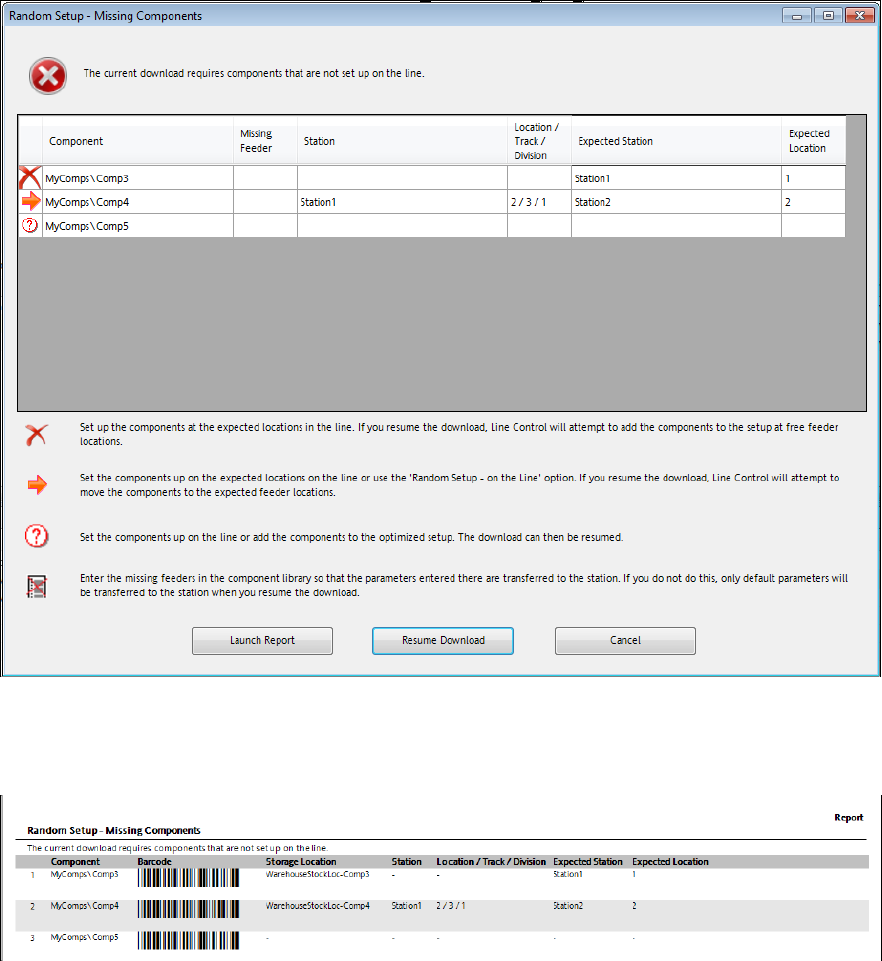
SIPLACE Pro Fe ature Des cription Ausgabe 05/2014 Edit ion 112 Figure 8- 24 : Miss ing components – creat ing a report ► Click on the Launch Report button. The f ollowing repor t is disp layed f or the m issing com ponen…
SIPLACE Pro Feature Description Ausgabe 05/2014 Edition
111
8.4.10 Random Setup - Enhancements
The following enhancements have been performed for Random Setup in this SIPLACE Pro
version.
8.4.10.1 Dialog for Missing Components
– Components that are set-up at wrong locations in the line will be automatically positioned at the
correct locations in the working copy of the setup if the download is repeated with the Resume
Download button. So, such components are treated like missing components. Components at
wrong locations have to be changed over in the line after the download.
– It is now possible to create a report, i.e. to fetch still missing components from the stock.
Example
Following preconditions are assumed in this example:
– An optimized recipe is available for a line with three stations.
– A production schedule that contains the recipe is opened in the Line Control GUI.
– Random Setup – Within a Table is enabled in the production schedule.
– The Comp3 component exists in the optimized recipe but is not yet set-up in the line.
– The Comp4 component exists in the optimized recipe but is set-up at the wrong location.
– The Comp5 component does not exist in the optimized recipe and is not yet set-up in the line.
SIPLACE Pro Feature Description Ausgabe 05/2014 Edition
112
Figure 8-24: Missing components – creating a report
► Click on the Launch Report button.
The following report is displayed for the missing components:
Figure 8-25: Missing components - report
Additionally, the barcode and the storage location are displayed in the report. If no values are
assigned to Storage Location, Station and Location/Track/Division, these three columns will not
be displayed.
► Click on the Resume Download button.
The dialog is displayed again and now only contains the Comp5 component that has to be manually
set-up before the download is repeated one more time.
8.4.10.2 Support of Station-Wise Download
As of this SIPLACE Pro version, the station-wise download is supported combined with Random
Setup. Detailed information can be found in the SIPLACE Random Setup User Manual.
SIPLACE Pro Feature Description Ausgabe 05/2014 Edition
113
8.4.11 SIPLACE LED Pairing – Enhancements in SIPLACE Pro
Following enhancements have been performed for SIPLACE LED Pairing in SIPLACE Pro.
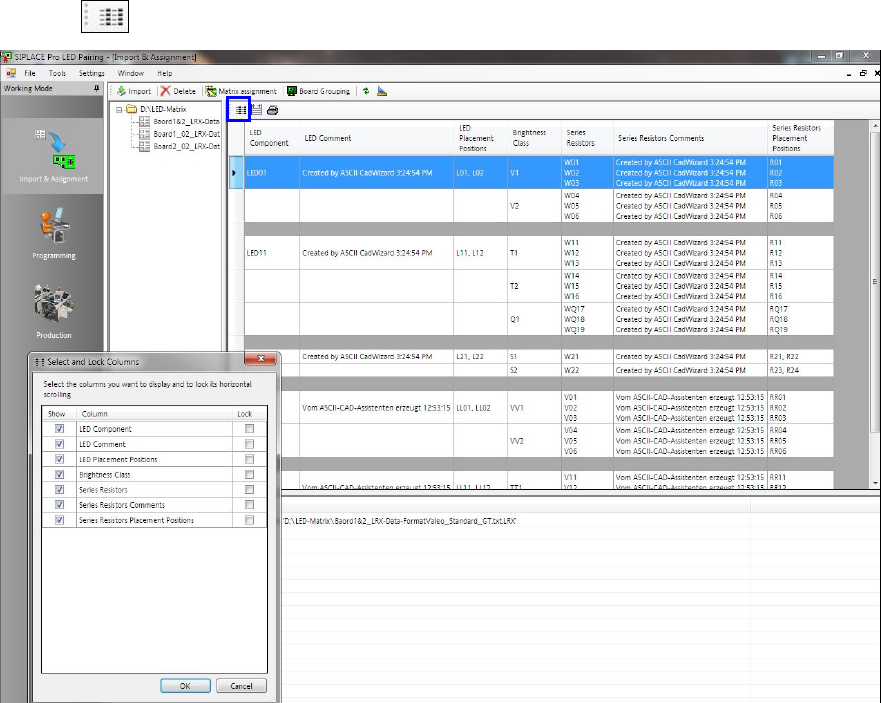
– The functionality of SIPLACE LED Pairing Controller is supported.
– Depending on the configuration, the comments to the LED components can be displayed.
Furthermore, the corresponding series resistors are displayed in separate rows.
– With the button, a dialog is opened in which you can set the columns to be displayed.
Figure 8-26: SIPLACE LED Pairing – displaying columns