00196920-07_SIPLACE_Pro_FeatureDescription_DE_EN.pdf - 第140页
SIPLACE Pro Fe ature Des cription Ausgabe 05/2014 Edit ion 140 9.2.10 Incompl ete Waffle - P ack Tr ay Descript ions Incom plete waffle - pac k tra y descriptions ma y now be edite d at the station. The user can create a…

SIPLACE Pro Feature Description Ausgabe 05/2014 Edition
139
Component Shape
Editor:
Handling tab Change pickup positions and
pickup points
X
Feeder/Feeders tab
Change tolerance values
X
ICOS Lead Groups and
SIPLACE Vision Lead
Groups tabs
Change description of a
component shape in SIPLACE
Vision (measurements, lead
groups)
X
Nozzles tab Remove or add nozzles, if
available on the placement
head. Only the nozzle that is
intended for the component
must not be removed.
X
Confirm Reduced
Acceleration dialog box
Change acceleration values
X
Cameras tab Remove or add cameras. Only
the camera that is intended for
the component in the machine
must not be removed.
X
Board Editor:
Board, Fiducials,
Placements, Inkspots,
Precedences tabs
Change board data
X
Recipe Editor:
Board 1 / 2 tab
Change board data in the recipe
X
Nozzle Editor:
Customized Nozzle tab Add or change customized
nozzle
X
Setup Editor:
Head tab
Change placement heads
X
Nozzle Changer 1/2/3/4 tab
Change nozzle changer
X
Nozzle Configuration tab
Change nozzle configuration
X
Table 9-3: Data changes in the setup
SIPLACE Pro Feature Description Ausgabe 05/2014 Edition
140
9.2.10 Incomplete Waffle-Pack Tray Descriptions
Incomplete waffle-pack tray descriptions may now be edited at the station.
The user can create a new waffle-pack tray description in SIPLACE Pro and tag it as incomplete.
Only the height of the waffle-pack tray has to be set correctly. All other properties may be
completed by the operator at the station after the download.
As soon as the changed, completed waffle-pack tray description has been uploaded from the
station into the SIPLACE Pro database, the "incomplete" tag will be deleted for the correspondent
waffle-pack tray.
9.2.11 Position Detection of Waffle-Pack Trays
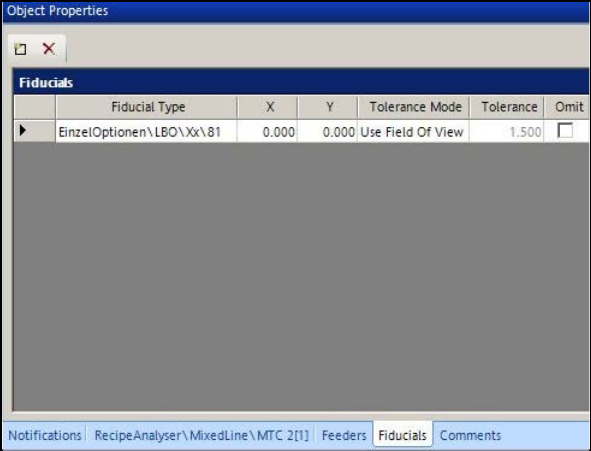
Similarly to boards, fiducials may be defined for waffle-pack trays to increase the placement
accuracy from the support. The fiducial definitions are created in the new Fiducials tab.
Figure 9-5: Defining fiducials for waffle-pack tray
Any number of fiducial positions may be defined. The station software selects and uses two of
them for the measurement.
9.2.12 Changing Acceleration Value for Waffle-Pack Tray
The acceleration values in Y- and Z-direction for MTC and WPC may be changed at the station and
uploaded to SIPLACE Pro.
SIPLACE Pro Feature Description Ausgabe 05/2014 Edition
141
9.2.13 Simplified Component Shape Editor
The Component Shape Editor has been improved.
9.2.13.1 Setting Placement Force and Travel Profiles
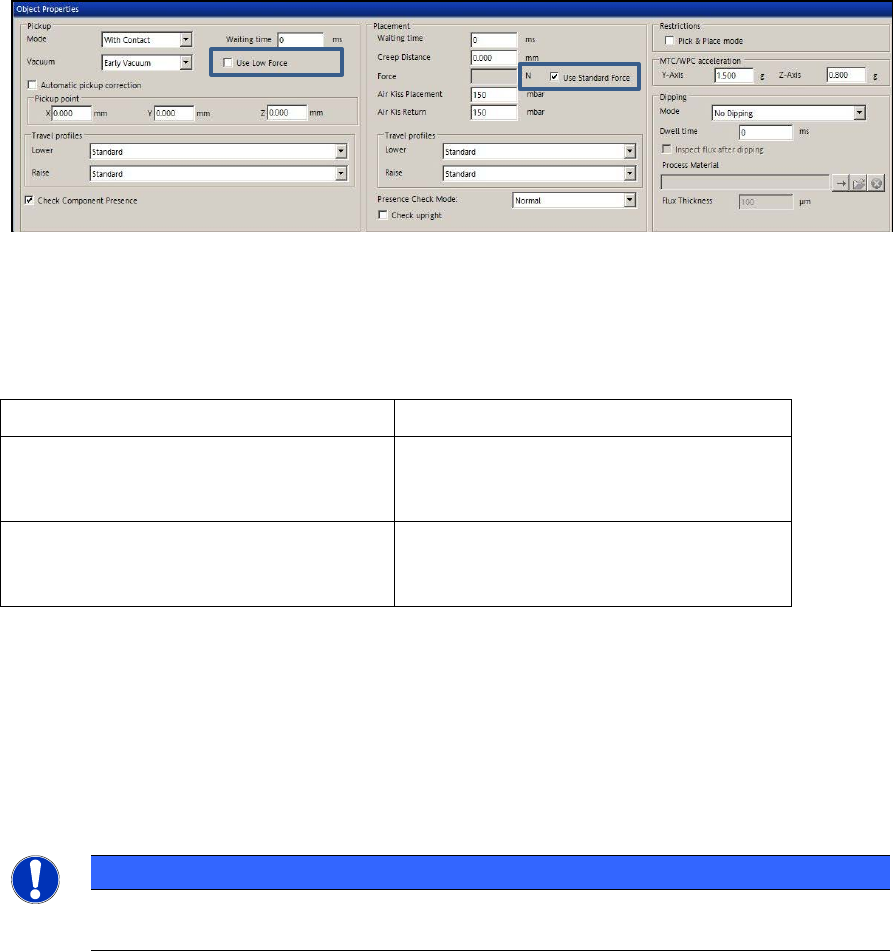
Placement force and travel profiles are set in the Handling tab. The corresponding setting options
have been reduced and simplified.
Figure 9-6: Setting placement force and travel profiles
By enabling the Use Low Force option for pickup and the Use Standard Force option for
placement, the default values are used for the placement force.
The following options can be selected for the travel profiles:
Travel profiles for pickup Travel profiles for placement
Lower: Standard
Special
Lower: Standard
Crawl
Special
Raise: Standard
Slow Start
Creep Start
Raise: Standard
Crawl
Table 9-4: Travel profile options
The assignment of the new options to the previous settings can be found in the Online Help for
SIPLACE Pro.
9.2.13.2 Detection of Upright Components
In the Handling tab of the Component Shape Editor a check for upright components can now
explicitly be activated in the Check Presence Mode by enabling the Check upright field.
NOTICE
The check for upright components is only possible in connection with a component
sensor.