00196920-07_SIPLACE_Pro_FeatureDescription_DE_EN.pdf - 第53页
SIPLACE Pro Fe ature Des cription Ausgabe 05/2014 Edit ion 53 4.2.3 Linear Dipping Uni t at the X Table (Dipping Mode) SIPLACE Pro 6.0 s upports dipping of com ponents with the linear dippi ng unit at t he X tab le (LDU …

SIPLACE Pro Feature Description Ausgabe 05/2014 Edition
52
4.2.1 Overview of the Component Supply
Station software 702.xx supports the following already existing feeder types.
Feeder Type Name
Tape Feeder
8 mm X
12 mm X
16 mm X
24 mm X
32 mm X
44 mm X
56 mm X
72 mm X
88 mm X
Matrix Tray Feeder MTC 2
Manual Tray Feeder
Carrier X
Arbitrary Carrier X
Linear Feeder with
adapter on X table
Linear 3x95 AX
Linear 2x15 AX
Linear 30 AX
Accessories with adapter
on X table
Label Presenter AX
Reject Conveyor AX
Linear Dipping Unit X
4.2.2 Possible Clearance under the PCB
Station Type Station Software Permitted Settings
X2, X3, X4 702.xx Setting in a range of 0 mm to 40 mm
(default: 20 mm).
X4i 701.xx, 702.xx Setting in a range of 0 mm to 25 mm
(default: 20 mm).
SIPLACE Pro Feature Description Ausgabe 05/2014 Edition
53
4.2.3 Linear Dipping Unit at the X Table (Dipping Mode)
SIPLACE Pro 6.0 supports dipping of components with the linear dipping unit at the X table (LDU-
X) for the Twin Head, the C&P-20 head and the CPP head.
Head Station Software Mode
C&P (6/12) <=605.xx Dipping Vision
Twin Head all Dipping Vision & Vision Dipping
C&P 20 <605.xx ---
C&P 20 >=605.xx Dipping Vision & Vision Dipping
CPP >=702.xx Dipping Vision & Vision Dipping
4.3 Quad Lane Conveyor
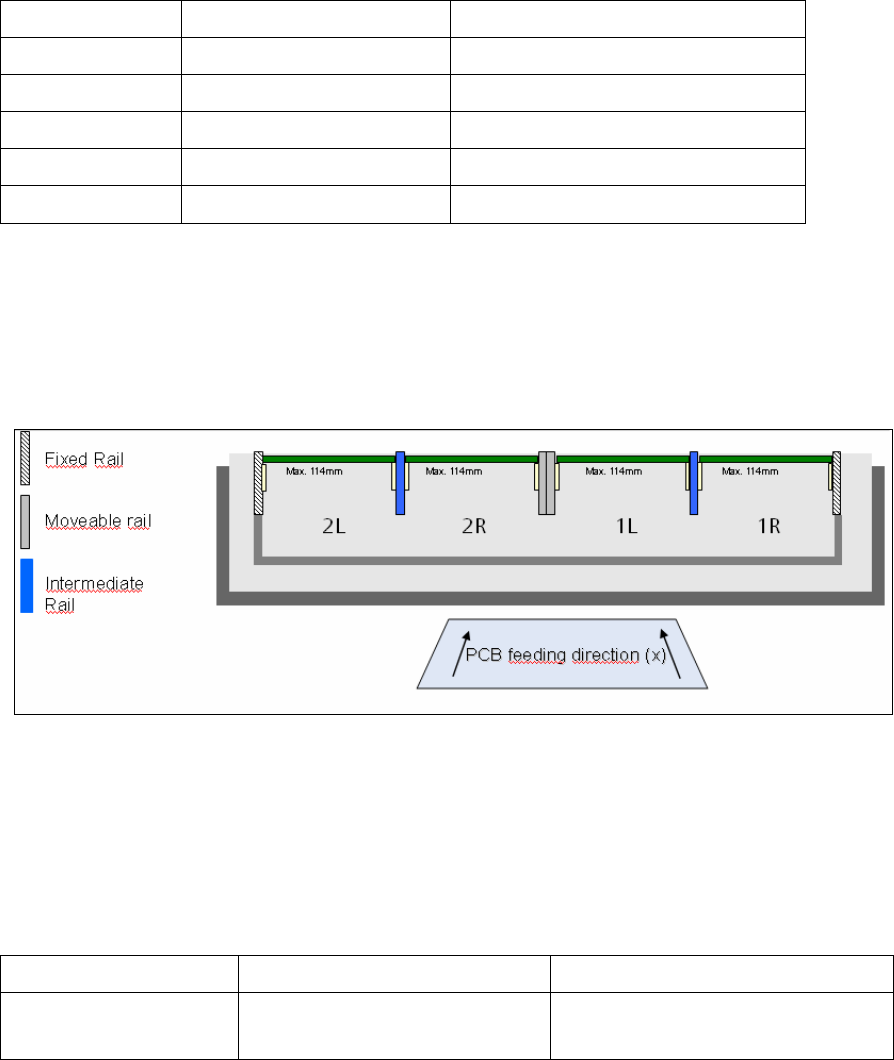
SIPLACE Pro 6.0 supports the Quad Lane conveyor for the X series and for X41 machines. The
Quad Lane conveyor consists of 4 lanes, the so-called sub lanes Lane1 Right, Lane 1 Left and
Lane 2 Right, Lane 2 Left (1R/1L and 2R/2L).
As in previous SIPLACE Pro versions recipes are produced on lanes 1 and 2 and then sent to the
station (download), however not on the two sub lanes Right and Left. Within the recipe the PCBs
can then be defined for either the right and/or the left side.
4.3.1 New Hardware Options in the Line Editor
In the Line Editor the new transport system type is configured.
Station Type Object Type Name
X2, X3, X4 and
X4i
Transport system type Quad Conveyor Modular X

SIPLACE Pro Feature Description Ausgabe 05/2014 Edition
54
4.3.2 Assigning the Sub Lanes in LCGUI
Conveyor Lane Sub Lane Note
Right Lane 1 Right Sub Lane (1R)
Left Lane 1 Left Sub Lane (1L)
Right Lane 2 Right Sub Lane (2R)
Left Lane 2 Left Sub Lane (2L)
Both Lanes Right Sub Lanes (1R, 2R) The setting "Both Lanes" is used in the
"Alternating" mode.
In the I-Placement placement mode
separate recipes must be used.
Both Lanes Left Sub Lanes (1L,2L)
4.3.3 Restrictions for Machines with Quad Lane Transport
The Quad Lane Transport in SIPLACE Pro V6.0 shows the following restrictions:
● The Quad Lane Transport cannot be used in conjunction with the following options:
● Virtual PCB
● Station-wise Download
● PCB Barcode
● The operation of the Quad Lane Transport is only possible if the transport mode is set to Quad
Lane at all stations of the line.