00196920-07_SIPLACE_Pro_FeatureDescription_DE_EN.pdf - 第60页
SIPLACE Pro Fe ature Des cription Ausgabe 05/2014 Edit ion 60 5 F eature De scr ipti on SIPL A C E Pro V7.xx New a nd modifi ed Machine Support (V 7.0) 5.1 New Machi ne Type SIPLACE SX SIPLAC E Pro 7 .0 support s the n e…
SIPLACE Pro Feature Description Ausgabe 05/2014 Edition
59
4.9 Reworked Gerber Data Import (Option)
A separate license is required in order to use this function. The Gerber data import has been
modified. Now "real" Gerber data are imported. The advantage of this modified data import lies in
keeping the original data structure. Thus, problems regarding the resolution, that may occur when
converting Gerber data into jpeg or bitmap files, can be avoided.
The import is now directly carried out in the PCB Editor. The PCB Editor provides the new Gerber
Data for this. The menu items were omitted.
In addition, the Gerber data can be arranged in layers. These layers are defined in the new Gerber
Layer tab that can be accessed via the menu Tools => Settings. If the Gerber data is arranged in
layers these layers can be displayed in different colors in the PCB Editor or they can be shown or
hidden.
For detailed information please refer to the online help in SIPLACE Pro Desk.
4.9.1 Polygon Panel Forms
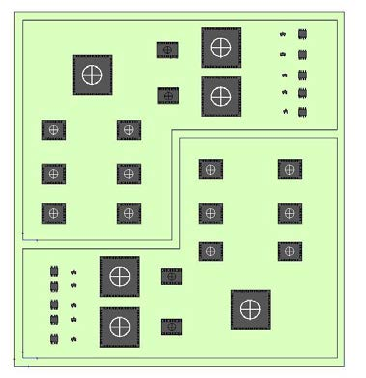
Until now it was only possible to create rectangular panels on a PCB. Now it is possible to define
more complex panel forms (as the following example shows).
For this the PCB Editor provides the Panel tab with the Polygon Panel function. For these panels
an alternative form (e.g. a hexagon) can be created by means of polygon points.
For detailed information please refer to the online help in SIPLACE Pro Desk.

SIPLACE Pro Feature Description Ausgabe 05/2014 Edition
60
5 Feature Description SIPLACE Pro V7.xx
New and modified Machine Support (V7.0)
5.1 New Machine Type SIPLACE SX
SIPLACE Pro 7.0 supports the new machine type SIPLACE SX. The SIPLACE SX can be
configured with one or two gantries (gantry modularity).
In the station editor you define if the SIPLACE SX is equipped with one or two gantries at the
factory. You can change this configuration in the setup editor.
For detailed descriptions and possible configurations, please refer to the relevant SIPLACE SX
documents.
5.1.1 New Hardware Options
Es stehen neue Hardware Optionen für die Konfiguration der SIPLACE SX zur Verfügung.
Object type Term Description
Table type
Change Over Table 60 X Component changeover table for
SIPLACE SX machines with 60 tracks.
This table can be placed at the inner and
the outer position of the SIPLACE SX.
Table WPC 60 X Table for setting up the WPC5 at the
SIPLACE SX.
Conveyor type
Single Conveyor SX Single conveyor at the SIPLACE SX.
Dual Conveyor SX Dual conveyor at the SIPLACE SX.
5.1.2 Heavy PCB
The PCB conveyor of the SIPLACE SX allows the transport of heavy PCBs.
● For single conveyor (assembled PCBs of 2 to 5 kg)
● For dual conveyor (assembled PCBs of 1 to 2 kg)
For detailed information, please refer to the online help in SIPLACE Pro Desk.
SIPLACE Pro Feature Description Ausgabe 05/2014 Edition
61
5.2 Support of 2x8mm X Feeders
SIPLACE Pro 7.0 supports the new 2x8mm X-Feeder type for machines of the X series, X4i and
SX. This feeder is equipped with two component divisions in 8 mm tapes. The 2x8mm X feeder can
be used for 0201 component shapes but not for 01005 shapes.
For a detailed description, please refer to the relevant documents.
5.3 Support of the IPTE Multi Stick Feeder
SIPLACE Pro 7.0 supports the new IPTE MSF 60 and IPTE MSF XL80 feeder type for machines of
the X series and SX1,SX2. The feeders can be placed on the X table types COT 40 and COT 40.
5.4 Support of the Multistar CPP Placement Head
The Multistar CPP head (Collect&Pick&Place) has the ability to work in three different placement
modes.
● Small components can be placed in the Collect&Place mode.
● Small to medium components can be placed in the mixed mode.
● Medium components and one large component (in the 6 o' clock position) can be placed in the
Pick&Place mode.
The Multistar CPP head can be installed in two different positions (high and low position). In the
high position components with a height of up to 11.5 mm can be placed.