00196920-07_SIPLACE_Pro_FeatureDescription_DE_EN.pdf - 第43页
SIPLACE Pro Fe ature Des cription Ausgabe 05/2014 Edit ion 43 Preceden ce Finde r restrict ions: – The Prec edence Fin der do es onl y work on O NE board . – Chip - Stacking is not su p ported. This m eans the plac ement…
SIPLACE Pro Feature Description Ausgabe 05/2014 Edition
42
3.6.2 Precedence Finder
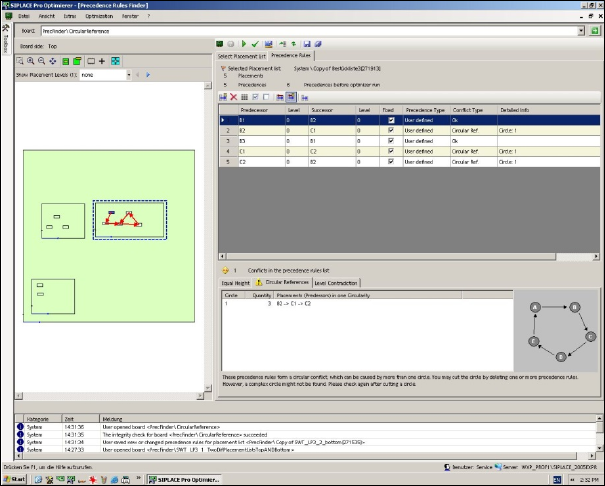
With SIPLACE Pro 5.1 the Precedence Finder is an additional tool in the SIPLACE Pro Optimizer
GUI. The Precedence Finder works out automatically rules for the placement sequence for all
components to be placed. This means the Precedence Finder analyzes the component, nozzle and
board data and generates precedence rules for the placement sequence.
Fig.: Precedence Finder
Main causes for placement sequence problems:
– Same hight of components
– Circular precedence (if one or more placements form a circle that the optimizer can not
process)
– Conflicts between placement level and placement sequence
– Nozzle collision
– Shielding (several components under a shield)
The Precedence Finder allows the user to check precedences, to generate precedences or to keep
precedences. In addition placement sequences could be visualized graphically. More detailed
information how to use precedences are described in the online help.
SIPLACE Pro Feature Description Ausgabe 05/2014 Edition
43
Precedence Finder restrictions:
– The Precedence Finder does only work on ONE board.
– Chip-Stacking is not supported.
This means the placement sequence due to overlapping chips can not be included because the Z
axis is not considered.
– The Precedence Finder considers every component as cuboid or cylinder of constant height.
– For customized nozzles the basic nozzle is used for checking the precedence rules.
3.7 Features of Optimization (V5.1)
3.7.1 Freeze Tables
In the setup editor (tabular view) of SIPLACE Pro 5.1 you can "freeze" individual tables via the
context menu. The optimizer is not allowed to setup or delete feeder or components on "frozen"
tables.
3.7.2 Remove Unused Feeders from Fixed Setup
In SIPLACE Pro 5.1 following two settings are added in the optimizer parameter dialog.
– (a) Keep feeder position on tables.
– (b) Ignore fixed setup options.
– (c) Do not allow components to be setup again.
Setting (a) and (b) delete all components and feeders in a fixed setup that are no longer required.
Setting (c) prevents that a component that is already setup is setup again even if the optimizer
recommends this setting.
For more detailed information please refer to the online help.
3.7.3 Option Interference Edge in the Board Editor
In SIPLACE Pro the user has the option to enter in the board editor an interference edge. This
enables SIPLACE Pro to consider the maximal height of all placements or all structures on the
board before the board enters the placement machine. If the interference edge is higher than the
distance to the placement head the optimizer displays an error message and the board cannot be
placed.
SIPLACE Pro Feature Description Ausgabe 05/2014 Edition
44
3.8 Features of LC GUI (V5.1)
3.8.1 Avoid redistributing components in Integrity Check
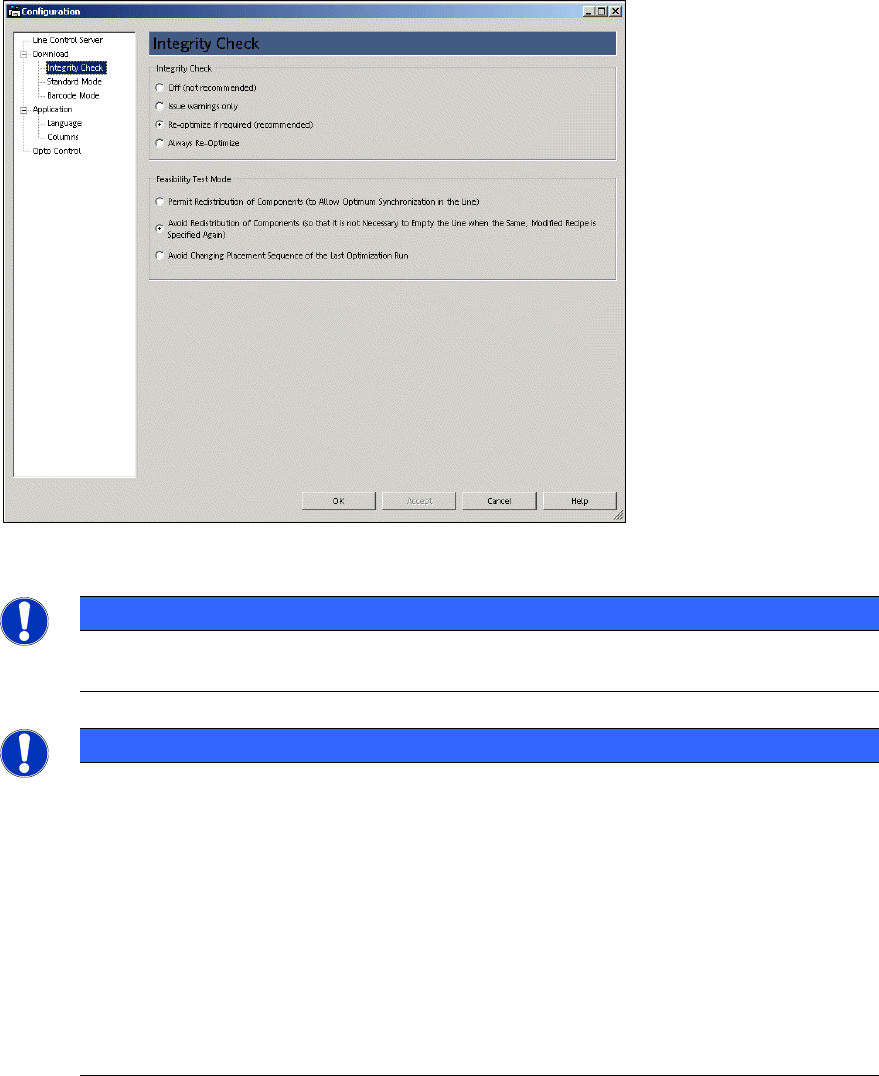
In the LC GUI the function "Avoid redistributing components…" is expanded.
The options "Avoid redistributing components…" and "Avoid changing placement sequence during
last optimizer run" require the same placement sequence and thus the same placement time.
Fig. Integrity Check
NOTICE
If the placement sequence could not be kept (i.e. by setup of an additional component),
the user will receive an error message.
NOTICE
In some cases there are different optimizer results for optimizer level OL2 and OL3.
– Boards with a lot of panels with fiducials
– Long Board Option (LBO) in step mode
Workaround: Before optimization or download select following options from the menu.
– Desk: Job Editor -> Configure… -> Siemens Optimizer Parameter
Optimization: Optimizer Level
– "Avoid redistributing placement position for each head" and
– "Do not change placement sequence"
– LC GUI: Integrity check: "Avoid redistributing components…"