00196920-07_SIPLACE_Pro_FeatureDescription_DE_EN.pdf - 第37页
SIPLACE Pro Fe ature Des cription Ausgabe 05/2014 Edit ion 37 Results in the Set up of "Ide ntical No zzle Conf igurat ion" 3.3.2 Avoid Redistributing Components on Placement Hea ds In SIPLAC E Pro 5. 0 there i…
SIPLACE Pro Feature Description Ausgabe 05/2014 Edition
36
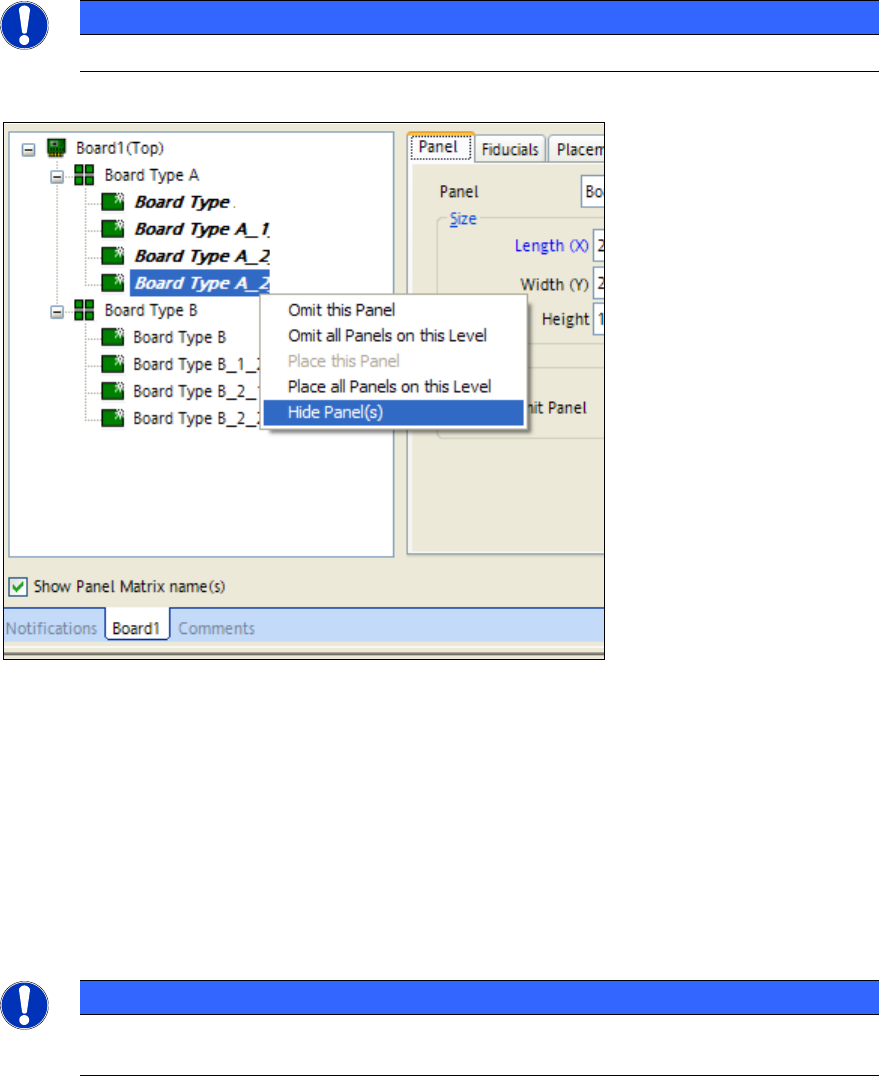
3.2.4 Show and Hide Individual Panels on a Board
It is not only possible to hide and show placement positions of complete boards but also to hide
and show single panels. This setting is only locally visible in the board editor and it is not saved.
The optimizer considers all boards and does not consider if these panels are shown or hidden.
NOTICE
Panels from the 3rd level (main level = level 0) can not be shown or hidden.
3.3 Optimizer Features (V5.0 xx)
3.3.1 Identical Nozzle Configuration for C&P Heads for all Recipes in a Job
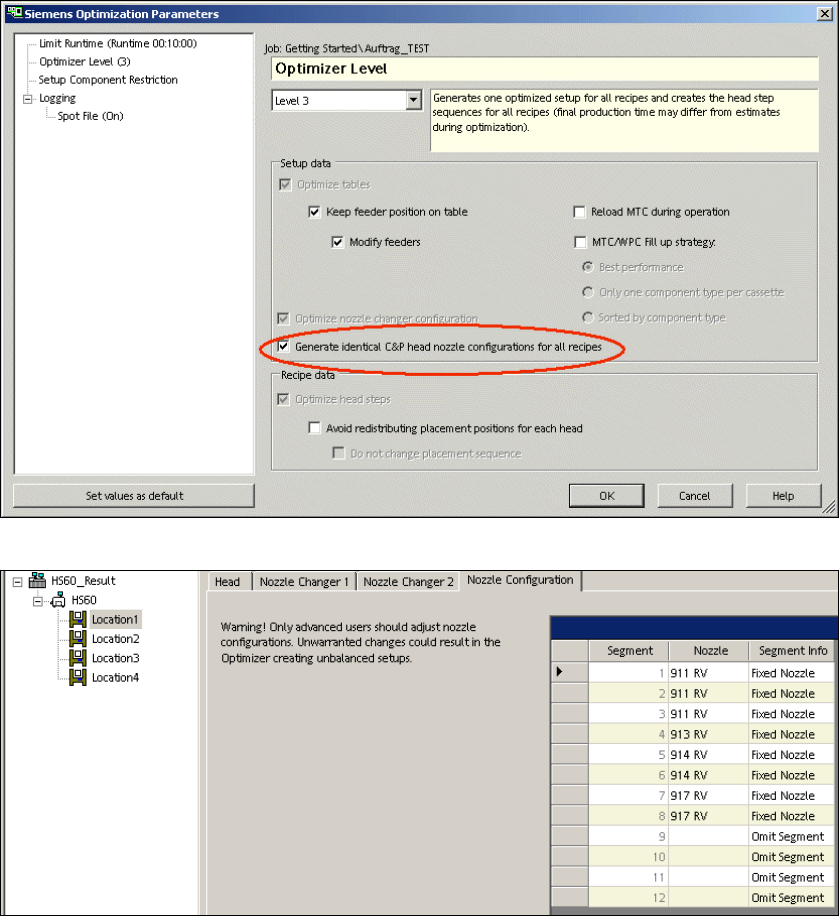
In SIPLACE Pro 5.0 there is a new option (Generate identical C&P head nozzle configuration for all
recipes) in the optimizer parameters. This option enables the same nozzle configuration (fixed
setup) on the C&P heads for all recipes of a job. This configuration avoids a nozzle change if
several recipes have to be placed in a job.
NOTICE
This function is also valid for the special segments required for 01005 placement of the D
series. The segments do not have to be changed for every recipe.
SIPLACE Pro Feature Description Ausgabe 05/2014 Edition
37
Results in the Setup of "Identical Nozzle Configuration"
3.3.2 Avoid Redistributing Components on Placement Heads
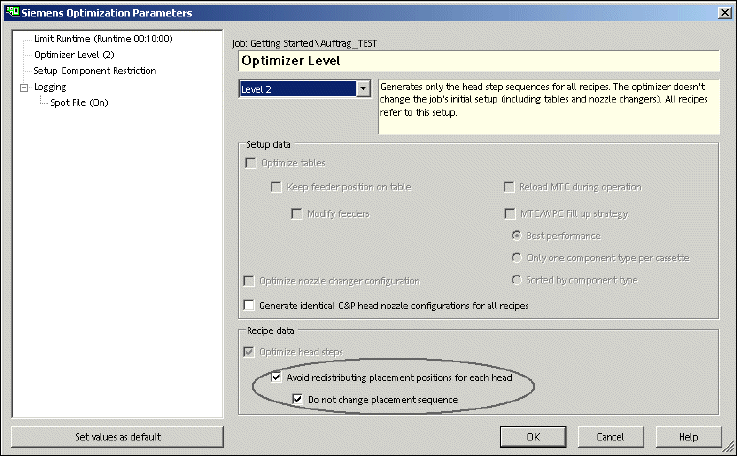
In SIPLACE Pro 5.0 there is the new option "Do not change placement sequence". This option can
only be activated in optimizer level 2 and in expert mode. This new option is an addition to the
already existing option "Avoid redistributing placement positions for each head".
This new option avoids redistributing the placement positions for each head. And in this additional
option the placement sequence during optimization remains the same.
Activate this function if you have already achieved an optimal production during successful
optimization but you need to optimize again. The optimization results you have already achieved
for the production time remain the same after a new optimization.
SIPLACE Pro Feature Description Ausgabe 05/2014 Edition
38
Parameter dialogue with the new option in OL2
3.3.3 Save Optimizer SPOT Files in a Separate Default Folder
In SIPLACE Pro 5.0 the SPOT files created by the optimizer are saved in a default folder SPOT or
in a different user-specific folder. For more details please refer to the online help.
3.4 Features of LC GUI (V5.0 xx)
3.4.1 Download of Partial Setups
SIPLACE Pro 5.0 enables a download of partial setups. First of all you have to activate the
download of partial setups via Configuration -> Download -> Partial Setup. The setups which are
sent to the stations contain only those components which are needed for the selected recipes. The
recipe selection can be done manually or refers automatically to the downloaded recipe. For more
details please refer to the online help.
Restrictions:
– Asynchronous dual conveyor: If a recipe is being downloaded to a conveyor lane and the same
or another recipe has already been downloaded to the other lane in dual asynchronous mode,
there can be a conflict if the filtered partial setups differ. In order to solve this conflict you have
to download the recipes for both conveyor lanes. The option "Avoid redistributing components"
avoids that the line is completely emptied.
– The barcode mode supports the manual recipe selection only since the line control does not
know which board type is currently in the line.
– If in barcode mode the manual recipe selection is changed there can be a conflict that the
filtered partial setup changes. All active recipes have to refer in barcode mode to the same
filtered partial setup. In order to solve this conflict all active recipes have to be downloaded
together. The option "Avoid redistribution of components" avoids that the line is completely
emptied.