00196920-07_SIPLACE_Pro_FeatureDescription_DE_EN.pdf - 第54页
SIPLACE Pro Fe ature Des cription Ausgabe 05/2014 Edit ion 54 4.3.2 A ssigni ng the Sub Lanes in LCG UI Conveyor La ne S ub Lane Note Right Lane 1 Right Sub L ane (1R) Left Lan e 1 Left Sub Lane (1 L) Right Lane 2 Right …
SIPLACE Pro Feature Description Ausgabe 05/2014 Edition
53
4.2.3 Linear Dipping Unit at the X Table (Dipping Mode)
SIPLACE Pro 6.0 supports dipping of components with the linear dipping unit at the X table (LDU-
X) for the Twin Head, the C&P-20 head and the CPP head.
Head Station Software Mode
C&P (6/12) <=605.xx Dipping Vision
Twin Head all Dipping Vision & Vision Dipping
C&P 20 <605.xx ---
C&P 20 >=605.xx Dipping Vision & Vision Dipping
CPP >=702.xx Dipping Vision & Vision Dipping
4.3 Quad Lane Conveyor
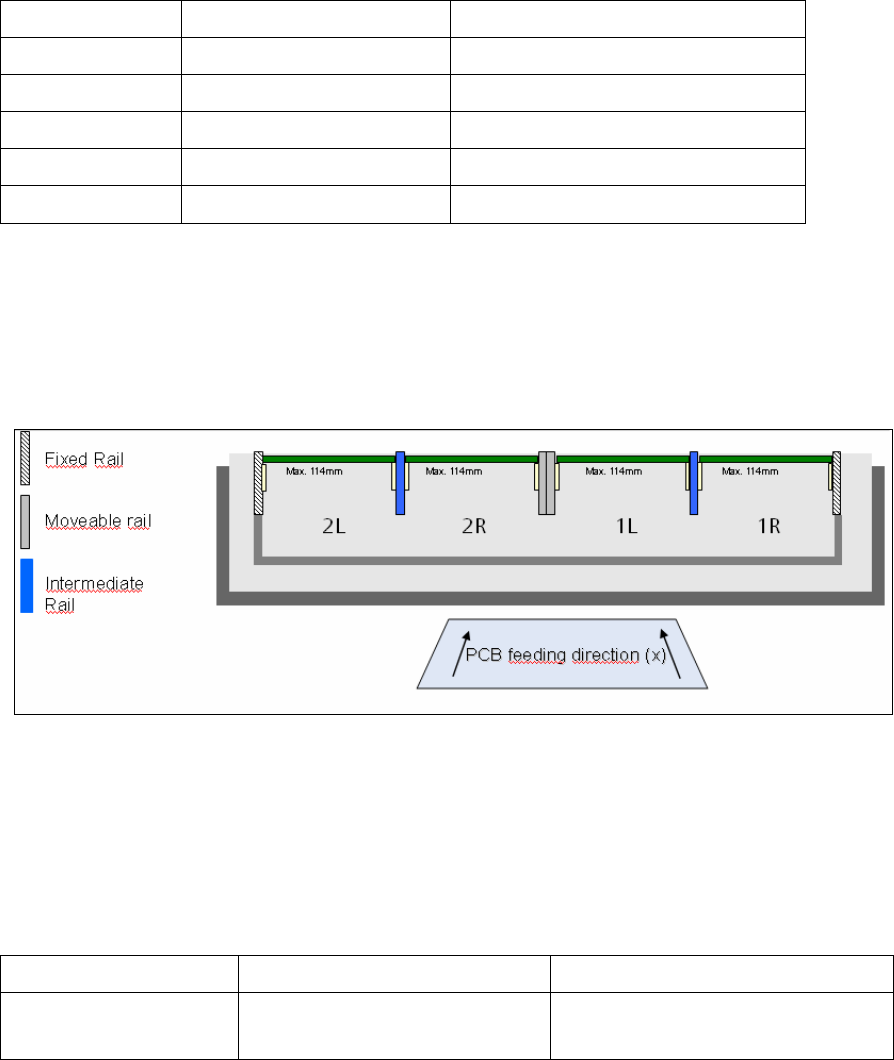
SIPLACE Pro 6.0 supports the Quad Lane conveyor for the X series and for X41 machines. The
Quad Lane conveyor consists of 4 lanes, the so-called sub lanes Lane1 Right, Lane 1 Left and
Lane 2 Right, Lane 2 Left (1R/1L and 2R/2L).
As in previous SIPLACE Pro versions recipes are produced on lanes 1 and 2 and then sent to the
station (download), however not on the two sub lanes Right and Left. Within the recipe the PCBs
can then be defined for either the right and/or the left side.
4.3.1 New Hardware Options in the Line Editor
In the Line Editor the new transport system type is configured.
Station Type Object Type Name
X2, X3, X4 and
X4i
Transport system type Quad Conveyor Modular X

SIPLACE Pro Feature Description Ausgabe 05/2014 Edition
54
4.3.2 Assigning the Sub Lanes in LCGUI
Conveyor Lane Sub Lane Note
Right Lane 1 Right Sub Lane (1R)
Left Lane 1 Left Sub Lane (1L)
Right Lane 2 Right Sub Lane (2R)
Left Lane 2 Left Sub Lane (2L)
Both Lanes Right Sub Lanes (1R, 2R) The setting "Both Lanes" is used in the
"Alternating" mode.
In the I-Placement placement mode
separate recipes must be used.
Both Lanes Left Sub Lanes (1L,2L)
4.3.3 Restrictions for Machines with Quad Lane Transport
The Quad Lane Transport in SIPLACE Pro V6.0 shows the following restrictions:
● The Quad Lane Transport cannot be used in conjunction with the following options:
● Virtual PCB
● Station-wise Download
● PCB Barcode
● The operation of the Quad Lane Transport is only possible if the transport mode is set to Quad
Lane at all stations of the line.
SIPLACE Pro Feature Description Ausgabe 05/2014 Edition
55
New and modified functions (V6.xx)
4.4 Recipe Analyzer API (Option)
The Recipe Analyzer API enables the implementation of 3rd party applications for reading out the
recipe analysis data for further processing. A separate license is required in order to use this
function. For a detailed description of the option and its functionality in SIPLACE Pro 6.0 please
refer to the "Interface Description - Recipe Analyzer API" document with the item no.
[00196138-xx].
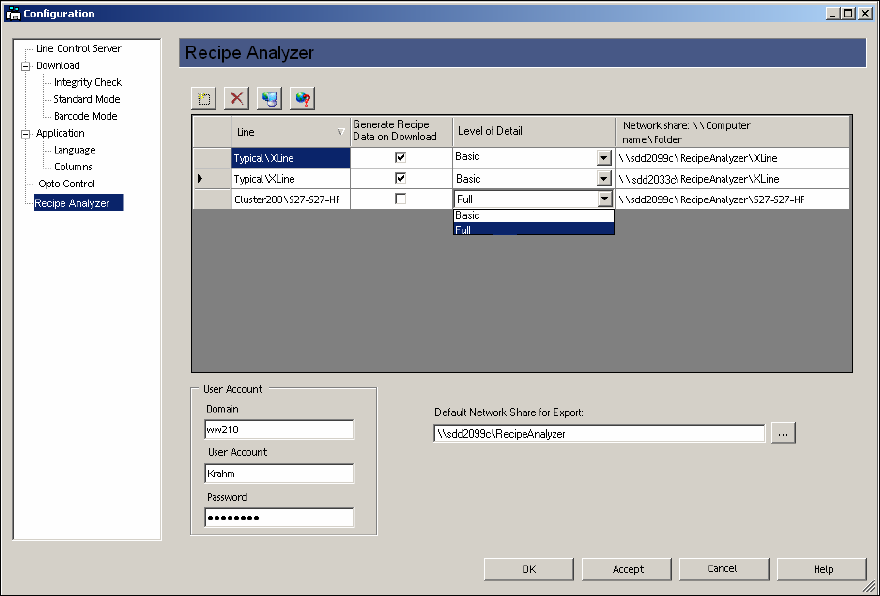
4.5 Generating Recipe Analyzer Data during Download (Option)
A separate license is required in order to use this function. It is possible in SIPLACE Pro 6.0 to
have the recipe analysis generate data automatically while the recipe is being sent to the station
(download). This data is generated in XML format and can be provided in a shared directory.
The network share is configured in LCGUI.
This data can then e. g. be processed and evaluated by an external application.
For a detailed description of the data structure please refer to the "Interface Description – Recipe
Analyzer API" document with the item no. [00196138-xx].