00196920-07_SIPLACE_Pro_FeatureDescription_DE_EN.pdf - 第150页
SIPLACE Pro Fe ature Des cription Ausgabe 05/2014 Edit ion 150 9.2.24 A ut omaticall y Set Up and Fixed Nozzles on One Pl acement Head The no zzle setup f or the se gments of a placem ent head ar e define d in the S etup…
SIPLACE Pro Feature Description Ausgabe 05/2014 Edition
149
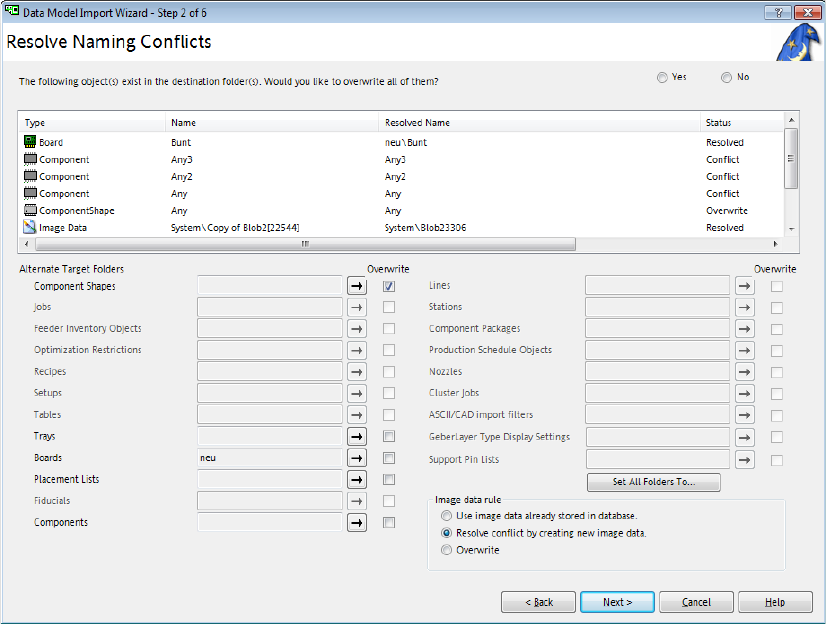
9.2.22 Overwriting Single Object Types during Import
Previously, only a global overwriting of all available objects was supported by the import wizard
during import of objects in SIPLACE Pro Desk. As of this SIPLACE Pro version it is possible to tag
and overwrite single object types.
Figure 9-17: Overwriting object types during import
All object types have e check box of their own to be tagged with a checkmark. Only the object
types for which naming conflicts exist are enabled.
9.2.23 Job Editor – Query for Board Top Side and Bottom Side
If a board is added in an opened job in the Job Editor, the board top side will be automatically
assigned to the new created recipe.
As of this software version, an additional dialog will open if the board bottom side is not empty,
querying if the board bottom side shall be added. The board bottom side is regarded as empty if no
placement list is assigned to it.
The query is displayed in the Job Editor only.
SIPLACE Pro Feature Description Ausgabe 05/2014 Edition
150
9.2.24 Automatically Set Up and Fixed Nozzles on One Placement Head
The nozzle setup for the segments of a placement head are defined in the Setup Editor
(Undefined,Omit Segment, Fixed Nozzle).
If Fixed Nozzle was defined for a segment in previous SIPLACE Pro versions, all segments of the
placement head were treated as fixed. If Undefined was defined for another segment, this
segment was treated as unusable by the optimizer and could not be used during placement.
As of this SIPLACE Pro version, it is allowed to set up additional nozzles even if fixed nozzles
already exist on the head. Only the segments with nozzle setup Fixed Nozzle are now treated as
fixed. Omitted segments are ignored and segments that are set to Undefined may be set up with
the corresponding nozzles.
9.2.25 Counting Panels
As of this SIPLACE Pro version, panels can be counted specifically.
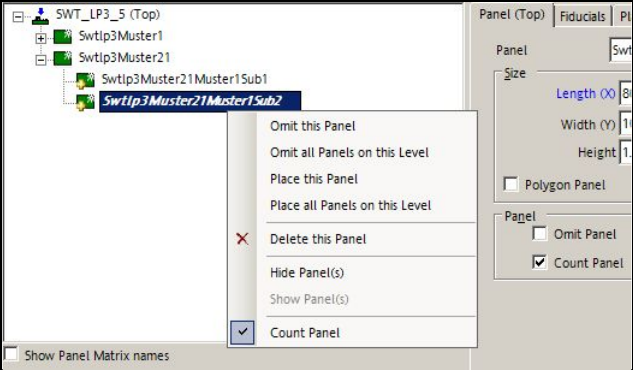
In the Board Editor can be defined which panels on each board shall be counted.
Figure 9-18: Board Editor – Counting panels
If the Panel tab is selected in the Board Editor, the Count Panel function may be enabled either
directly in the tab or in the tree view with the right mouse button.
Precondition: a placement list must have been assigned to the panel.
If panels shall be counted, all desired panels on the board have to be correspondently tagged. Top
side and bottom side have to be considered separately.
SIPLACE Pro Feature Description Ausgabe 05/2014 Edition
151
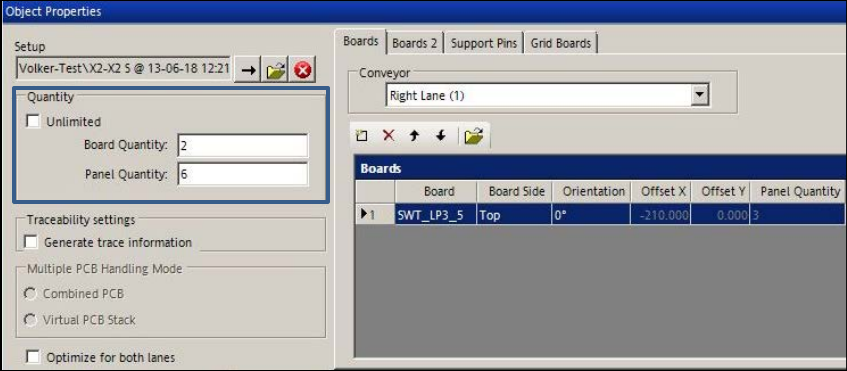
The selected panels of a board are counted in the Recipe Editor.
Figure 9-19: Recipe Editor – Counting boards / panels
The Quantity box contains two available options: Unlimited or Board Quantity / Panel Quantity.
If Board Quantity has been selected, the number of boards can be entered. Hereupon, the
number of panels is calculated and vice versa.
The number of boards can be defined for each recipe in the Production Schedule on the Line
Control GUI.
If the columns shall be displayed for this function, the appropriate setting can be made under
Settings – Application – Columns on the Line Control GUI.