S 20 Series Maintenance I.pdf - 第512页
S 20 系列维修培训指南 I 2000 年 6 月版 10 华夫盘交换器 19 1 0.3.2 1 0.3.2 1 0.3.2 1 0.3.2 零点校正值的校准 零点校正值的校准 零点校正值的校准 零点校正值的校准 前提条 件 切忌手 动将其零点校 正值调到零 除了 在 4 号料 盘 外 取 下所有料盘 从机器上 取 下 WPC 并断 电 这 样就 可以保 证 有 足够大 的工 作 空间 Fig. 1 0.3 - 1 零点校正值的 核…

2000 年 6 月版 S 20 系列维修培训指南 I
10 华夫盘交换器
18
10.3
10.310.3
10.3 供料轴开关和位置的校准
供料轴开关和位置的校准供料轴开关和位置的校准
供料轴开关和位置的校准
10.3.1
10.3.110.3.1
10.3.1 校准程序
校准程序校准程序
校准程序
警告
必须严格按照校准程序进行校准
这一点至关重要 否则 机器会受到严重损坏
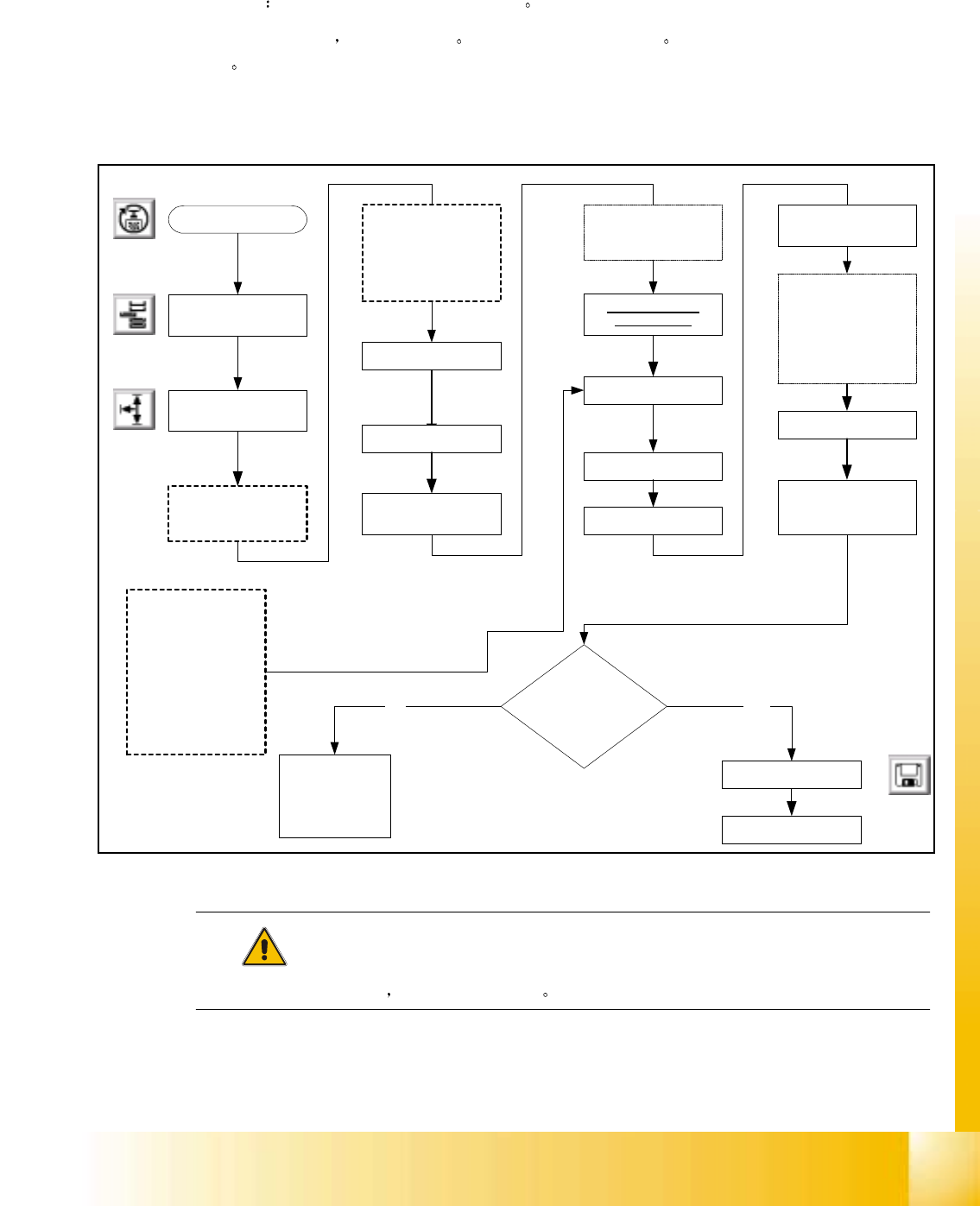
供料轴的校准
1.
零点校正值 的校准
2. 参考点接近开关位置的 校准
3.
供料位置 的校准
4. 限位开关最大和最小位 置的校准
5. 编辑软件限位开关位置
具体步骤 见下一页说明
注意
每一个校准步骤后 所有的 WPC 轴回参考点
S 20 系列维修培训指南 I 2000 年 6 月版
10 华夫盘交换器
19
10.3.2
10.3.210.3.2
10.3.2 零点校正值的校准
零点校正值的校准零点校正值的校准
零点校正值的校准
前提条件 切忌手动将其零点校正值调到零
除了在 4 号料盘外 取下所有料盘 从机器上取下 WPC 并断电 这样就可以保证有足够大的工作
空间
Fig. 10.3 - 1 零点校正值的核准
注意
确保在供料轴回参考点后 料盘不会碰到导轨
Select " Teach "Select "Lift table axis"
Remove all trays
except position #4
Align Tray #8 so that
there is a clearance of
0.2 - 0.3mm between
the front of the tray
and the rail guides
located inside the top
cover
Select appropriate
step size
Using the arrows jog
the "LIFT AXIS" down
so that tray # 4 is in
the transfer position
When in position
select " QUIT"
WPC
Settings
Select " Teach "
Select appropriate
step size
Using the arrows, jog
the "FEED" axis untill
the pawl of the feed
arm is in the center of
the cut out of the tray
Start SITEST
WAFFLE PACK
CHANGER
Select "QUIT"
Select "YES to accept"
Machine will now
perform a reference
run for the feed axis
Select " Teach"
Select " NO"
Select "Feed axis"
Select "WPC machine
Data"
Select "Save WPC
machine Data"
Is pawl
centered in tray cut-out
and will tray clear guide
rails?
YES
Repeat Calibration
NO
DO NOT SELECT YES
TO ACCEPT THIS
CURRENT POSITION
AS THE NEW ZERO
POINT. IF YOU DO
THIS WILL CORRUPT
THE WPC DATA IN
SUCH A WAY THAT
RECALIBRATION WILL
BE EXTREMELY
TEDIOUS
2000 年 6 月版 S 20 系列维修培训指南 I
10 华夫盘交换器
20
10.3.3
10.3.310.3.3
10.3.3 Reference BERO 位置的校准
位置的校准位置的校准
位置的校准
前提条件
前提条件前提条件
前提条件 切忌手动将零点校器数值调到零
切忌手动将零点校器数值调到零切忌手动将零点校器数值调到零
切忌手动将零点校器数值调到零
供料轴零点校正值必须严格校准
供料轴零点校正值必须严格校准供料轴零点校 正值必须严格校准
供料轴零点校正值必须严格校准 否则就不要进行下一步
否则就不要进行下一步否则就不要进 行下一步
否则就不要进行下一步
取下装有 Emergency Switch 紧急开关 的盖子 Emergency Switch 紧急开关 必须保持
通电状态
Fig. 10.3 - 2 Reference BERO
位置的校准
操作概述
操作概述操作概述
操作概述
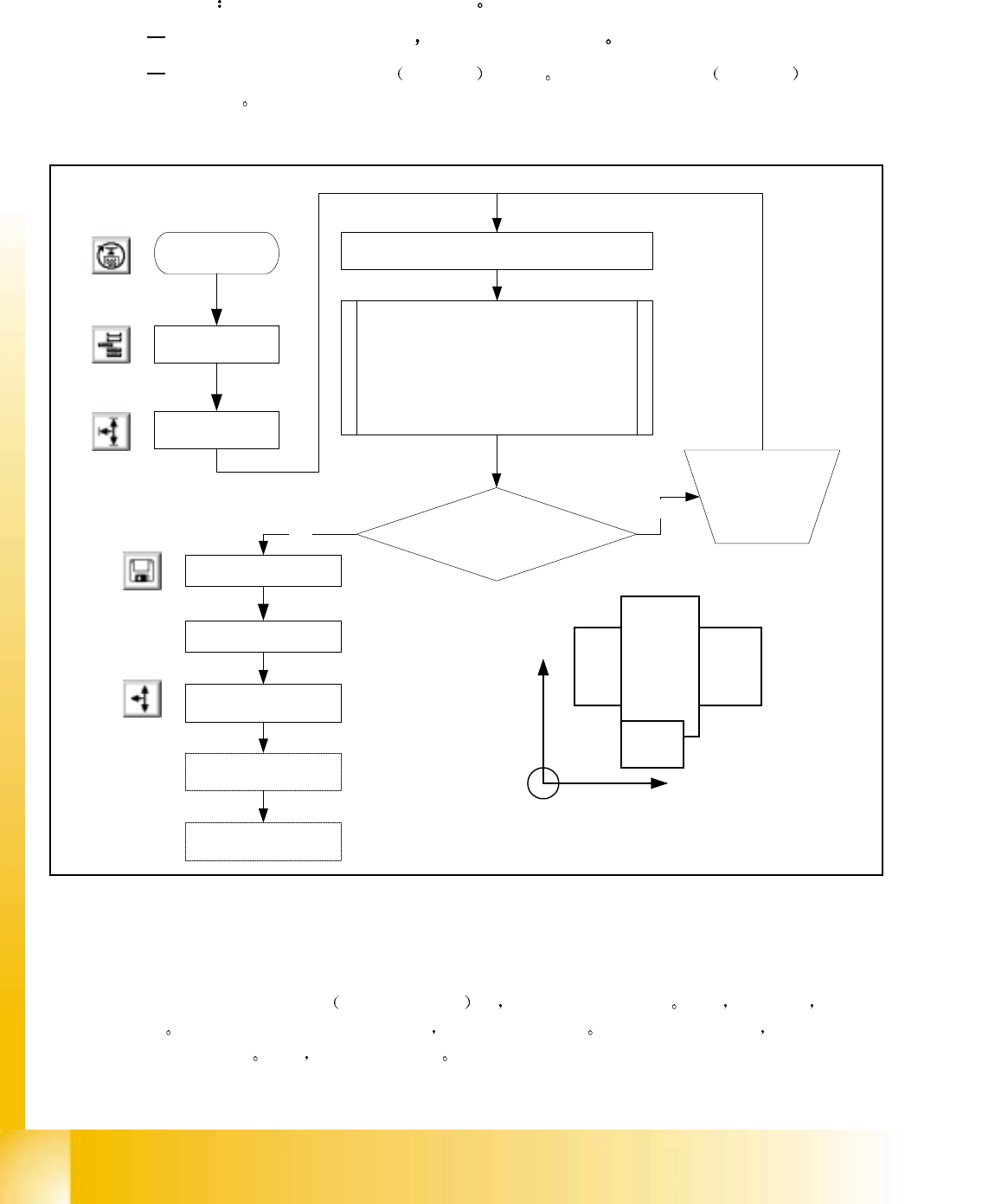
选择 "Reference Bero"
参考点接近开关 时 供料器轴移至零位置 此后 边向前移 边计
数
MC 预计在一定数量的 digit 之内
接近开关将被激活 如果此范围内被激活 在监视器上会
显示校正系数
现在 进行相应的调整
Start SITEST
WAFFLE PACK
CHANGER
WPC
Settings
SELECT "Reference Bero"
Feed axis moves in neg. direction till flag
activates Bero. A message appears on the
screen detailing either adjustment OK or
Deviation X.XX mm If necessary adjust by
the amount of deviation indicated. A positive
number means to move in positive direction
see diagram
Adjustment Necessary?
Select "WPC machine
Data"
Select "Save WPC
machine Data"
NO
Adjust flag
according to
Software
comments
YES
WPC
Settings
Select " Lift table axis"
Select " reference run"
80S/F*
WP
C
+
Machine Co-ordinates
+