S 20 Series Maintenance I.pdf - 第518页
S 20 系列维修培训指南 I 2000 年 6 月版 10 华夫盘交换器 25 10.4.3 Reference BERO 位置的校准 位置的校准 位置的校准 位置的校准 Fig. 10.4 - 2 Reference BERO 位置的校准 操作概述 操作概述 操作概述 操作概述 选择 "Referenc e Bero" 参考点接近开关 时 供料器轴移 至 零位置 此后 边向前 移 边计 数 MC 预计 在一定 数…
2000 年 6 月版 S 20 系列维修培训指南 I
10 华夫盘交换器
24
10.4.2
10.4.210.4.2
10.4.2 零点校正值的核准
零点校正值的核准零点校正值的核准
零点校正值的核准
前提条件
前提条件前提条件
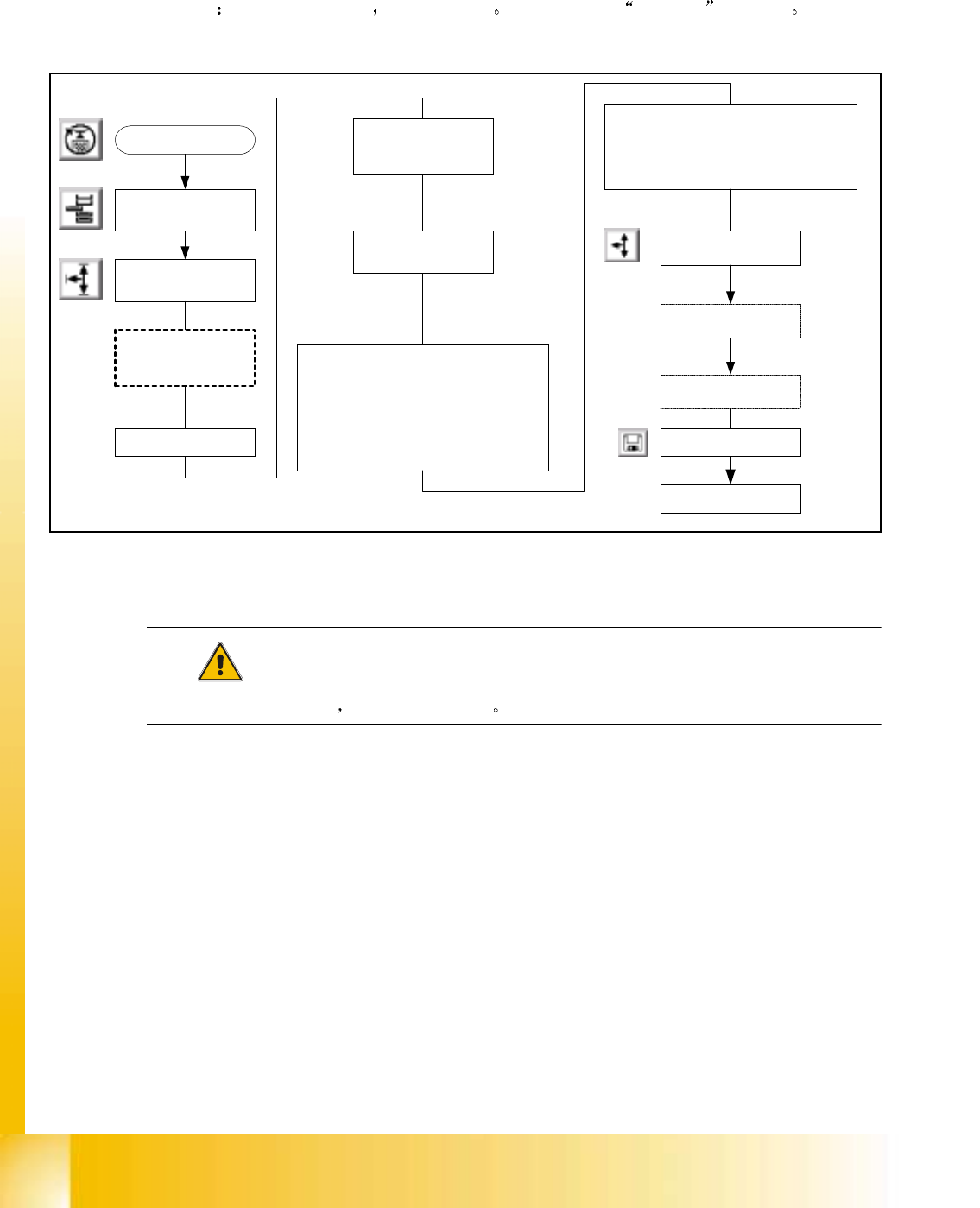
前提条件 除了 1 号的料盘外 取下所有料盘 切忌将原来的 零点校 正 值调到零
Fig. 10.4 - 1
零点校正值的校准
注意
确保在供料轴回参考点后 料盘不会碰到导轨
Select " Teach "Select "Lift table axis"
Remove all trays
except position # 1
Select an appropriate
step size
Using the arrows jog the
"LIFT AXIS" up/down so that tray # 1
is in the transfer position .
This means the tray can slide smoothly
onto and off of the feeder arms.
When correctly adjusted :
Select "QUIT".
WPC
Settings
Start SITEST
WAFFLE PACK
CHANGER
Under "Zero point
Correction
Select " Teach"
At the message" Caution the current
position is adopted as the new Zero Point
Corrector"
Select "YES"
WPC
Settings
Select " Lift table axis"
Select " reference run"
Select "WPC machine
Data"
Select "Save WPC
machine Data"
S 20 系列维修培训指南 I 2000 年 6 月版
10 华夫盘交换器
25
10.4.3 Reference BERO 位置的校准
位置的校准位置的校准
位置的校准
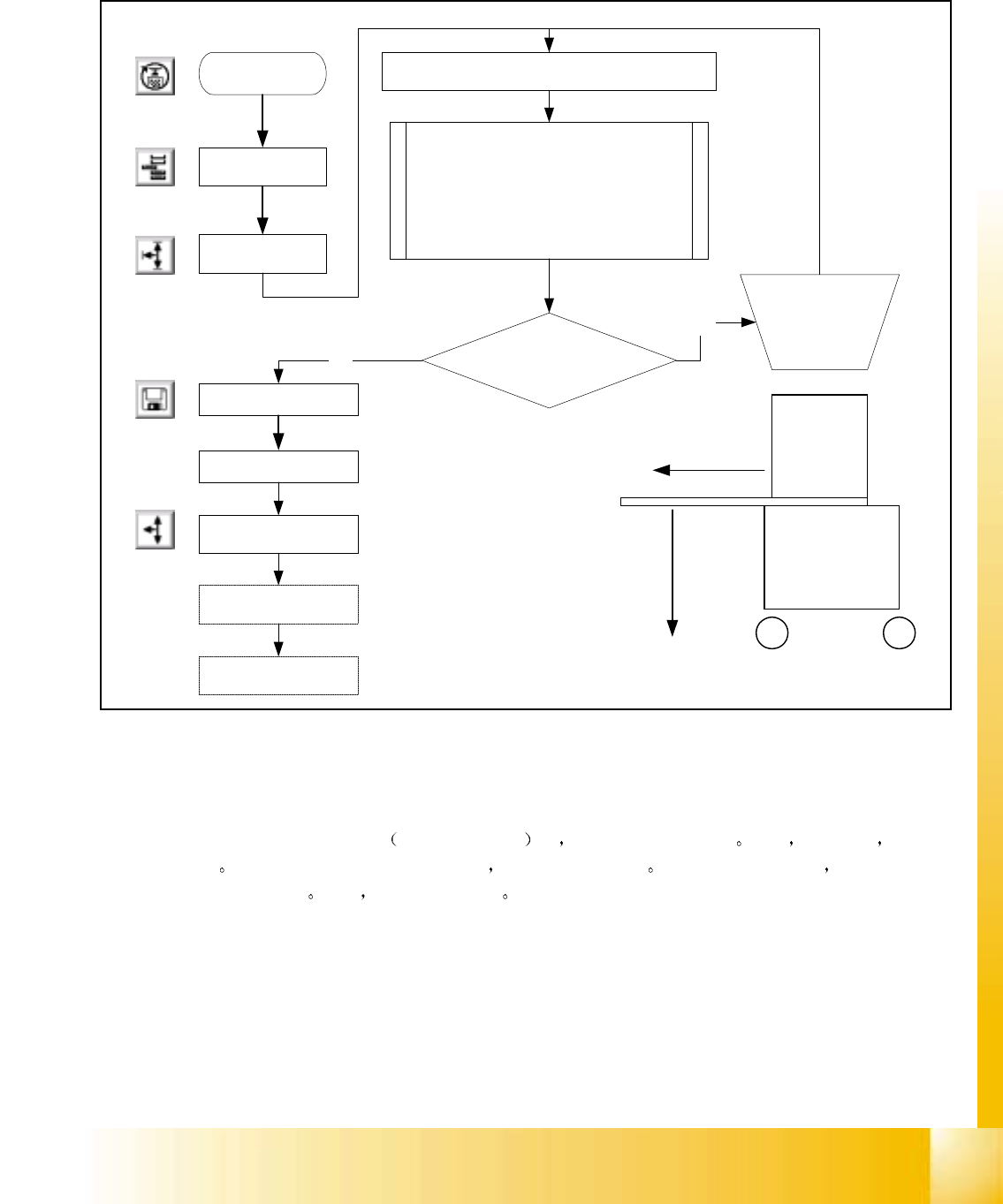
Fig. 10.4 - 2 Reference BERO
位置的校准
操作概述
操作概述操作概述
操作概述
选择 "Reference Bero"
参考点接近开关 时 供料器轴移至零位置 此后 边向前移 边计
数
MC 预计在一定数量的 digit 之内 接近开关将被激活 如果此范围内被激活 在监视器上会
显示校正系数
现在 进行相应的调整
Start SITEST
WAFFLE PACK
CHANGER
WPC
Settings
SELECT "Reference Bero"
Feed axis moves in neg. direction till flag
activates Bero. A message appears on the
screen detailing either adjustment OK or
Deviation X.XX mm If necessary adjust by
the amount of deviation indicated. A positive
number means to move in positive direction
see diagram
Adjustment Necessary?
Select "WPC machine
Data"
Select "Save WPC
machine Data"
NO
Adjust flag
according to
Software
comments
YES
WPC
Settings
Select " Lift table axis"
Select " reference run"
+
Machine Co-ordinates
+
WPC
Side View
Feed Axis
Lift Axis
2000 年 6 月版 S 20 系列维修培训指南 I
10 华夫盘交换器
26
10.4.4
10.4.410.4.4
10.4.4 限位开关的校准
限位开关的校准限位开关的校准
限位开关的校准
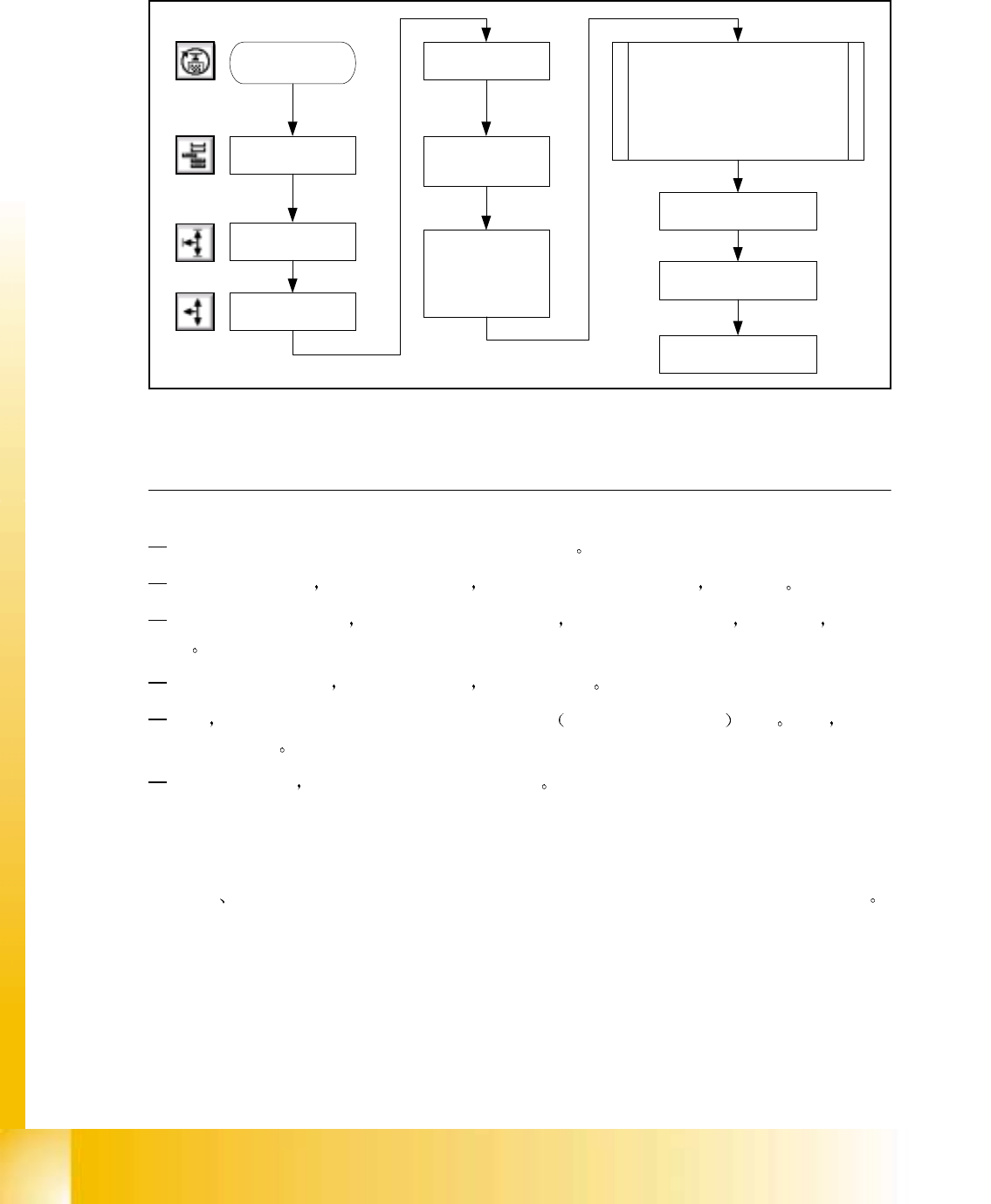
Fig. 10.4 - 3 限位开关的校准
注意 10
1010
10
上部限位开关的核准程序与下部限位开关的程序相同
如果必须进行校正 则须移动触发铁块 因为限位开关被销在位之上 不能调整
如果得到一个错误信息 即限位开关必须 向上运动 则必须校正触发铁块 使其向下 反之亦
然
如果限位开关被起动 此时如要移动轴 则必须绕过它
为此 须按下控制箱内的 Endschalter Hubachse 升降轴限位旁路开关 按钮 现在 可以
进行回参考点
限位开关的位置 详见第11和第12 页的照相图
10.4.5
10.4.510.4.5
10.4.5 编辑软件极限位置
编辑软件极限位置编辑软件极限位置
编辑软件极限位置
轴的最大 最小行程位置所用的软件极限位置必 须调节到从实际极限位置开始算起的 20 digit
Start SITEST
WAFFLE PACK
CHANGER
WPC
Settings
Select " Lifting
table axis"
WPC
Settings
Under " Check
Position" select
Limit Switch +/-
Lift axis moves in +/-. direction till
flag activates Limit Switch. This
must happen within a certain
amount of digits from the correct
feed axis ZPCV. If incorrect
SiTest Software advises how
much to move flag
At the message:
"Please remove
all Carriers"
Select "OK"
Select " Lifting table
axis"
WPC
Settings
Select " reference run"