Smart Gui - Algorithm Training Material_rev1.pdf - 第302页
Copyright © ViT rox All Rights Reserved . Steps for Fiducial Setup 1. Ensure c orrect Fiducial Shape is select ed. In this case, Ellipse should be chosen. 2. Normally a fiducial is bright er compar ed to the PCB/Backgr o…
Copyright © ViTrox All Rights Reserved.
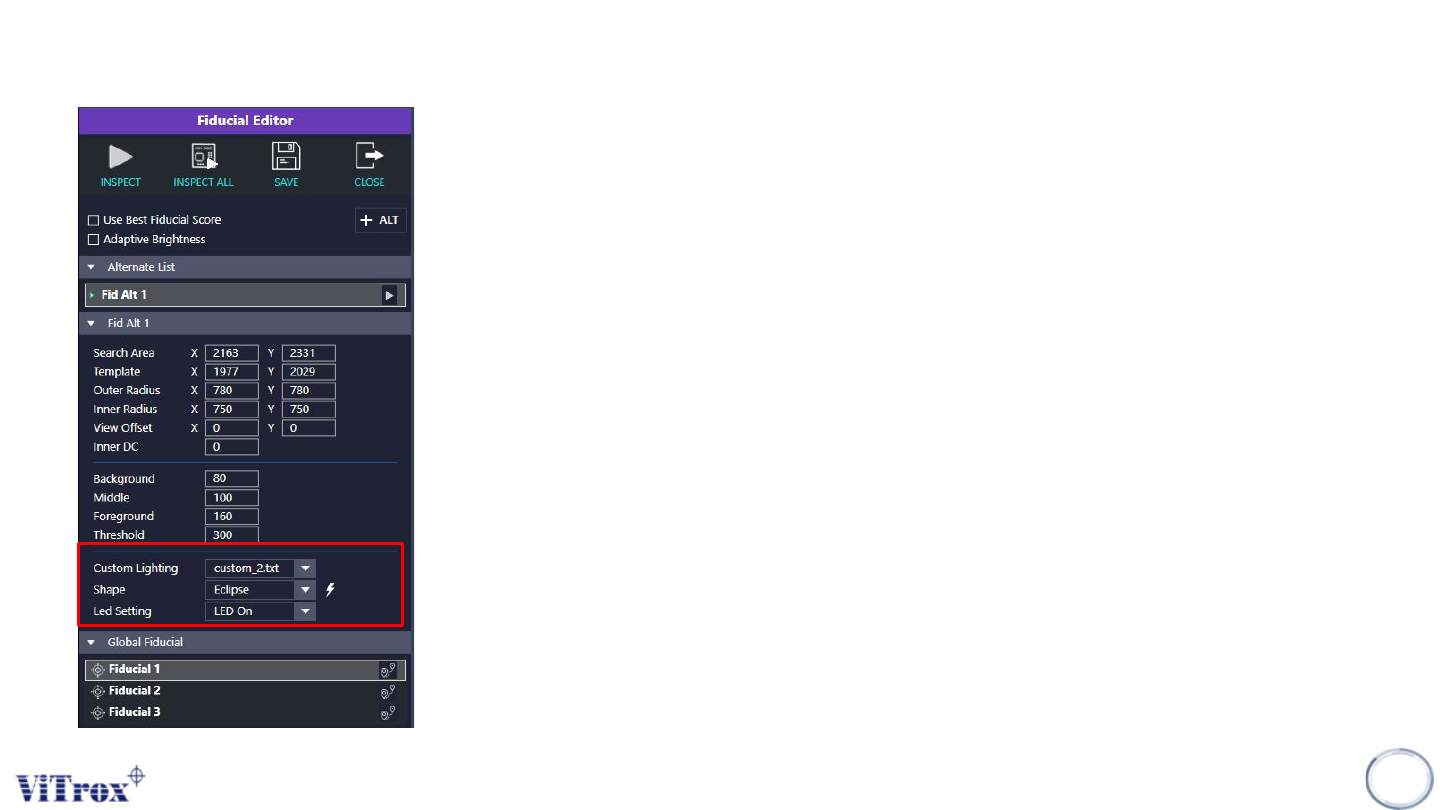
Fiducial Editor
301
1. Custom Lighting
● Select the lighting angle that having the best contrast.
2. Shape
● Select the shapes for the fiducial
● The lightning icon shows beside is use to auto train the
fiducial shape & greyscale.
3. LED Setting
● Turn on or off the LED.
● This may affect the contrast of the fiducial.

Copyright © ViTrox All Rights Reserved.
Steps for Fiducial Setup
1. Ensure correct Fiducial Shape is selected. In this case, Ellipse should be chosen.
2. Normally a fiducial is brighter compared to the PCB/Background.
3. Ensure that appropriate size is set for Search Area which is in yellow colour. Search Area should be big
enough to cover Template and Inner & Outer Radius. Search Area is normally set as a square and should
not cover any bright area/pad of similar size to the actual fiducial.
4. Template should be slightly bigger than the actual fiducial, but smaller than “search Area”. It's in green
colour.
5. View Offset should normally be turned off (set to 0).
6. Inner DC means to exclude the “dirty” area residing inside the inner part of the fiducials. It should only be
applied when the dirty area in the inner part of the fiducial creates a significant impact on the total score
of the “Current Inspection Value”. It should be set smaller than the actual fiducial.
7. Inner Radius should be set slightly smaller than the actual size of the fiducial, on the bright area/pad.
8. Outer Radius should be set slightly bigger than the actual size of the fiducial, on the dark area/PCB. The
difference between Inner Radius and Outer Radius is normally 30-50.
302

Copyright © ViTrox All Rights Reserved.
Steps for Fiducial Setup
9. Background refers to the average grayscale level in between " Template" and Outer Radius. Normally this
area should be dark and thus it should be set between 50-100.
10. Middle refers to the average grayscale level in between "Outer Radius" and "inner Radius". Normally this
area should consist of dark and bright area and thus it should be set in between 100-200.
11. Foreground refers to the average grayscale level inside the "Inner Radius". In case if "Inner DC" is used,
then foreground refers to the average grayscale level in between the inner radius and inner DC. Normally
this area is bright, thus it should be set in between 200-250.
12. Inspect and observe the value obtained in Current Inspection Value. The above parameter should be set
appropriately in order to get the highest score for "Current Inspection Value".
13. Current Inspection Value, ensure that an appropriate Presence Threshold is set. Presence threshold
should not be set too loose (typically 700).
14. Custom Lighting custom_#no.txt stores the lighting setting information. User may change the lighting
configuration in the file.
15. Alternate fiducial can be set when necessary (eg. When there is different fiducial sizes or shapes)
303