00198661-02_UM_SX12-V3_EN.pdf - 第235页
Instruction manual SIPLACE SX1/SX2 Edition V2 and V3 5 Tasks at the placement machine From software version SC.713.1 Edition 12/2020 5.2 Controls and d isplays 235 5.2.3 Controls on the placement machine's operator …
5 Tasks at the placement machine Instruction manual SIPLACE SX1/SX2 Edition V2 and V3
5.2 Controls and displays From software version SC.713.1 Edition 12/2020
234
5.2.2 Overview of the SIPLACE SX1/SX2 V2
5
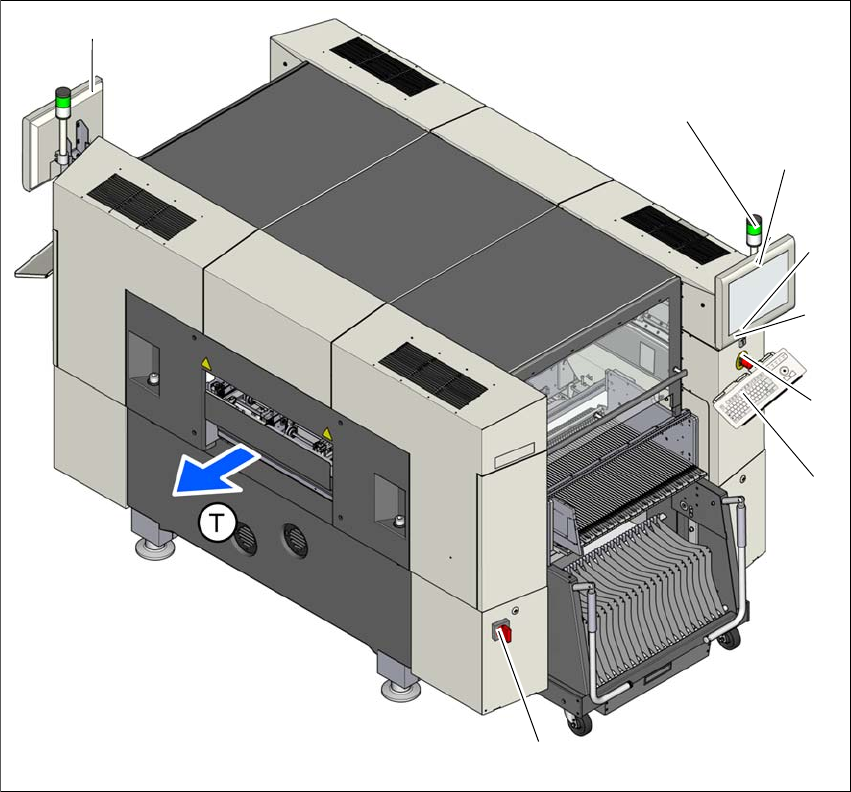
Fig. 5.2 - 2 Controls and displays on the SIPLACE SX1/SX2 V2
5
(1) Main switch (5) Stop button (black)
(2) Start button (white) (6) LCD touchscreen
(3) EMERGENCY STOP button (7) Indicator lamps with horn
(4) Keyboard (T) Direction of PCB transport
(1)
(4)
(3)
(2)
(6)
(7)
(7)
(5)

Instruction manual SIPLACE SX1/SX2 Edition V2 and V3 5 Tasks at the placement machine
From software version SC.713.1 Edition 12/2020 5.2 Controls and displays
235
5.2.3 Controls on the placement machine's operator panels
All the controls can be reached by a 1.40 m tall person.
Main switch 5
The main power switch is used to switch the power supply to the placement machine on and off.
Stop button (black) 5
This black button is used to stop the placement process at the placement machine.
Start button (white) 5
This white button starts the placement machine after it has been switched on or after faults have
been eliminated.
EMERGENCY STOP button 5
The EMERGENCY STOP button latches in the ON position when pressed. The power supply to
the gantry axes, the component trolleys, conveyors and used tape cutters is interrupted and the
voltage supplied to the star axes of the placement heads is reduced. Turn the button to release it.
Multi-touch monitor (for the SIPLACE SX1/SX2 V3) 5
On each side of the placement machine, there is a flat screen with a highly sensitive "multi-touch"
surface (screen with multi-finger gesture recognition). Use the station software to show a key-
board for screen entries.
LCD monitor (for the SIPLACE SX1/SX2 V2) 5
There is a flat LCD screen with a touch-sensitive surface (touchscreen) on either side of the place-
ment machine.
DANGER
Lethal voltages!
Some parts inside the placement machine carry potentially lethal voltages - even when
switched off at the main power switch.

5 Tasks at the placement machine Instruction manual SIPLACE SX1/SX2 Edition V2 and V3
5.2 Controls and displays From software version SC.713.1 Edition 12/2020
236
Keyboard (for the SIPLACE SX1/SX2 V2) 5
The keyboard is located beneath the monitor.
5
Indicator lamp with audio signal 5
The sequence of colors for the indicator lamps can be configured:
– Two-color: white - green.
– Three-color: red - yellow - green
These lamps are used to signal operating statuses and malfunctions of the placement machine.
See also
Section 5.7 on page 254.
CAUTION
Risk of hitting monitor and keyboard!
When working on the component trolley, there is a risk that you could hit yourself on the
monitor and keyboard.
Turn the monitor and keyboard all the way to the side.
Make sure that your head is not underneath the monitor and keyboard.