00198661-02_UM_SX12-V3_EN.pdf - 第321页
Instruction manual SIPLACE SX1/SX2 Edition V2 and V3 6 Station e xtensi ons From software version SC.713.1 Edition 12/2020 6.6 Tray holder 321 6.6.1 T echnical data 6 6 Occupation of locations on the compone nt trolley i…

6 Station extensions Instruction manual SIPLACE SX1/SX2 Edition V2 and V3
6.6 Tray holder From software version SC.713.1 Edition 12/2020
320
6.6 Tray holder
Item no. 00141286-xx Tray holder
Item no. 00519840-xx Tape guide channel for tray holder
Components can be made available quickly on waffle pack trays with the help of the tray holder.
If the tray holder is not present, you can use all 60 feeder tracks on the SX changeover table.
To use the tray holder on an SX changeover table, you need to fit the placement machine with a
modified empty tape duct.
For a detailed description and operating details, refer to the " Assembly Instructions - Manual
Tray - SIPLACE SX1/SX2", Item No. 00196823-xx]
The tray holder can only be used if the relevant changeover table and its COT insert are fitted in
the outer position.
Individually placed JEDEC waffle pack trays or waffle pack magazines can be fixed to the waffle
pack tray carrier with magnets. If two JEDEC waffle pack trays are fitted, fix these into place with
the locking and fixture rails.
Parts: Item no.:
Magnet 00316593-xx
Locking bar/mounting rail for JEDEC magazines 00372615-xx
CAUTION
Avoiding collisions
When moving a component trolley in or out, make sure that the tray holder is not in place
as this could cause a collision with the empty tape channel and the nozzle changer holder.
The tray holder may only be fitted to the table once the table has been moved in.
Remove the tray holder from the table before moving the table out.
Instruction manual SIPLACE SX1/SX2 Edition V2 and V3 6 Station extensions
From software version SC.713.1 Edition 12/2020 6.6 Tray holder
321
6.6.1 Technical data
6
6
Occupation of locations on the component trolley in the SIPLACE SX1/
SX2
26
Configuration options in the placement machine
SIPLACE SX2
SIPLACE SX1
Locations 1 and 2
Location 1
Placement head range TwinStar, CPP
*a
*)a Only permitted in high assembly position (CPP_H).
Max. waffle pack tray height including components
MultiStar
TwinStar
11.5 mm
25 mm
PLEASE NOTE
Further information
The maximum component height for the waffle pack tray holder depends on the maxi-
mum component height for the placement head used. When using waffle pack trays,
bear in mind that the components may not higher than the pickup height of a standard
feeder.
6 Station extensions Instruction manual SIPLACE SX1/SX2 Edition V2 and V3
6.7 3D coplanarity laser module From software version SC.713.1 Edition 12/2020
322
6.7 3D coplanarity laser module
Item no. 00519919-xx 3-D coplan
The 3D coplanarity laser module works with a line of laser light. This enables you to generate and
analyze the height profile of a two-dimensional arrangement of component leads e.g. BGA, QFP
etc. This analysis provides data about the coplanarity (contact plane) and collinearity (contact line
straightness) of component leads or balls.
For more details, refer to the "Assembly Instructions 3D Sensor", German+English [Item. no.
00197084-xx]
6.7.1 Safety instructions for coplanarity module sensor
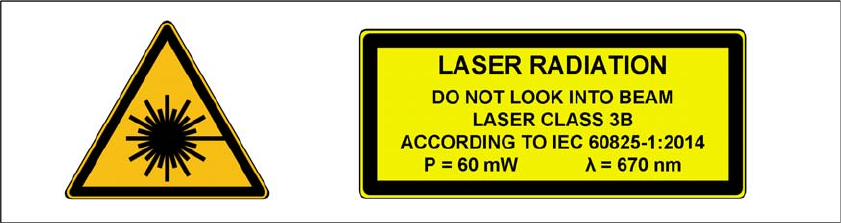
The sensor works with a semiconductor laser which has a wave length of 670 nm (visible/red).
The maximum optical output is 60 mW.
The sensor is classified as laser class 3B.
– When using the sensor, always observe the IEC 60825-1:2014 regulations about "Safety of
Laser Equipment" and the accident prevention guidelines for "Laser Radiation" (DGUV Reg-
ulation 11), applicable in Germany.
– Also observe the accident prevention regulations of your own country!
The following warning labels are attached to the front and back of the sensor housing:
6
Fig. 6.7 - 1 Laser class 3B classification for the sensor