00198661-02_UM_SX12-V3_EN.pdf - 第253页
Instruction manual SIPLACE SX1/SX2 Edition V2 and V3 5 Tasks at the placement machine From software version SC.713.1 Edition 12/2020 5.6 Alert informat ion and online help 253 5.6.3 Color coding in the online help alert …
5 Tasks at the placement machine Instruction manual SIPLACE SX1/SX2 Edition V2 and V3
5.6 Alert information and online help From software version SC.713.1 Edition 12/2020
252
5.6.2 Viewing information about the selected alert
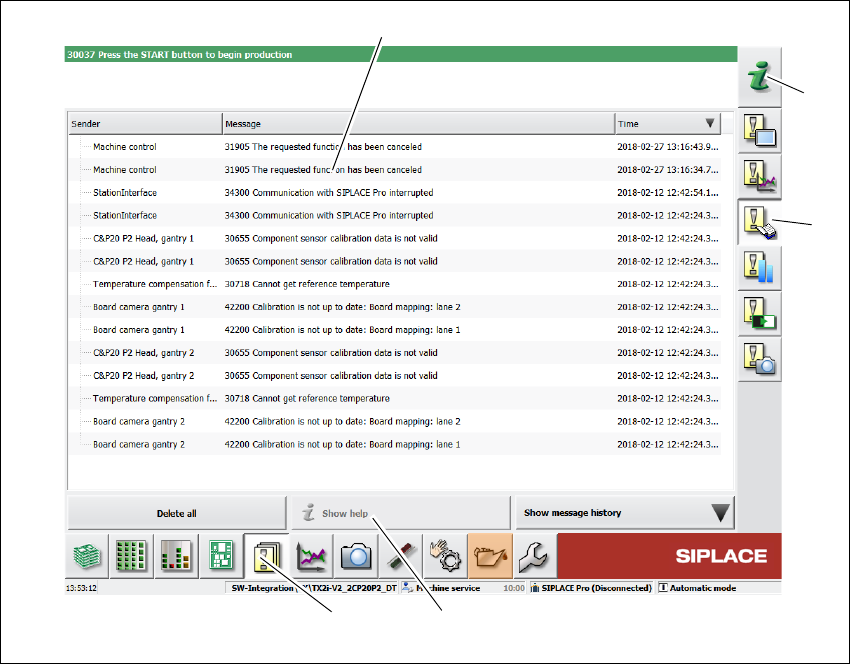
Click on the button in the toolbar (1).
All the alerts which occurred will be listed.
Select the error category using the buttons in the vertical toolbar (2).
Click on a message in the alert list (3), to open detailed information about it.
. 5
Fig. 5.6 - 2 Example:Alarm list
Select the alert display for which you want to view information from the list of alerts.
Click on the "Show Help" (4) button to view the information.
To view information about a different alert, search the index of the help system (5) by entering the
alert number.
(5)
(2)
(3)
(4)
(1)

Instruction manual SIPLACE SX1/SX2 Edition V2 and V3 5 Tasks at the placement machine
From software version SC.713.1 Edition 12/2020 5.6 Alert information and online help
253
5.6.3 Color coding in the online help alert information
5
5.6.4 Context-sensitive online help
To see information about the current view, click on the icon to start the help system for the
station computer. The main window of the
help system will open with alert information. The infor-
mation refers to the view currently shown and from which the help function was started. Use the
list of contents, index and the search function to view the contents of the Online Help.
Text highlight Meaning
Red text Alert number and message
Black text Possible cause(s) of alert
Green text Instructions for solving the alert
Blue underlined text Open additional information
5 Tasks at the placement machine Instruction manual SIPLACE SX1/SX2 Edition V2 and V3
5.7 Indicator lamps with horn From software version SC.713.1 Edition 12/2020
254
5.7 Indicator lamps with horn
5.7.1 Overview
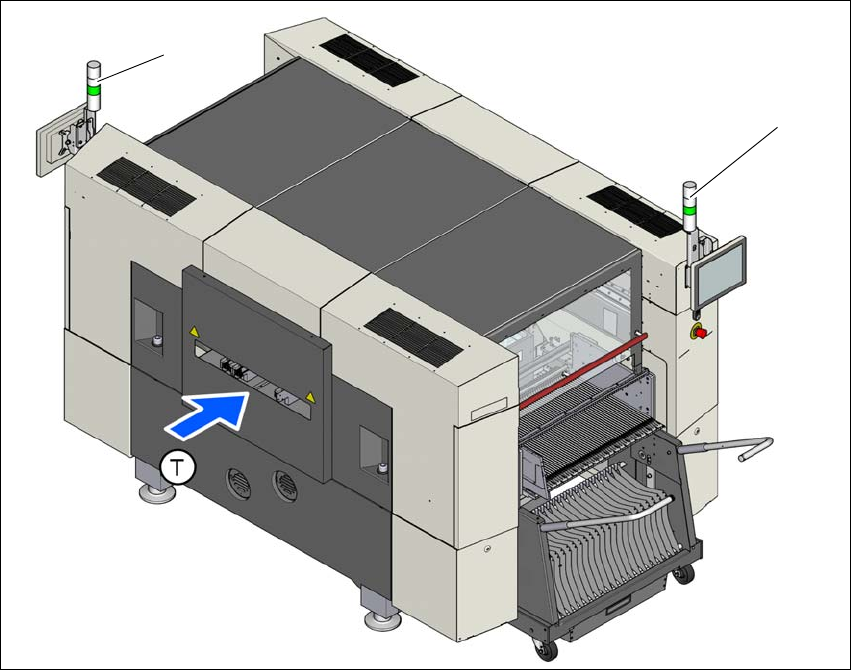
These indicator lamps are used to signal operating statuses and malfunctions of the placement
machine. The horn indicates when an alert has occurred. The indicator lamp can be configured to
have two or three colors. The relevant indicator lamp system (two or three color) is set in the au-
toconfiguration for the station software.
5.7.2 Indicator lamp (standard)
Fig. 5.7 - 1 Indicator lamps for operating states
L1 left indicator lamp
L3 right indicator lamp
T Direction of PCB transport
(L1)
(L2)