00198661-02_UM_SX12-V3_EN.pdf - 第251页
Instruction manual SIPLACE SX1/SX2 Edition V2 and V3 5 Tasks at the placement machine From software version SC.713.1 Edition 12/2020 5.6 Alert informat ion and online help 251 5.6.1 Viewing information about the current …
5 Tasks at the placement machine Instruction manual SIPLACE SX1/SX2 Edition V2 and V3
5.6 Alert information and online help From software version SC.713.1 Edition 12/2020
250
5.6 Alert information and online help
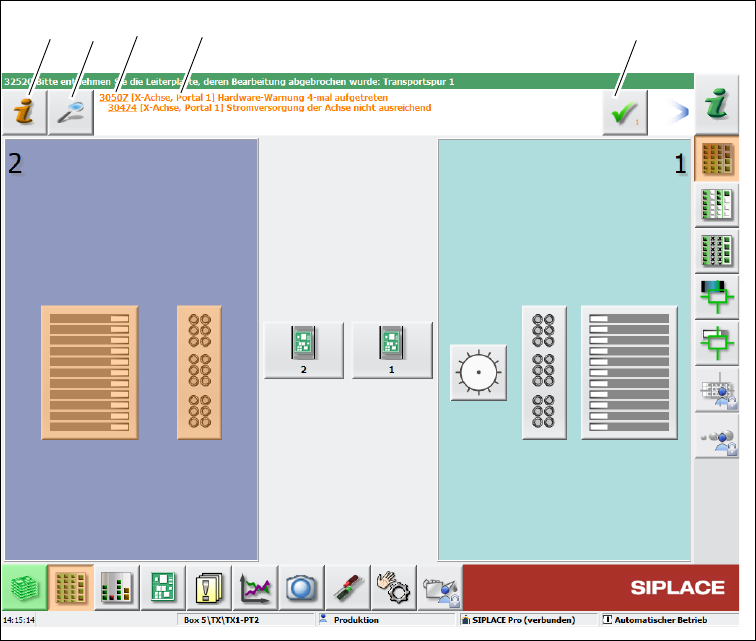
If alerts occur during placement machine operations, the alert message in the status field of the
user interface will be shown in red. The icon for
alert information will be active.
The button highlighted in red in the toolbar indicates that operator action is required.
5
Fig. 5.6 - 1 View with alarm notification (example)
Legend for fig. 5.6 - 1
(1) "Alert information" icon: for opening the help function for the current alert
(2) "Details" icon: for opening detailed information (e.g. error source, time of occurrence)
(3) Alert number
(4) Alert message: brief information about the alert
(5) "Acknowledge alert" icon: for deleting the alert display
(1)
(2) (3)
(4)
(5)
Instruction manual SIPLACE SX1/SX2 Edition V2 and V3 5 Tasks at the placement machine
From software version SC.713.1 Edition 12/2020 5.6 Alert information and online help
251
5.6.1 Viewing information about the current alert
To view information about the current alert, click on the icon to start the help system for the
station computer. The main window of the
help system will open with alert information. The infor-
mation refers to the alert currently shown and from which the help function was started.
Once an alert has been resolved and the solution has been automatically determined by the place-
ment machine, this alert will be automatically removed from the status field.
If the solution is not recognized automatically, the alert can also be manually deleted from the sta-
tus field.
To do this, click on the icon; the alert message will no longer be shown in the status field.
5 Tasks at the placement machine Instruction manual SIPLACE SX1/SX2 Edition V2 and V3
5.6 Alert information and online help From software version SC.713.1 Edition 12/2020
252
5.6.2 Viewing information about the selected alert
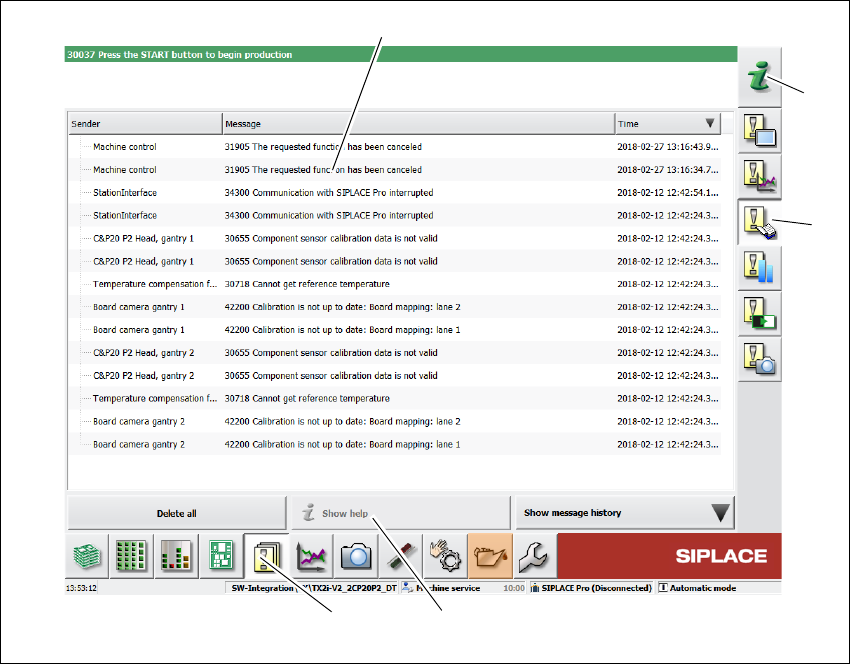
Click on the button in the toolbar (1).
All the alerts which occurred will be listed.
Select the error category using the buttons in the vertical toolbar (2).
Click on a message in the alert list (3), to open detailed information about it.
. 5
Fig. 5.6 - 2 Example:Alarm list
Select the alert display for which you want to view information from the list of alerts.
Click on the "Show Help" (4) button to view the information.
To view information about a different alert, search the index of the help system (5) by entering the
alert number.
(5)
(2)
(3)
(4)
(1)