00198661-02_UM_SX12-V3_EN.pdf - 第338页
6 Station extensions Instructio n manual SIPLACE SX1/SX2 Edition V2 and V3 6.16 With LCD monitor and keyboard From software version SC.713. 1 Edition 12/2020 338
Instruction manual SIPLACE SX1/SX2 Edition V2 and V3 6 Station extensions
From software version SC.713.1 Edition 12/2020 6.16 With LCD monitor and keyboard
337
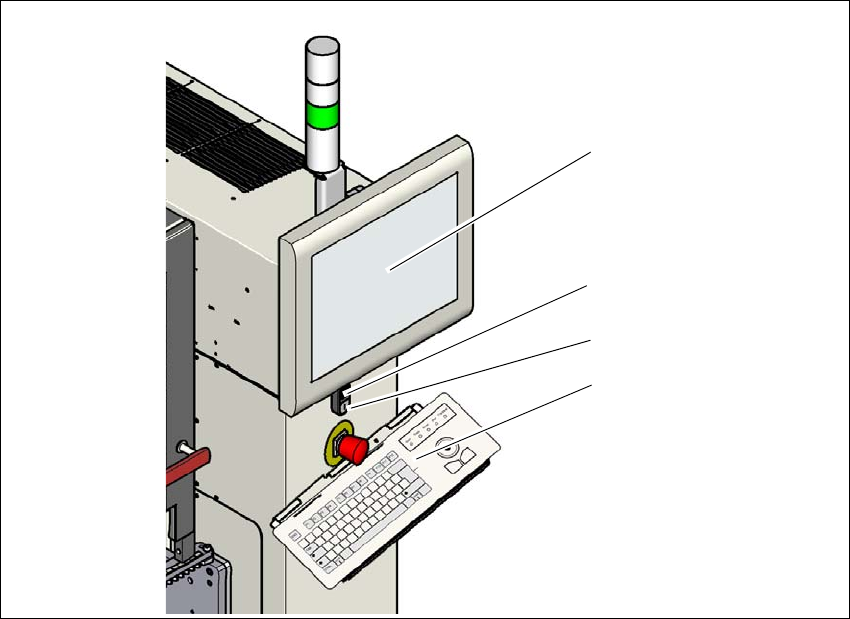
6.16 With LCD monitor and keyboard
The SIPLACE SX1/SX2 V2 features a multi-touch monitor with keyboard as a default.
Instead of the standard multi-touch monitor, you can configure a 15" LCD monitor with keyboard
at each of the SIPLACE SX1/SX2 V3 operating panels.
6
Fig. 6.16 - 1 With LCD monitor and keyboard
(1) LCD touchscreen
(2) Start button (white) on the placement machine
(3) Stop button (black) on the placement machine
(4) Keyboard
(1)
(4)
(2)
(3)
6 Station extensions Instruction manual SIPLACE SX1/SX2 Edition V2 and V3
6.16 With LCD monitor and keyboard From software version SC.713.1 Edition 12/2020
338
Instruction manual SIPLACE SX1/SX2 Edition V2 and V3 7 Maintenance
From software version SC.713.1 Edition 12/2020
339
7 Maintenance
To ensure that your SIPLACE placement machine always runs properly during production, we ad-
vise that you service the placement machine on a regular basis.
The SIPLACE TX maintenance documentation contains recommendations for the maintenance
tasks to be performed at each maintenance interval. Workflows have been defined for each main-
tenance interval. These combine the individual steps to form an efficient sequences of tasks in
order to optimize the "Uptime" for each maintenance task.
7
Maintenance workflows
We differentiate between four workflows which are to be performed independently of one another
per maintenance interval.
– Workflow 1: Weekly maintenance tasks.
– Workflow 2: Combination of weekly and 3-monthly maintenance tasks.
– Workflow 3: Combination of weekly and 6-monthly maintenance tasks.
– Workflow 4: Combination of weekly and 12-monthly maintenance tasks.
Planning workflows
Each workflow is supported with a document (job card), which guides you efficiently through the
maintenance work.
Example for the frequency of individual workflows over a period of one year:
– Workflow 1: 45 times / year
– Workflow 2: 4 times / year
– Workflow 3: 2 times / year
– Workflow 4: 1 time / year
PLEASE NOTE
Job cards for maintenance
All maintenance work is explained in detail in the corresponding job cards and clearly il-
lustrated in the diagrams.